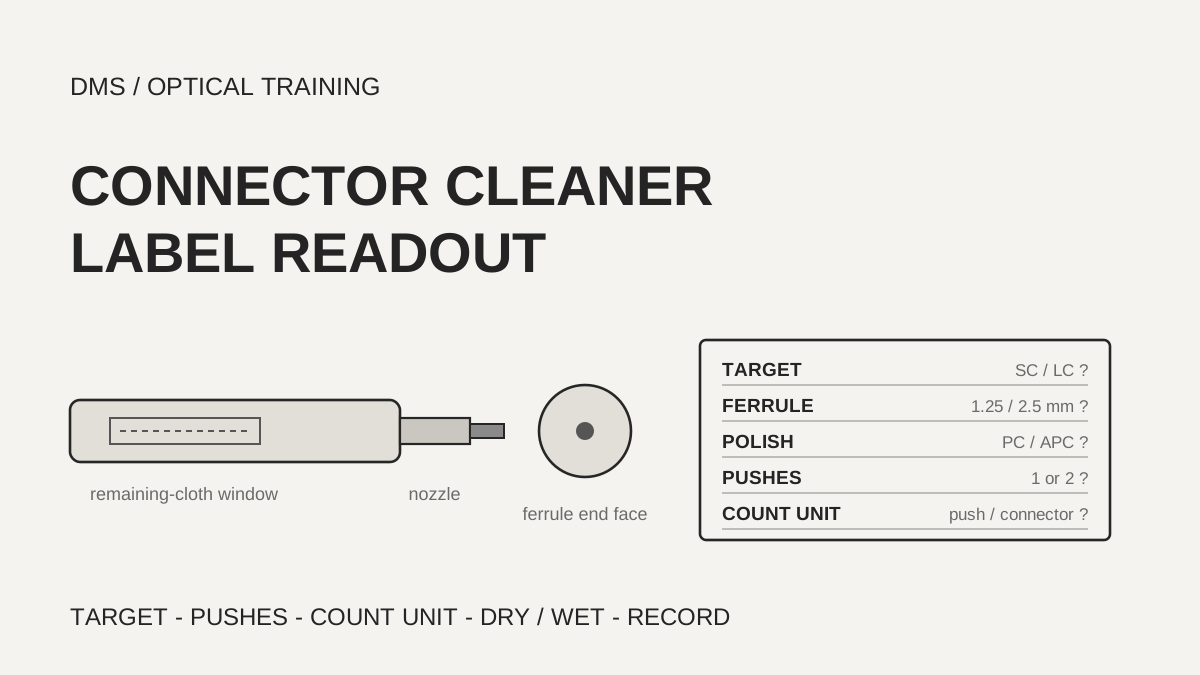
A connector cleaning tool is chosen by matching the target connector and the ferrule (the ceramic cylinder that holds the fiber) diameter printed on the body and in the instructions, and then it is used with the push count and remaining-cloth indicator that its own instructions give. In the documents reviewed, SC and LC tools carry different part numbers, and one document says a single push finishes a clean while another says to push twice up to the stop. Wet-to-dry cleaning comes in only when inspection still shows contamination after dry cleaning.
Based on the manufacturer and organization documents reviewed on November 1, 2026.
Learning objectives
-
Find the target connector, ferrule diameter, polish type and plug-or-adapter use on a cleaner's label and datasheet, and match them to the installed connector.
-
Explain how push counts and cleaning-count figures differ between documents, and check the unit of a number before it goes into a plan.
-
Sort out the order of dry cleaning and wet-to-dry cleaning, the inspections before and after, and the record items, and use them as a field checklist.
What do you read first on a cleaner's label?
You first check that the target connector and ferrule diameter match. In the documents reviewed, the same one-click type of tool was split by target. Fujikura's One-Click Cleaner PRO catalog lists an SC version (model SCPRO-CLK-A, green) and an LC version (LCPRO-CLK-A, blue), and gives PC and APC as the applicable polish types for both. US Conec's IBC cleaners split into part number 9393 for LC and MU and part number 9392 for SC, ST, FC and E2000. The HUBER+SUHNER document also gives separate part numbers for 1.25 mm ferrule and 2.5 mm ferrule tools.
The target is read only as far as the manufacturer states it. The Fujikura HOC instruction manual says the tool is designed to clean AFL's TITAN RTD and TRIDENT hardened fiber optic connectors and SC connectors, and that Fujikura is not liable for damage caused by applying it to other uses. The US Conec catalog lists a tool for OptiTap connectors used in FTTx (part number 9394) and one for hardened HEC-DC SC connectors (part number 25760) separately from the general SC tool. The MPO tool is described as cleaning both flat and angled MT ferrules. A label that says only SC therefore leaves one more question: whether the installed connector is the standard type or a hardened one.
As a DMS interpretation, when a tool arrives, find four things on its label and instructions and write them down: the connector type, the ferrule diameter, flat or angled polish, and whether it cleans a plug directly or the inside of an adapter. If any item is missing from the instructions, the tool is not used for that purpose, and the item is recorded as not confirmed.
Scroll horizontally to view a wide table.
| Document and edition | Tool | Target | Polish and method |
|---|---|---|---|
| Fujikura PRO catalog (TSBB24002B, shown as 2024–2026) | SCPRO-CLK-A, LCPRO-CLK-A | SC, LC | PC, APC · dry |
| Fujikura HOC manual (shown as 2020) | One-Click Cleaner HOC | 2.5 mm hardened connectors (TITAN RTD, TRIDENT) and SC | no polish stated |
| US Conec catalog (SM-0014-0326) | IBC 9393, IBC 9392 | LC and MU, SC and ST and FC and E2000 | no polish stated · dry strand |
| US Conec catalog (SM-0014-0326) | IBC MPO II (7104) | MPO | flat and angled MT ferrules |
| HUBER+SUHNER cleaning guide (Rev M, 2025-04-15) | IBC for 1.25 mm 84108853, for 2.5 mm 84095171 | LC, SC, E2000 | dry |
-
Match the target connector and ferrule diameter on the label first
-
Even for SC, hardened connectors have their own tool listed
-
Do not use a tool for a purpose its instructions do not name, and record the item as not confirmed
Is it one push or two?
It differs by tool, so the tool's own instructions govern. The Fujikura HOC manual says to push the outer shell forward to start cleaning and that a click means the cleaning is finished. The US Conec instructions for single-fiber cleaners also say to push forward until a click is heard. The HUBER+SUHNER document, however, says to push the IBC tool for LC, SC and E2000 up to the stop twice and treats each click as the end of one cleaning cycle. IBC is a US Conec tool name, yet the two documents state different push counts, and the reviewed documents do not say why. Applying a habit of one push to every tool would shorten the procedure for a tool whose document asks for two.
Cleaning a plug directly and cleaning inside an adapter also differ. The Fujikura HOC manual says to put the adapter into the guide nozzle for a connector inside an adapter, and the plug into the inner nozzle, and then push. The Fujikura PRO catalog says it removed the guide cap to shorten cleaning time and describes a nozzle that extends and retracts. US Conec says to remove the guide cap and insert the tip into the adapter and push for a connector in an adapter, and to open the cover of the guide cap, insert the connector and push for an unmated assembly. HUBER+SUHNER says to extend the tip about 1 to 2 mm and insert it through the adapter, and warns of a risk of tip breakage.
Some tools use motions other than pushing. For an MTP connector inside an adapter, HUBER+SUHNER says to turn the tape feeder wheel three times and, if contamination remains, repeat the steps once more. The US Conec cassette tool is used by pressing a lever to expose fresh cloth and sliding the connector across it in the direction of the arrow, keeping it perpendicular. The Fujikura HOC manual says not to reuse the cleaning cloth, not to touch or pull it, and not to use the tool once the cloth is empty because that can damage the connector. The indicator shows Full, Little or Empty. It also warns that slanting the tool or using too much force can damage both the connector and the tool.
Scroll horizontally to view a wide table.
| Document | Tool | Cleaning motion | Caution |
|---|---|---|---|
| Fujikura HOC manual | HOC | Push the outer shell, a click ends the clean | Do not use when the cloth is empty, do not reuse the cloth |
| US Conec catalog | IBC single fiber | Push forward until a click | Guide cap use is described separately |
| HUBER+SUHNER Rev M | IBC LC, SC, E2000 | Push up to the stop twice, a click ends one cycle | Tip extended 1–2 mm through an adapter, risk of breakage |
| HUBER+SUHNER Rev M | IBC MTP, in adapter | Turn the tape feeder wheel 3 times | Repeat once more if contamination remains |
| US Conec catalog | Cassette | Press the lever for fresh cloth, slide in the arrow direction | Keep the connector perpendicular to the cloth |
-
Push counts differ by manufacturer document, and the tool's own instructions govern
-
Plug cleaning and in-adapter cleaning use nozzles and caps differently
-
A tool with an empty cloth is not used
What does a cleaning-count figure count?
A cleaning count is a catalog figure, and its unit differs between documents. Fujikura gives 775 or more for the One-Click Cleaner PRO, and its product page gives 500 for standard products. US Conec gives more than 525 engagements for IBC single-fiber tools and more than 775 for LC PLUS and SC PLUS. Dual-ferrule tools use a different unit. The LC² model is stated to clean 525 or more LC duplex connectors, which is 1,050 or more ferrule end faces, and the MDC model is stated the same way. For cassette cleaners, a replacement reel is stated to give more than 400 cleanings.
The HUBER+SUHNER document says an IBC tool can be used for about 500 cleaning cycles and that the indicator turns completely red when the cleaning yarn is used up. Because the same document tells the user to push twice up to the stop for one cleaning, the reviewed text cannot settle whether 500 counts clicks or two-push cleans. If the figure counts pushes and every connector takes two, a tool rated 775 would clean about 387 connectors. That is a DMS calculation under an assumption and not a manufacturer value.
As a DMS interpretation, before a cleaning count goes into a consumables plan, confirm its unit in the instructions, and judge the real replacement time by the remaining-cloth indicator. The 775 from Fujikura and the 775 from US Conec are not shown to share a unit, so they are not compared directly.
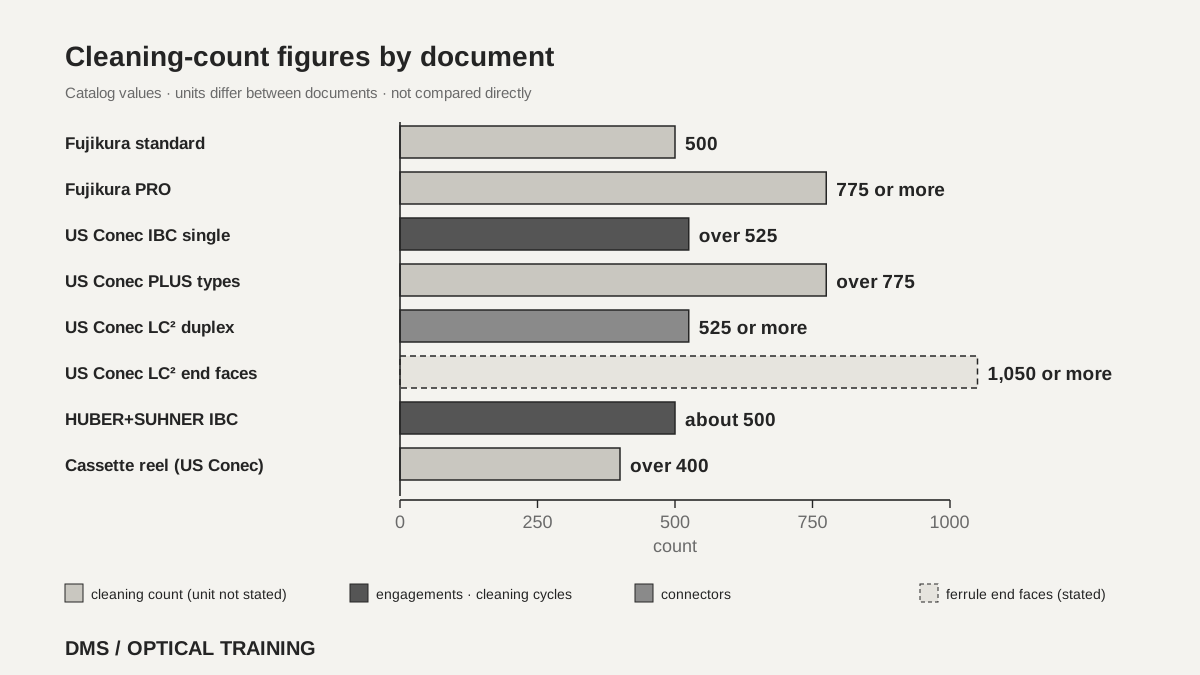 Cleaning-count figures by document, with the unit each one statesView original
-
Check whether a count means pushes, engagements, connectors or ferrule end faces
-
Dual-ferrule tools differ by a factor of two between connectors and end faces
-
Judge replacement by the remaining-cloth indicator
When does wet cleaning follow dry cleaning?
The order that appears across the documents is to start dry and move to wet-to-dry when inspection still shows contamination. The HUBER+SUHNER general procedure chart has the user inspect with a microscope and connect if clean. If not, it has two rounds of dry cleaning and inspection, and only if the end face is still not clean does it call for wet cleaning followed by dry cleaning and another check. The Leviton sheet treats wet-to-dry as a step used if needed: apply cleaning solution to a lint-free wipe, touch the ferrule end face to the wet area and drag gently to the dry area, wait about 10 seconds, and then dry clean with a cleaning tool.
US Conec says dry cleaning removes common contamination well, and that wet-to-dry may help with stubborn residue or with contamination caused by static in dry environments. It also says not to soak the cloth or thread, because too much solvent requires additional dry cleans. The Fujikura PRO catalog lists dry cleaning as its method and has no wet cleaning wording.
The two documents that mention alcohol purity point the same way. FOA says some solvents might attack epoxy so only reagent-grade 99% isopropyl alcohol should be used, and says never to use cotton swabs or cloth because they leave threads. Leviton says isopropyl alcohol of less than 99% purity should not be used. Some tool families go the other way. HUBER+SUHNER says wet cleaning is not recommended in its ODC connector section. Its Q-ODC-12 section lists in the revision history (Rev L, 2024-01-19) that wet cleaning was deleted, yet the body text still says the cleaning tape may be wetted with isopropyl alcohol or distilled water if necessary. The reviewed text does not settle which to follow.
Scroll horizontally to view a wide table.
| Source | Dry and wet wording | Condition |
|---|---|---|
| HUBER+SUHNER general procedure chart | Wet-to-dry only after two dry rounds still leave contamination | Microscope inspection at each step |
| Leviton PK-A3047-10-00-0C (2022) | Wet-to-dry if needed, wait about 10 seconds, then dry | Isopropyl alcohol under 99% not to be used |
| US Conec catalog | Dry for common contamination, wet-to-dry for stubborn residue and static | Do not soak the cloth |
| FOA cleaning page (no date shown) | Lint-free pad with reagent-grade 99% isopropyl alcohol, dry with a pad, then inspect | No cotton swabs or cloth |
| Fujikura PRO catalog | Cleaning method is dry | No wet cleaning wording |
-
Start dry and use wet-to-dry only for contamination that inspection still shows
-
Two documents give 99% or higher as the alcohol purity
-
Some tool families do not recommend wet cleaning, so read their instructions first
How are inspections before and after cleaning arranged?
Of the documents reviewed, US Conec, HUBER+SUHNER, Leviton and FOA describe inspection before and after cleaning, and only the Leviton sheet names the standards behind it. It says that, per ANSI/TIA 568.3-D, all fiber optic assemblies, test jumpers and ports under test should be inspected, cleaned and free of damage in accordance with IEC 61300-3-35. This lesson did not read either standard, so it keeps only the sentence as Leviton quotes it. For magnification, Leviton gives a 200X field microscope or video scope, and HUBER+SUHNER gives a minimum of 200x with monitor inspection for safety. HUBER+SUHNER also says an MTP or MPO has at least 12 fibers and every fiber must be inspected individually.
The order just before mating is described similarly. Leviton says to inspect both sides of each mated pair, to connect immediately after a successful inspection, and to re-clean and re-inspect before reinsertion if the pair was disconnected. US Conec says mating dirty connectors can cross-contaminate both and scratch or pit the ferrule end face, and its catalog includes a picture of an end face that was mated dirty five times and then cleaned, labeled as severe permanent damage. The Fujikura catalog says over 85% of network outages are attributed to dirty or damaged connectors but gives no source, so it is kept only as a manufacturer claim.
There is also a safety sentence. HUBER+SUHNER says that when a Q-ODC-12 is connected to an active laser during cleaning, laser protection glasses are mandatory and the fibers must not point toward the eyes, and it recommends the same glasses for the eye check. The document does not say whether cleaning a live line is permitted, so checking the state of the light source before cleaning is a DMS interpretation.
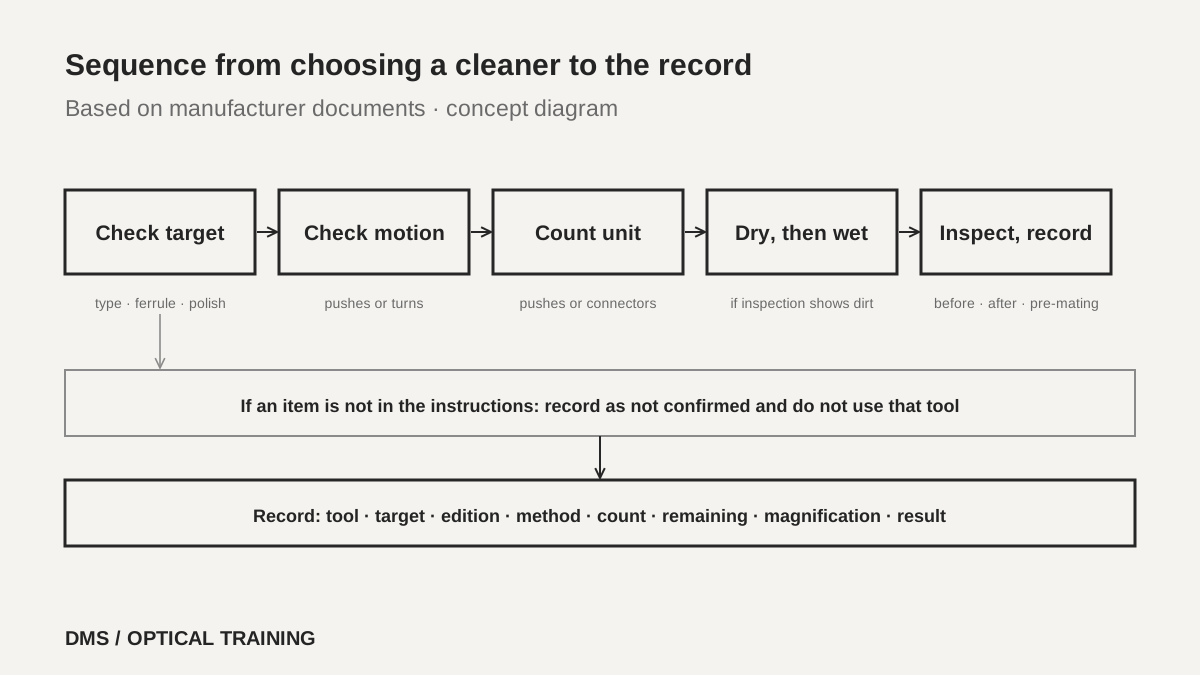 Order from tool selection to the recordView original
-
Check the end face at the same magnification before and after cleaning
-
Inspect both connectors of the mated pair and connect right after inspection
-
Look up the safety sentence in the tool's own instructions
How is a tool chosen in a hypothetical case?
The case below is a teaching assumption and not a real site or measurement. A distribution box has mixed SC/APC adapters and LC duplex adapters, and the toolbox holds only one SC one-click tool. First check the type and color on the adapter side, that is, whether it is green angled polish or blue flat polish. Next find the tool's target table and look for the instruction sentence that says SC is a target and that both PC and APC apply. The LC adapters are not a target of this tool, so a separate LC tool is obtained or the method the instructions allow is used.
Then decide whether to clean the plug directly or the inside of the adapter. Follow the push count and the cap use the instructions give, and check the end face at 200x after cleaning. If it is not clean, dry clean once more, and if contamination remains, use wet-to-dry with isopropyl alcohol of 99% or higher purity. Check the remaining amount on the tool's indicator and connect right after inspection. If the instructions do not list that polish type, or the indicator is empty, the tool is not used.
-
Check the adapter type and color and match them with the tool's target table
-
Obtain another tool for a type that is not a target
-
Do not use the tool if the polish type is not listed or the indicator is empty
What goes into the record after the check?
The record carries the cleaner's maker and model, the target connector and ferrule diameter, and the instruction edition or document number. Also write the cleaning method (dry or wet-to-dry), the number of pushes or turns, the remaining amount on the indicator, the inspection tool and magnification, and the before-and-after judgment with the date and time. If wet cleaning was used, add the name of the solution and the alcohol purity. State the end-face acceptance criteria as the inspection standard and edition in use, and write items that could not be read as not confirmed rather than leaving them blank.
This material is limited to six manufacturer documents (three from Fujikura, plus US Conec, HUBER+SUHNER and Leviton) and one FOA page. The text of IEC 61300-3-35 and ANSI/TIA 568.3-D was not read, and Corning's MMC cleaning guide could not be downloaded and was not used. The conflict over wet cleaning inside the HUBER+SUHNER document, the difference in IBC push counts between two documents, the unit of the cleaning counts, whether current products carry the same values, and the actual cleaning effect in a test were not confirmed. Attach the instructions of the tool you use as the source.
-
Record the tool, target, edition, method, count and remaining amount together
-
Put the inspection tool, magnification and the before-and-after judgment on the same line
-
Record unconfirmed conditions as not confirmed
Checklist
-
Did you match the connector type, ferrule diameter and polish type on the cleaner's label with the installed connector?
-
Did you find in the tool's instructions the sentences on the push count and on use for plugs and inside adapters?
-
Did you check the unit of the cleaning count and how to read the remaining-cloth indicator?
-
Did you use wet-to-dry only on contamination left after dry cleaning, and confirm the alcohol is 99% purity or higher?
-
Did you inspect both connectors at the same magnification before and after cleaning and just before mating, and record the result?
Review questions
1. Can a one-click tool made for SC be used to clean a connector inside an LC adapter?
Answer: Not unless the instructions name that use as a target. The Fujikura PRO catalog and the US Conec catalog separate SC and LC tools into different models and part numbers, and the HOC manual says Fujikura is not liable for damage from other uses.
2. Does one push of a cleaning tool always mean one clean?
Answer: Not always. The Fujikura HOC manual and the US Conec instructions describe a single push until a click, while the HUBER+SUHNER document says to push its IBC tool up to the stop twice. Follow the count in that tool's own instructions.
3. If a catalog says 775 cleanings, can the tool clean 775 connectors?
Answer: It cannot be assumed. A cleaning count may be stated per push or per engagement, and US Conec states its dual-ferrule tool as 525 or more connectors, which is 1,050 or more end faces. Confirm the unit and how many pushes a connector takes before calculating.
Sources
-
Fujikura: One-Click Cleaner PRO Series catalog · TSBB24002B, shown as 2024–2026, pages 1 to 2
-
Fujikura: One-Click Cleaner PRO product page · whole web page, no date shown
-
Fujikura: One-Click Cleaner HOC Instruction Manual · DCML-10057-1, shown as 2020, page 1 rendered and checked
-
US Conec: Fiber Optic Connector Cleaning Solutions catalog · SM-0014-0326, pages 3 to 13
-
HUBER+SUHNER: Cleaning of fiber optic connectors · Edition 2024/01, Rev M 2025-04-15, pages 3 to 10 and 13 to 20, page 19 rendered and checked
-
Leviton: Fiber Optic Cleaning and Inspection Products · PK-A3047-10-00-0C, shown as 2022, pages 1 to 2, page 1 rendered and checked
-
FOA: Cleaning Fiber Optic Connections · no date shown, whole page