Dressing patch cords in an ODF (optical distribution frame) is not about making the panel look tidy. It is about leaving the field so that a later visit can still reach every port and no connector is being pulled. The safer order is to set the route first, choose a cord that matches the route length, then check bend radius and bundling, and finally line up labels with records. Slack is set to fit the route rather than left as spare, and a label goes on as a traceable hierarchy rather than as a single tag beside the port.
Based on manufacturer and association documents reviewed on October 24, 2026.
Learning objectives
-
Separate the order of route, length, bend and label decisions when dressing patch cords in an ODF.
-
Check a manufacturer's bend radius, slack and bundling guidance and judge the field case with it.
-
Confirm door closure and slack pinching, and update records, at handover.
What should be decided first when dressing patch cords?
The route comes first. The FOA ODF reference says clearly defining and adhering to patch cord paths is the first step to avoid tangling, and that this becomes especially difficult when several technicians share the work. CommScope's patch cord management guide makes the same point in workflow terms: before choosing a cord length, establish the best route between the points of connection, then find the required length by adding the horizontal and vertical distances. If the route is decided afterwards, the length is wrong, and folding the surplus into the panel brings both bending and tangling with it.
The route includes the direction the cords leave the panel. CommScope advises routing patch cords equally toward both sides of the vertical cable management channels so that one side is not overloaded. The FOA reference notes that routing cords toward the front can hide unused ports and make existing cords harder to remove. So the direction of the management channel, not the front of the panel, is fixed first, and the same rule is applied to every port. Belden lists a design where one patch cord length reaches any port within the cabinet as an advantage of a good ODF.
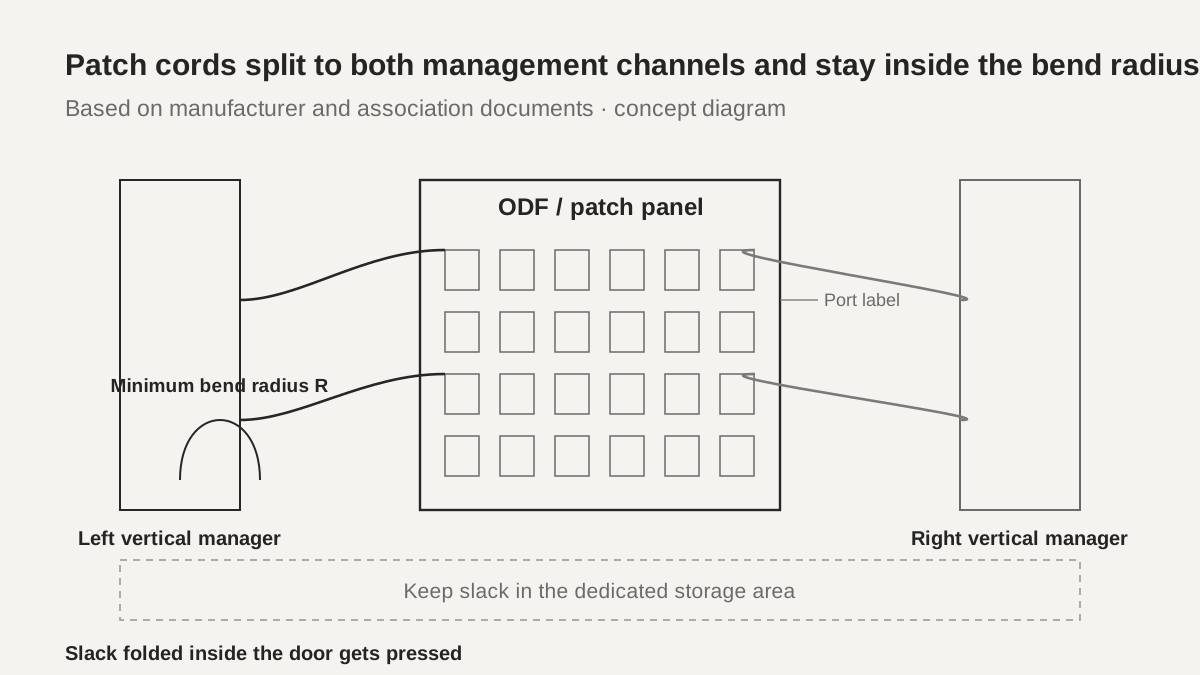 Patch cords split to both management channels and stay inside the bend radiusView original
Distance and cord length are fixed together. The FOA reference explains that when the distance between a rack of active equipment and the ODF or PON splitter rack is a few meters, standard 3 m, 5 m and 7 m cords allow quick and easy connection. Those are the FOA document's examples; the real length still comes from the rack layout and the route through the vertical and horizontal managers. A longer cord means more slack and more chance of bending and tangling.
-
Set the route first, then the length
-
Split cords evenly to both management channels
-
Front-routed cords can hide ports
How much slack should be left?
Slack is set to fit the route, not left as spare. CommScope advises avoiding excessive slack and keeping a neat appearance when selecting a cross-connection cord, and notes that a tight or stretched cord pulls on connectors while too much slack makes the panel harder to work on. Both the short side and the long side are problems, so this is a choice between two failures rather than one correct value.
Where the slack goes matters too. Belden says an ODF should protect incoming and outgoing cables with slack management and articulated trays so that pinch points are prevented. Slack folded inside the door is easily pressed when the panel is closed, and slack that spills out of the vertical manager tangles with other cords on the next visit. Slack therefore stays inside the defined manager and its dedicated storage area, and after the panel is closed you check that nothing is pinched.
Scroll horizontally to view a wide table.
| Slack condition | What it looks like | What to check |
|---|---|---|
| Too short | Connectors pulled, ports stressed | Re-measure the route and fit a longer cord |
| Too long | Spills out of the manager, hard to work | Keep it in the storage area and reset the route |
| Pressed by the door | Cord caught when the door closes | Check door clearance and the pressed point |
-
Match slack to the route length
-
Do not fold slack inside the door
-
Check for pinch points when closing
How is bend radius confirmed?
Bend radius is confirmed from the minimum value on the cord's specification sheet. CommScope states that the minimum bend radius of an optical cord varies with cord diameter and should be verified before use, and that exceeding it can add significant loss and affect channel performance. Panduit's patch cord specification sheet lists a minimum bend radius of 9 mm for 900 µm buffered cord, 16 mm for 1.6 mm cord and 29 mm for 3.0 mm cord. These are Panduit's values for those products; a cord from another maker is checked against its own specification sheet.
Scroll horizontally to view a wide table.
| Cord type | Minimum bend radius |
|---|---|
| 900 µm buffered | 9 mm |
| 1.6 mm | 16 mm |
| 3.0 mm | 29 mm |
High density makes the cord itself thinner. The FOA reference notes that in high-density ODFs the cord diameter falls from 2 mm to 1.6, 1.4 or even 1.2 mm, with a matching reduction in mechanical protection. Even with bend-insensitive G.657 fiber, the cord's minimum bend radius is a separate specification, so "bend-insensitive fiber" is not a reason to bend past the cord limit. High density is also traded against access for connecting, labeling, testing and maintenance, so as density rises there is more reason to keep bend and label clearance.
-
Read the minimum bend radius from the cord sheet
-
Thinner high-density cords have less protection
-
Bend-insensitive fiber does not change the cord limit
How are labels placed and ordered?
Labels go on as a traceable hierarchy, not as a single tag beside the port. The FOA reference says patch cord labels must be unambiguous, clear and logical, and can carry the location of the first splitter together with the ODF and OLT positions. Its example builds the label from settlement, street, building or house number, then the rack cabinet number in the CO, POP or data center, then the patch panel position in that cabinet, and then the port number. Only a structure that narrows from location to port lets one line identify a cord. Belden likewise advises port-level labeling for each port to reduce human error.
Scroll horizontally to view a wide table.
| Level | What it carries | Example |
|---|---|---|
| Location | Building, floor or site | Building A, floor 3 |
| Rack | Rack number | R07 |
| Panel | Panel position in the rack | P02 |
| Port | Port number | LC-14 |
Labels go on both ends of the cord as well as the port. CommScope says technicians must have clear labeling information for the ports involved, and the FOA reference describes using the front of the door for labeling in high-density ODFs. Labeling is not a one-time task. The FOA reference recommends keeping an instruction document inside the ODF, and CommScope says that when the work is done, documentation is updated to the as-built configuration and the work order is closed. When labels and records disagree, the next technician stops trusting the labels.
-
Label as a hierarchy from location to port
-
Label both ends of the cord and the port
-
Update records to as-built after the work
In a hypothetical case, what is fixed first?
The situation below is an assumed training case, not a real site. A 96-port ODF has been patched, and an inspection shows three things: cords are bunched only on the left of the vertical manager, some cords have spilled out of the manager and touch the door, and two 1.6 mm cords show press marks when the door is closed.
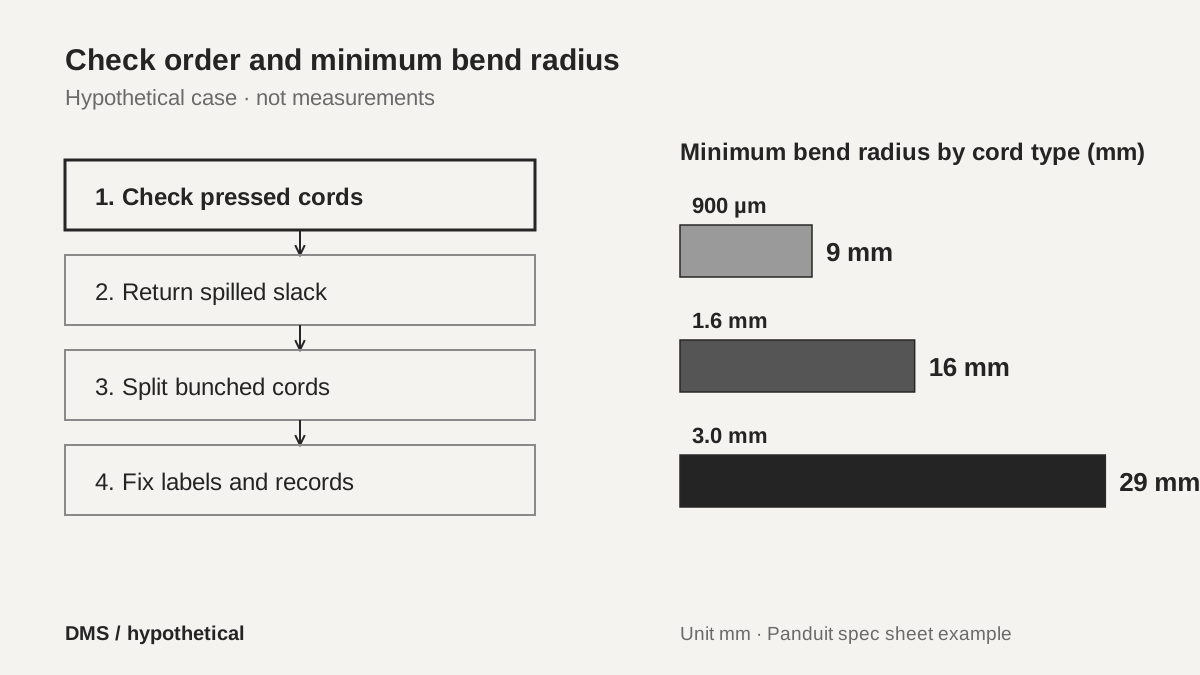 Check order and minimum bend radius in the hypothetical caseView original
Priority is set by risk and by how easily it can be undone. The two pressed 1.6 mm cords may have gone past the 16 mm minimum bend radius, so they carry the highest loss risk and are checked first. Next, slack that spilled out of the manager is returned inside it, and last the bunched cords are split to both channels. Ports with no label, or with a label that disagrees with the records, are corrected in the same visit to reduce tangling on the next one.
-
Check the pressed cords first
-
Return spilled slack into the manager
-
Split bunched cords and fix labels
What is rechecked before the work is closed?
Closing and records are checked together. CommScope says that when patch panels are mounted in enclosures they should be closed securely and, where necessary, locked, making sure that cord slack is not snagged or pinched by the doors. The FOA reference's reason for defining cord paths is that several technicians create tangling. The closing check therefore looks at all three at once: whether new cords stay on the defined route, whether slack is pressed by the door, and whether labels exist at both ends and match the records.
Something is also left behind. The record notes which cord went to which port, the cord length and type, the managers and slack location used, and the labeling scheme. Only when the next technician can follow the same route and the same labeling rule does tangling stop accumulating. Where the cord sheet's minimum bend radius and the observed bend, or a port left without a label, differ, that fact is written down too.
-
Check door closure and slack pinching
-
Check that labels match the records
-
Record route, length, cord type and labeling scheme
Checklist
-
Did you set the cord route and direction before the length?
-
Did you split cords evenly to both sides of the vertical manager?
-
Did you check and keep the minimum bend radius on the cord sheet?
-
Did you label as a hierarchy from location to port, on both cord ends?
-
After closing the door, did you check slack pinching and update the records?
Review questions and answers
1. Why set the route before the length for ODF patch cords?
Answer: The needed length can only be measured accurately once the route is fixed. If the route is decided afterwards, the length is wrong and folding the surplus into the panel creates bending and tangling.
2. Why is it a problem to leave a 1.6 mm cord pinched by the door?
Answer: A pressed cord may be bent past its minimum bend radius. Panduit's specification sheet lists 16 mm as the minimum bend radius for a 1.6 mm cord, and going past it can add loss.
3. What is the problem with labeling only one point at the port?
Answer: It cannot be traced along the cord, so the next technician struggles to identify the right cord. The FOA reference recommends a hierarchy that narrows from location to rack, panel and port, and Belden recommends port-level labeling.
Sources and versions
-
FOA: Optical Distribution Frames/Patch Panel · 2024, FOA technical reference (by Vladimir Grozdanovic)
-
CommScope: A Guide to Patch Cord Management for Fiber Optic Solutions · August 15, 2018
-
Belden: 6 Features to Look for in an Optical Distribution Frame · November 21, 2019
-
Panduit: Opti-Core Fiber Optic Patch Cords and Pigtails Specification Sheet (FBSP54--WW-ENG) · dated December 2023