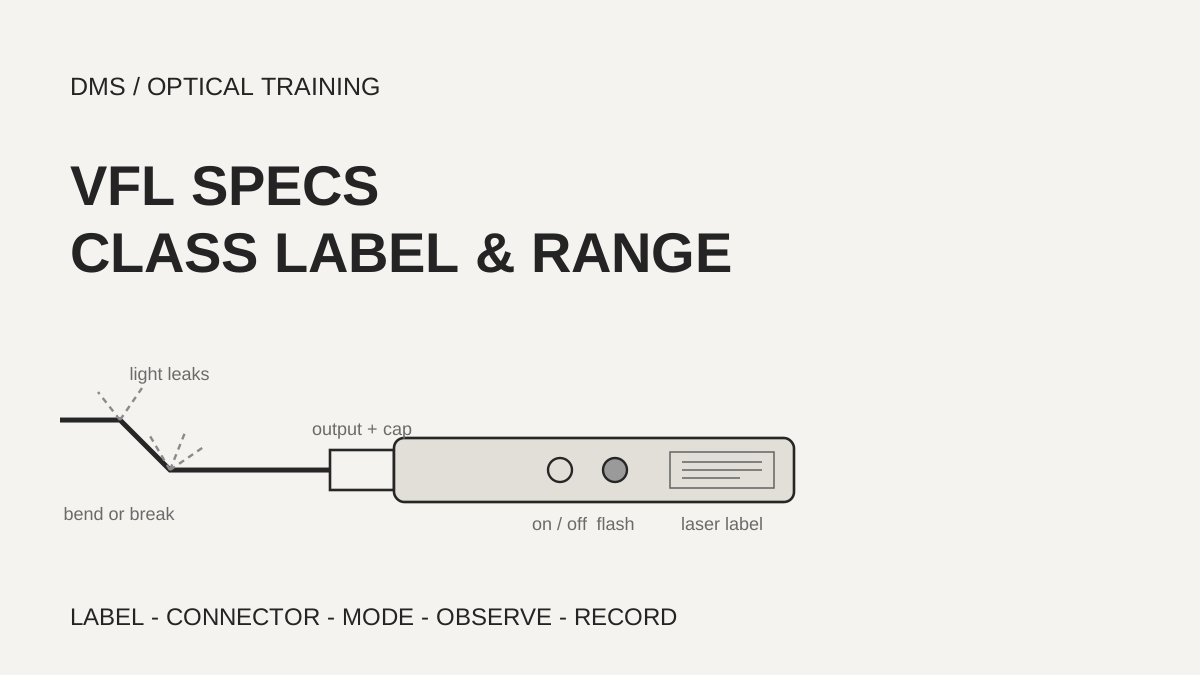
Before a visual fault locator (VFL, a tool that shows breaks and sharp bends in a fiber as red light you can see) is used, the laser label on the unit, the connector size, the flashing mode and the range in the manual are read first. The four manufacturer documents reviewed differ in how they state wavelength, laser class, visible range and the mode at power-on, so a number from one document is not carried over to another model. Visible light is a clue to a break or a sharp bend; it does not give a loss value.
Based on the manufacturer and organization documents reviewed on October 30, 2026.
Learning objectives
-
Find wavelength, power and class wording in a manufacturer specification table and on the unit label, and explain where they differ.
-
Avoid carrying a visible range from one model to another, and find the connector size and flashing mode in the manual of the unit in use.
-
State how to record a result when no light is seen, without concluding that nothing is wrong.
What does a visual fault locator show, and what does it not show?
A visual fault locator sends red laser light into a fiber so that light leaking from a break or a sharp bend can be seen by eye. The Fluke Networks VisiFault sheet lists tracing fibers, checking continuity and finding faults such as breaks, bad splices and tight bends, and its figure marks continuity checks and tracing, a microbend or broken fiber, a bad splice, a sharp bend and a broken fiber in a connector. The EXFO FLS-240 guide lists detecting breaks in the OTDR dead zone, detecting defective connectors, highlighting sharp bends where losses occur, end-to-end identification in multifiber cables, optimizing mechanical and fusion splices, and detecting major scratches on connector surfaces. The FFL-100 manual that VIAVI hosts says the light escapes at the exact site of the damage and makes the cable sheath glow red.
The use matters inside closures. FOA says fibers are often broken as trays and closures are assembled or re-entered, that tray covers can pinch fibers and cause breaks that can only be found with a VFL test, and that the break can be too close to the splice for an OTDR, so it just looks like a bad splice. None of the four documents describes a way to read loss as a number from this light. A VFL result is therefore recorded as seen, not seen, and where it was seen, and the size of any loss is measured separately.
-
A VFL shows light leaking near a break, a sharp bend or a bad splice
-
The documents read give no way to read loss as a number
-
A pinch inside a closure is hard to separate on an OTDR, which is where a VFL helps
Why is the laser class worded differently from document to document?
The same kind of tool is labeled differently. The Fluke sheet lists a 635 nm (nominal) laser diode as Class 2. The EXFO FLS-240 guide says the unit is a Class 2M product under IEC 60825-1:2007 and 21 CFR 1040.10, that natural aversion responses such as the blink reflex usually give adequate eye protection, and that viewing the output may be more hazardous if optics are used within the beam. The FFL-100 and FFL-050 manuals that VIAVI hosts give Class 2 or Class II in the specification table, while the label text they reproduce reads IEC CLASS 2M LASER PRODUCT and CDRH CLASS II LASER PRODUCT together with a warning not to view the beam directly with optical instruments.
The standard text was not read for this lesson, so the classes are not defined here and the wording is passed on as the documents give it. As a DMS reading, one class word in a catalog or a specification table is not used to settle the safety conditions; the label on the unit and the warnings in its manual are read together. What the documents read have in common is not looking into the output and putting the protective cap on when the tool is not in use. The Fluke and VIAVI documents also say not to magnify or modify the laser output. EXFO adds that fibers are not installed or terminated while a light source is active. When a connector end face is viewed with a microscope or magnifier, turning the VFL off and disconnecting it first is, in DMS's reading, the order that does not conflict with these warnings.
Scroll horizontally to view a wide table.
| Source | Class wording in the specification | Unit label or safety text |
|---|---|---|
| Fluke VisiFault sheet | Class 2, 635 nm (nominal) | The unit figure shows CLASS II LASER; do not look into the output or magnify it |
| EXFO FLS-240 guide | Class 2M, 630–645 nm | Viewing may be more hazardous with optics in the beam |
| FFL-100 and FFL-050 manuals hosted by VIAVI | Class 2 or Class II, 650 nm | IEC CLASS 2M and CDRH CLASS II wording; do not view directly with optical instruments |
-
The specification table and the label can word the class differently, even inside one document
-
A class name alone does not settle the safety conditions; the unit label is read
-
When optics are used, the VFL is turned off and disconnected first
How far can a visible range number be trusted?
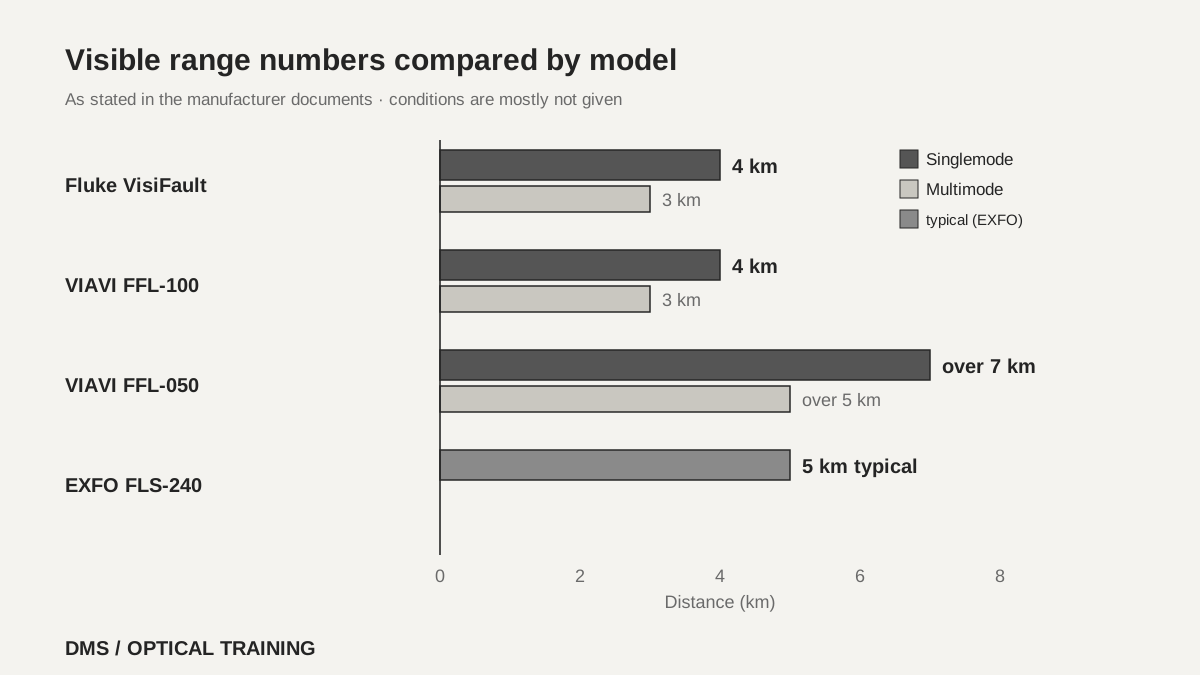
Visible range differs by model, and conditions are almost never given. Fluke lists 4 km on singlemode and 3 km on multimode, and the FFL-100 hosted by VIAVI lists the same 4 km and 3 km. The pocket-sized FFL-050 in the same family has the same maximum power of 1.0 mW yet lists over 7 km on singlemode and over 5 km on multimode. The EXFO FLS-240 lists a typical 5 km and notes that the distance depends on fiber attenuation, and another note says its typical power of 0.8 mW is valid only with 50/125 µm fiber.
The documents do not say why these numbers differ. Sheath color, ambient light, fiber attenuation and how the light was viewed are not stated, apart from the EXFO attenuation note. A visible range is therefore a reference value read from the manual of the unit in use, not a basis for comparing models. Splitting a long route into shorter sections is a DMS reading, not something the manuals say.
 Visible range numbers compared by modelView original
Scroll horizontally to view a wide table.
| Source | Wavelength and power | Visible range |
|---|---|---|
| Fluke VisiFault sheet | 635 nm (nominal), 1.0 mW maximum | Singlemode 4 km, multimode 3 km |
| FFL-100 manual hosted by VIAVI | 650 nm, 1.0 mW maximum | Singlemode 4 km, multimode 3 km |
| FFL-050 manual hosted by VIAVI | 650 nm, 1.0 mW maximum | Singlemode over 7 km, multimode over 5 km |
| EXFO FLS-240 guide | 630–645 nm, 0.8 mW typical | 5 km typical, depends on fiber attenuation |
-
Range numbers differ by document and conditions are almost absent
-
They are not carried between models; the manual of the unit in use is the reference
-
Splitting a long route into sections is a DMS reading
How are the connector and the flashing mode matched?
Connector size comes first. The Fluke, FFL-100 and FFL-050 documents say the universal 2.5 mm output accepts SC, ST and FC connectors and that a separate 1.25 mm adapter is used for 1.25 mm ferrules. The two VIAVI documents add that LC and MU connectors connect through this adapter. The adapter is included with the FFL-100, sold separately with the FFL-050, and optional with the Fluke. The EXFO guide only says the connector is inserted all the way into the adapter, and the adapter size was not read in the pages used.
The mode at power-on also differs. EXFO starts in pulsating mode, switches to continuous with the button circled in red on the safety sticker, and returns to pulsating when the power button is pressed again. The two VIAVI documents say the FLASH button switches to flashing and pressing it again returns to continuous, which reads as continuous at power-on; that reading is DMS's. Fluke gives the key that toggles the two modes but not the mode at power-on. The flashing rate is stated as 2 Hz for Fluke, 2–3 Hz for the FFL-100 and 2–4 Hz for EXFO, and no rate was found in the FFL-050 manual. The two VIAVI documents advise using the flashing mode for easier identification.
Cleaning is read part by part. Fluke says to clean the VFL output adapter and the connector on the fiber under test before connecting but does not say how to clean the adapter, and the case is wiped with a soft cloth dampened with water or mild soap, with no abrasives, solvents or alcohol. EXFO says to clean the adapter with a lint-free swab dipped in isopropyl alcohol of 98 % purity or more and then blow it dry with compressed air. Whether one manufacturer's method can be carried over to another manufacturer's unit was not confirmed, so the method in the manual of the unit in use is followed.
 Sequence from reading the unit to the recordView original
Scroll horizontally to view a wide table.
| Source | Connector size | Mode at power-on and flashing |
|---|---|---|
| Fluke VisiFault sheet | 2.5 mm universal; 1.25 mm with an optional adapter | Mode at power-on not stated; flashing at 2 Hz |
| FFL-100 and FFL-050 manuals hosted by VIAVI | 2.5 mm universal; 1.25 mm with an adapter (included with the FFL-100) | Button switches to flashing and back to continuous |
| EXFO FLS-240 guide | Inserted all the way into the adapter | Starts flashing; continuous uses a separate button; 2–4 Hz |
-
The connector is matched first, 2.5 mm or 1.25 mm
-
The mode at power-on differs by document, so the indication on the unit is checked
-
Cleaning follows the method in the manual of the unit in use
If no light is seen, can it be said that nothing is wrong?
It cannot. The Fluke sheet says the light may not be visible through thick or dark-colored cable sheaths or through connector dust caps, and advises viewing it indirectly by holding a white card or paper in front of the output or the connector emitting the light. The EXFO guide says the light is often visible through the patchcord jacket, which is a reminder that it is not always visible. None of the documents read says that no light means no fault.
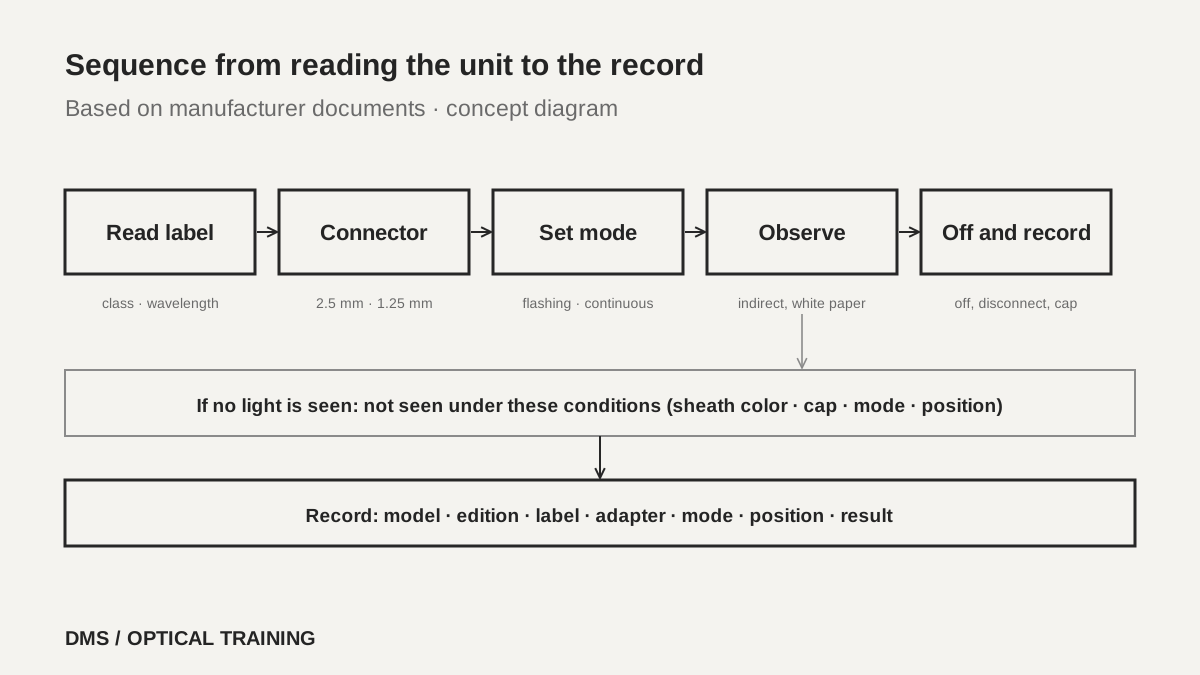
As a DMS reading, a result with no visible light is written as not seen under these conditions. The conditions include sheath color, whether a connector cap was on, flashing or continuous, and where and how the cable was viewed. Not seeing light neither replaces another test such as an OTDR nor proves that nothing is wrong.
-
A thick or dark sheath and a dust cap can hide the light, as Fluke notes
-
The light is viewed indirectly with a white card or paper
-
No light is recorded as not seen under these conditions, not as no fault
How is the order set in a hypothetical case?
The case below is a teaching assumption, not an actual site or measurement. Before a closure is reopened, one splice point looks like a bad splice on an OTDR. As FOA describes, a pinch under a tray cover is hard to separate on an OTDR, so the fiber is first checked by eye with the VFL before it is respliced.
The order is set like this. The label on the unit with the class, wavelength and power is read first, and the connector size and flashing mode are checked in the manual. The connector on the fiber under test and the output of the unit are cleaned by the method the manual gives, and the connector is attached all the way with an adapter of the right size. The mode is set to flashing and the tray cover is opened slowly while looking for the place where light leaks, and if no light is seen a white sheet is held up to view it indirectly. When a leak position is found, the fiber is checked by eye for a pinch and the photo and position are saved; it is not judged a bad splice here. If a microscope is needed to look at an end face, the VFL is turned off and disconnected first. At the end the unit is turned off, disconnected, and capped.
-
The label and the manual are read and the connector size is matched
-
A leak position is recorded only, and the judgement is left to other tests
-
At the end the unit is turned off, disconnected and capped
What is recorded when the check is finished?
The record lists the model of the locator and the edition of its manual, the class and wavelength on the label, the size of the adapter, and flashing or continuous mode. It also gives the position observed, the sheath color, whether a connector cap was on, whether light was seen, not seen or faint, and whether the surroundings were dark. If the output was cleaned, the date and the method are written.
The material is limited to four manufacturer documents and the FOA closure page, and the editions are old, from 2004 to 2013. Whether models sold today carry the same values was not confirmed. The text of the laser standard, the conditions under which the visible ranges were measured, and any instruction about not connecting to a live path were not found in the documents read. Whether the method in this lesson can be carried over to another model was also not confirmed, so the manual of the unit in use is attached as the source for every item.
-
Model, manual edition, label class and wavelength, adapter and mode are written together
-
The observation is split into seen, not seen and faint, with conditions
-
Conditions that were not confirmed are recorded as not confirmed
Checklist
-
Did you read the class, wavelength and power on the label of the unit in use, and write down the edition of its manual?
-
Did you use an adapter that fits the connector size (2.5 mm or 1.25 mm) and clean the output and the connector by the method in the manual before connecting?
-
Did you check the mode at power-on, and view the light in shade or indirectly on a white sheet?
-
When no light was seen, did you record it as not seen under these conditions instead of assuming no fault?
-
At the end did you turn the unit off, disconnect it and cap it, and did you turn it off when a microscope was used?
Review questions
1. If a specification table only says Class 2, are all the safety conditions known?
Answer and explanation: No. The manuals that VIAVI hosts give Class 2 or Class II in the specification table while the label text reads IEC CLASS 2M and CDRH CLASS II, and EXFO states Class 2M and says viewing may be more hazardous with optics in the beam. The class name is not read alone; the unit label and the warnings are read together.
2. May a visible range of 5 km from one manual be applied to another model?
Answer and explanation: No. The numbers in the documents read differ, for example singlemode 4 km, over 7 km and a typical 5 km, and the conditions are not given except for the EXFO attenuation note. The value in the manual of the unit in use is a reference only, and a long route is checked in sections.
3. What is done when the unit is connected but no light is seen?
Answer and explanation: It is not concluded that nothing is wrong. Fluke says the light may not be visible through thick or dark-colored sheaths and connector dust caps, and advises viewing it indirectly on a white paper. The result is recorded as not seen under these conditions, together with sheath color, cap, mode and position.
Sources
-
Fluke Networks: VisiFault Visual Fault Locator Instruction Sheet · PN 2157599, dated May 2004, a copy hosted by a reseller, all pages 1 to 6
-
EXFO: FLS-240 Pocket Pal Visual Fault Locator User Guide · P/N 1065102, version 3.0.0, printed June 2013, pages 1 to 2, 5 to 9 and 19
-
Westover Scientific: Visual Fault Locator FFL-100 User Manual, hosted by VIAVI · ZP-PKG-0333 REV A, copyright 2007, pages 1 to 2
-
JDSU: Visual Fault Locator (Pocket-sized) FFL-050 User Manual, hosted by VIAVI · ZP-PKG-0477 REV 2, copyright 2008, pages 1 to 2
-
FOA: Fiber Optic Splice Closures · no page date, copyright 2023 shown at the foot, the paragraph on tray cover pinching and VFL