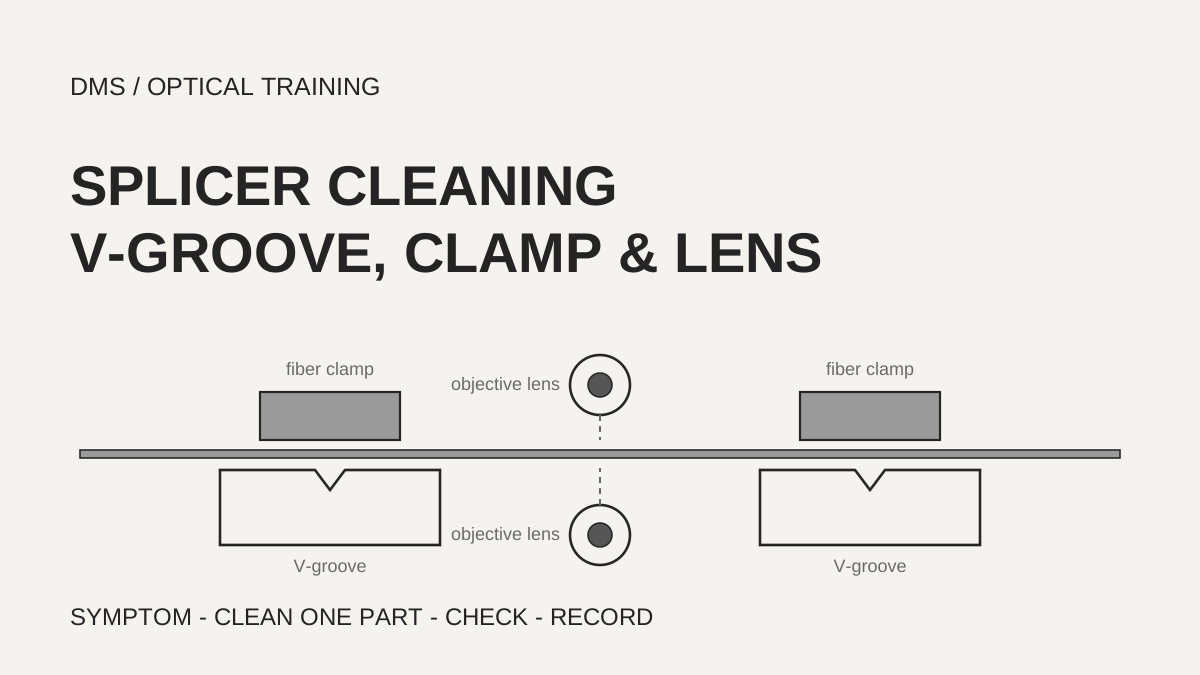
Splicer cleaning points fall into two groups: the parts that hold the fiber (V-groove and clamp) and the parts that look at the fiber (objective lens, LED and lens protection glass). A fiber position shifted from center or a motor overrun error points first to the V-groove and clamp, while a dust error or a blurred screen points first to the lens side. Intervals differ by maker: Fujikura recommends every day for the V-groove, Sumitomo says before and after each use, and Furukawa says once a month, so follow the manual of the splicer in use.
Based on the manufacturer manuals and technical pages reviewed on October 28, 2026.
Learning objectives
-
Divide the cleaning points of a splicer into the parts that hold the fiber and the parts that look at it.
-
Choose the first part to clean from a symptom or error message, and read the differing intervals and methods of each maker separately.
-
State the checks after cleaning and the items to record, and write down the conditions that were not confirmed.
What is cleaned on a splicer?
The cleaning targets split into two groups by function. One group aligns the fiber: the V-groove (the groove the fiber rests in) and the fiber clamp (the part that presses the fiber into the groove). The other group is how the camera sees the fiber: the objective lens, the observation LED and the lens protection glass. The Sumitomo TYPE-82C+ manual adds the bare fiber pads (the pads that press the stripped fiber) and the heat shrink oven (the part that heats the protection sleeve) as cleaning items.
The trouble that dirt causes can also be read in two ways. The Fujikura 90S+ page says dust on the V-groove or clamp may attach to the fiber or affect the splicing motion and result in high splice loss, and says a dirty objective lens interferes with fiber observation and causes errors and high connection loss. Sumitomo says even tiny dust in the V-grooves can offset the fiber, and the Furukawa S185 manual says dirt on the V-grooves or fiber clamps offsets the alignment or creates stress points on the glass that make the fiber weak. All of these are possibilities stated by the makers. The documents read give no number for how many dB of splice loss dust adds.
-
Check the parts that hold the fiber and the parts that look at it as separate groups
-
Part names vary by model, so locate them in the figure of the manual for the splicer in use
-
The documents read give no number for the size of the loss effect of dust
Which symptoms point to cleaning?
Some manufacturer documents state symptoms directly as cleaning signals. For the V-groove and clamp, Fujikura lists a fiber position shifted from center after the fiber gap is set, a ZL/ZR motor overrun error, and a core alignment time that is too long. For the objective lens it lists R-Too or L-Too Dusty Fiber errors, X or Y Dark Background errors, a Large Gap Offset or Large Cleave Angle error or a failed inspection, and a gap difference that cannot be set. Motor overrun appears in both lists.
The Sumitomo TYPE-82C+ troubleshooting table lists dust on the V-groove and bare fiber pads as one cause of kink or offset, bulging and neck-down, and lists arc power that is not optimum as another possible cause, with an arc test as the remedy. For a bubble it lists dust on the fiber and a cleave angle beyond the allowed limit, and says to cleave the fiber again. So dust on the fiber end face is solved by cleaving again, not by cleaning the splicer. In the Furukawa S185 self check, the Dust Check inspects the camera image for foreign objects and, if it fails, tells the user to clean the lenses. A failed Z-Linearity check tells the user to clean the V-groove and clamp with a brush.
As a DMS reading, errors about the image and screen are checked on the lens side first, and errors about fiber position and movement on the V-groove side first. A symptom that appears in both lists, such as motor overrun, is not assigned to one part; clean both parts in turn.
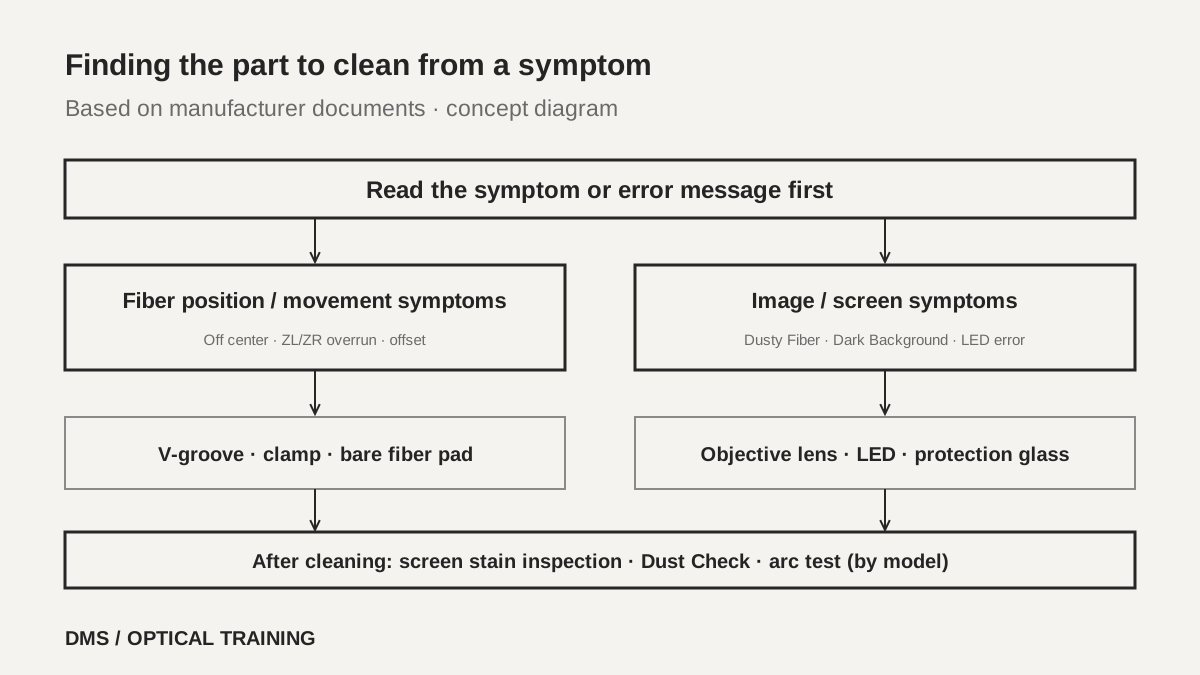 Order for finding the part to clean from a symptomView original
Scroll horizontally to view a wide table.
| Symptom or message | Part to check first | Source |
|---|---|---|
| Fiber position off center, ZL/ZR motor overrun, long core alignment time | V-groove and clamp chips | Fujikura 90S+ |
| Dusty Fiber, Dark Background, gap cannot be set | Objective lens | Fujikura 90S+ |
| Offset, bulging, neck-down | V-groove and bare fiber pads | Sumitomo TYPE-82C+ |
| LED error, uneven display, unclear fiber image | LED, then lens protection glass | Sumitomo TYPE-82C+ |
| Dust Check failed, Z-Linearity failed | Lens, V-groove and clamp | Furukawa S185 |
-
Symptoms about fiber position and movement lead to the V-groove and clamp first
-
Symptoms about the image and screen lead to the lens, LED and protection glass first
-
Dust on the fiber end face is solved by cleaving again, not by cleaning
How do cleaning intervals differ by manufacturer?
Even for the same V-groove, the interval differs. The Fujikura 90S+ page recommends cleaning the V-groove and clamp chips every day and the objective lens once a month depending on frequency of use. The Sumitomo TYPE-82C+ manual says regular cleaning and inspection are required, especially before and after each use, and says daily cleaning helps maintain performance. The Furukawa S185 manual says cleaning the lens and cleaning the V-grooves are each ideally done once a month, and says to shorten the interval if dirt is prominent. The Fujikura 90S manual gives no number: it says to inspect the V-grooves frequently and clean them periodically, and warns that without periodic lens cleaning dirt may accumulate and become impossible to remove.
The bars in the figure place these intervals on a scale of days. Placing before and after each use at one day or less and once a month at 30 days is a DMS conversion, not a value the makers compared under the same conditions. Take the interval from the manual of the splicer in use. All three makers have guidance to clean when a symptom appears, so in a dusty environment or on a day when a symptom appears, move to a cleaning check without waiting for the interval. That is the safer reading.
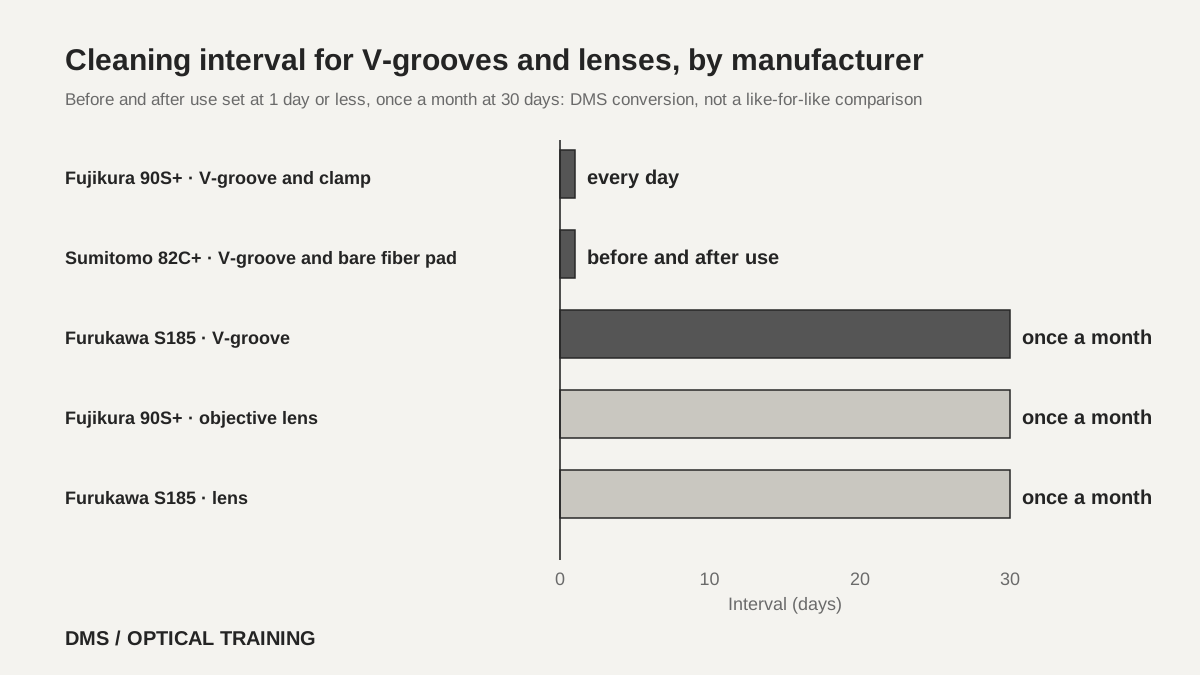 Cleaning intervals for V-grooves and lenses by manufacturer, placed on a scale of daysView original
Scroll horizontally to view a wide table.
| Source | V-groove and clamp | Objective lens and protection glass |
|---|---|---|
| Fujikura 90S+ page | Every day | Once a month, depending on use |
| Sumitomo TYPE-82C+ | Before and after use; daily cleaning helps | Protection glass when the image stays unclear after cleaning the LED |
| Furukawa S185 | Once a month; shorten if dirt is prominent | Once a month; shorten if dirt is prominent |
| Fujikura 90S manual | Inspect often, clean periodically | Clean periodically |
-
Do not memorize one interval; find it in the manual of the model in use
-
On a day when a symptom appears, check cleaning regardless of the interval
-
The conversion to days in the bar figure is a DMS comparison
How are the V-groove and clamp cleaned?
The basic method is wiping with a cotton swab moistened with alcohol. The Fujikura 90S manual says to open the wind protector, clean the bottom of the V-groove with a thin alcohol-moistened cotton swab, then remove the excess alcohol with a clean dry swab, and the clamp chips are cleaned the same way. The tools listed on the Fujikura 90S+ page are a cotton swab, alcohol, a magnifier, the SS03 stripper, the CT50 cleaver and fibers. Sumitomo says to brush the V-groove surface in the direction of the arrow with an alcohol-moistened swab, and to wipe the bare fiber pads with an alcohol swab and then a dry swab, without applying too much force. Sumitomo also says to turn the splicer off before cleaning.
What to do when a swab does not remove the dirt differs by document. The Fujikura 90S manual says to use the end face of a cleaved fiber to dislodge contaminants from the bottom of the V-groove and then repeat the swab step, and the 90S+ page also says a cleaved fiber may remove dust easily. Furukawa says to hold a fiber cleaved about 10 mm from its end at a 45 degree angle and run it back and forth along each groove to scrape off debris, and to wipe with an alcohol swab as well if the contamination is extreme. The Sumitomo document does not give this method.
Read the cautions too. Furukawa says the V-groove is made of brittle ceramic, so clean it carefully and do not use abrasive tools such as metal. Its clamp cleaning is wiping the top of the clamps with an alcohol swab, and it calls for high-purity ethanol. Gas sprays are also prohibited. Furukawa says sprays with Freon gas or alternatives can contaminate the camera lens and that hazardous gas may come out by electric discharge, causing fire and machine failure, and Sumitomo says the chemical reaction of canned air can deteriorate the LED and the lens protection glass and cause a loss of splicing capability.
-
Wipe with an alcohol swab, then remove the excess with a dry swab
-
When dirt stays, use only the method the manual of the model allows
-
The V-groove is ceramic, so use no metal tools and no gas spray
How are the objective lens and LED wiped, and what confirms the result?
The lens is wiped with the electrodes removed. The Fujikura 90S+ page says to open the wind protector, turn the fixing screw of the electrode rod by hand to remove it, and wipe the two objective lenses with a swab soaked in alcohol. It says to use a new swab at each location and not reuse it, and to finish with a swab that is not soaked in alcohol to remove uneven wiping. It calls for alcohol of 99% purity or higher and says rust may occur otherwise. There is wording about also cleaning the observation LED, but the same sentence also mentions wiping the optical fiber, and what that refers to was not confirmed.
The Fujikura 90S manual, Sumitomo and Furukawa all say to remove the electrodes. The Fujikura 90S manual says to turn the splicer off before wiping the lens and not to hit or touch the electrode tips, and Sumitomo warns that an electrode tip is extremely sharp. Sumitomo has one more step: if the fiber image is still unclear or an LED error recurs after cleaning the LEDs, wipe the lens protection glass in a circular motion with an alcohol swab, refit the electrodes and perform an arc test. It adds that right after electrode replacement the splicer cannot adjust the arc center position automatically and gives an error, so the arc test comes first.
The confirmation after wiping also differs by document. The Fujikura 90S+ page says to close the windshield, run the screen stain inspection from the maintenance menu, and treat the cleaning as finished when the OK screen appears. The Fujikura 90S manual says to check by eye that the lens surface has no streaks or smudges, turn the power on, confirm that no smudges show on the monitor and run the Dust Check. The Furukawa S185 has a Dust Check in its self check and tells the user to clean the lens if it fails. The same page of the Fujikura 90S manual carries a line to run arc calibration after cleaning, but from the page layout alone it was not confirmed which cleaning item that sentence belongs to.
-
Turn the power off and remove the electrodes before wiping the lens, and do not touch the electrode tips
-
Use a new swab at each location and finish with a dry swab
-
Confirm with the screen stain inspection, Dust Check or arc test of the model in use
How would the order be set in a hypothetical case?
The case below is assumed for teaching and is not a real site or measurement. On one splicer, the estimated loss keeps coming out high even though the work is done the same way, and now and then a message says the fiber position is shifted from center. The worker has checked the cleave angle display and the angle is within the allowed range. If the fiber is only stripped and cleaved again and again, time simply grows. In the symptom table above, a symptom about fiber position belongs to the V-groove and clamp, so that part is placed first for cleaning. This order is a DMS reading.
The order is set like this. Turn the splicer off and wipe the V-groove and clamp with an alcohol swab and a dry swab. If the dirt stays, use only the method the manual of the model allows. Then run the confirmation procedure of the model in use, and run an arc test if the electrodes were touched. If the symptom remains, move on to the lens, LED and protection glass. Clean one part at a time and write down the result, so that it is clear which cleaning removed the symptom. If the symptom still remains, hand it over to the manufacturer's service check. The Sumitomo manual recommends having the splicer checked periodically through its maintenance service, and this lesson makes no fault judgment beyond that.
-
A symptom about fiber position leads to cleaning the V-groove and clamp first
-
Clean one part at a time and write down the result
-
If cleaning does not solve it, hand it to a service check and make no judgment in this lesson
What is recorded when cleaning is finished?
The record holds the splicer model and the manual edition, the cleaned part and the date, the symptom or error message before cleaning, the alcohol used, and the result of the confirmation procedure after cleaning. Fujikura calls for alcohol of 99% purity or higher, Furukawa calls for high-purity ethanol for the clamps, and Sumitomo gives no purity, so record the type according to the manual of the model in use. For the confirmation procedure, record only what was actually run among the screen stain inspection, the Dust Check and the arc test, and write that the others were not run.
Record what was not confirmed as well. The material here is limited to manufacturer manuals and guidance pages, and no standard text was read. The documents read give no number for how many dB dust adds to splice loss or how much a cleaning interval reduces it. Whether the methods of one maker in this lesson can be moved to another model was also not confirmed, so record the method and interval with the manual of the model in use as the source.
-
Write the model, manual edition, cleaned part, date and symptom together
-
Write the confirmation procedures that were run and their results, and say the others were not run
-
Write down the conditions that were not confirmed
Checklist
-
Did you confirm the cleaning interval and method for the V-groove, clamp and lens in the manual of the splicer in use?
-
Was the splicer turned off before cleaning, the electrodes removed for the lens, and the electrode tips left untouched?
-
After wiping with a swab and alcohol, was the excess alcohol removed with a dry swab, and was no gas spray used?
-
Was a confirmation procedure such as the screen stain inspection, Dust Check or arc test run according to the model in use?
-
Were the cleaned part, symptom and confirmation result recorded with the model and the manual edition?
Review questions
1. Which part is cleaned first when the fiber position is shifted from center?
Answer and explanation: The V-groove and clamp are cleaned first. The Fujikura 90S+ page lists this symptom as a signal to clean the V-groove and clamp, and Sumitomo lists dust on the V-groove and bare fiber pads as a cause of offset. Errors about the image and screen belong to the lens side.
2. Why should the V-groove cleaning interval not be memorized as one number?
Answer and explanation: Because the interval differs by maker. Fujikura 90S+ says every day, Sumitomo says before and after use, and Furukawa says once a month and to shorten it if dirt is prominent. Find the interval in the manual of the model in use, and on a day when a symptom appears, check cleaning regardless of the interval.
3. Why should a gas spray not be used on the lens or V-groove?
Answer and explanation: Furukawa says sprays with Freon gas or alternatives can contaminate the camera lens and that hazardous gas may come out by electric discharge, causing fire and machine failure, and Sumitomo says the chemical reaction of canned air can deteriorate the LED and the lens protection glass and cause a loss of splicing capability. Wipe with an alcohol swab and a dry swab.
Sources
-
Fujikura: How to clean v-groove and fiber clamp chips of 90S+ · no date shown in the text read
-
Fujikura: How to clean objective lens of 90S+ · no date shown in the text read
-
Fujikura: Instruction manual Core Alignment Fusion Splicer 90S · marked RevT1, a copy hosted by a third party, pages 44 to 45
-
Sumitomo Electric: TYPE-82C+ Guide to operation · OME2024078-3 ver.1.01, pages 2-19 and 3-1 to 3-4
-
Furukawa Electric: S185 Series Fusion Splicer User Manual · FTS-B562 Issue 16, sections 8.2.3 to 8.2.6 and the self check page