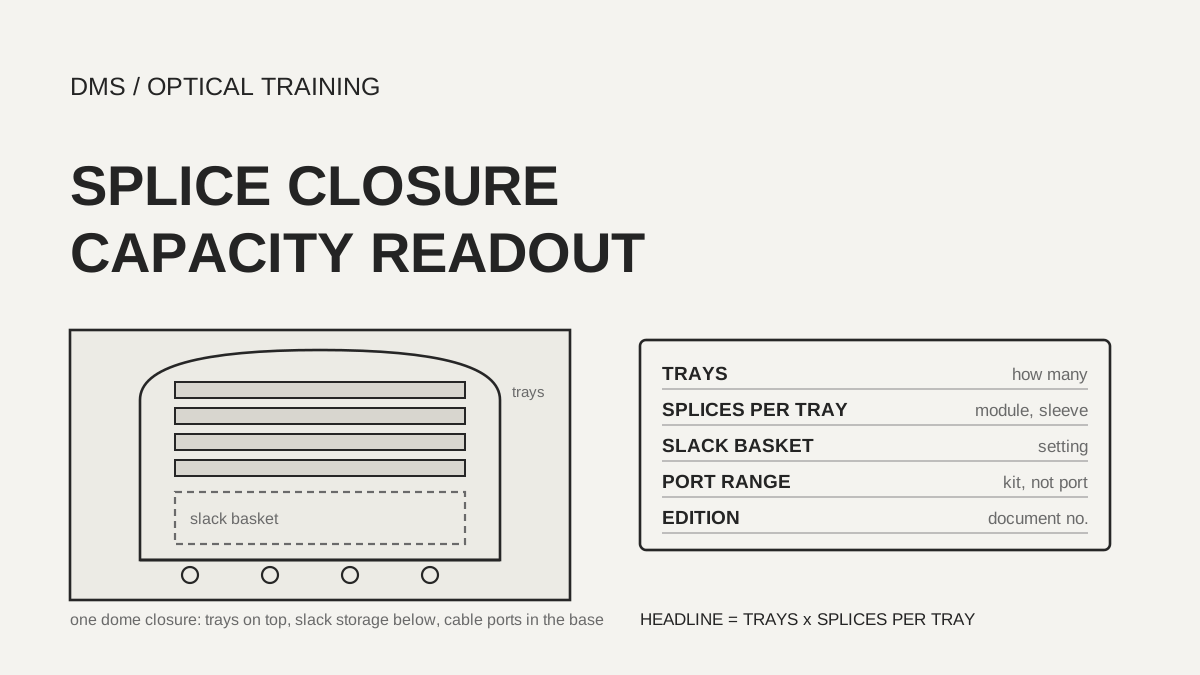
The headline capacity of a splice closure is the number of trays multiplied by the splices one tray holds, and the slack storage you choose changes both sides of that product. In the documents reviewed, the 768 splices quoted for the CommScope FOSC 450 D6 applied to eight FIST-module trays, while the same closure with the standard slack basket takes up to six trays. A cable port diameter range was also not one width per port but a separate range for each cable entry kit. So before you copy a headline figure into a design, confirm four things: the module type, the number of trays, the slack storage method and the edition of the document.
As of November 9, 2026, based on the documents listed under Sources.
Learning objectives
-
Read one closure capacity line as tray count, splices per tray and slack storage method.
-
See in a table that documents for the same product name can carry different figures by edition, and record each document by number and edition.
-
Read cable port diameter ranges in inches and millimeters on one scale, and check the cable outer diameter against the range of the cable entry kit.
What is multiplied inside one closure capacity line?
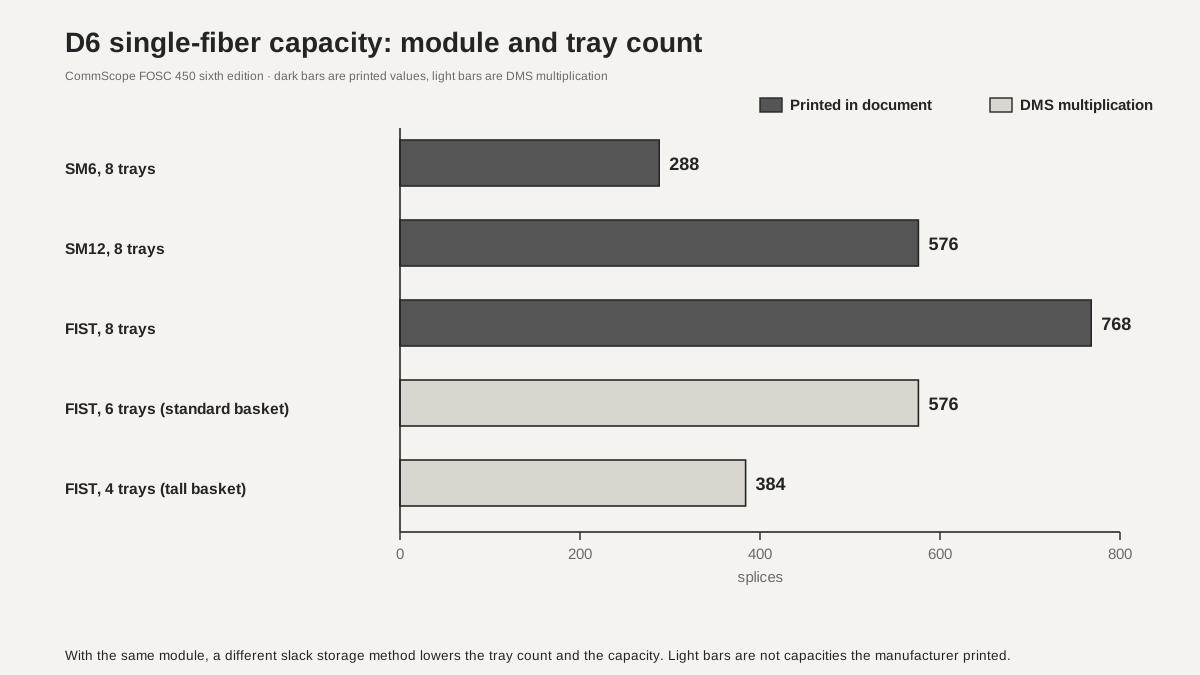
The CommScope FOSC 450 ordering guide (sixth edition) splits single-fiber splicing into SM6 modules, SM12 modules and FIST modules in its capacity chart, and lists the splices per tray and the trays per closure on separate lines. For the D6 closure, one tray holds 36 splices with SM6, 72 with SM12 and 96 with FIST. The tray count is eight with the flexible storage sock, six with the standard basket and four with the tall basket. The chart's single-fiber capacities of 288, 576 and 768 matched eight trays times the per-module splice count. The same document says capacity may vary with application variables such as the amount of slack storage.
In the table below, the 8-tray column is the value printed in the guide, and the 6-tray and 4-tray columns apply the same multiplication with only the tray count changed, which is a DMS calculation. The manufacturer did not print these as capacities, and whether sleeves and slack actually fit was not checked.
Scroll horizontally to view a wide table.
| D6 single-fiber module (splices per tray) | 8 trays | 6 trays | 4 trays |
|---|---|---|---|
| SM6 (36) | 288 | 216 | 144 |
| SM12 (72) | 576 | 432 | 288 |
| FIST (96) | 768 | 576 | 384 |
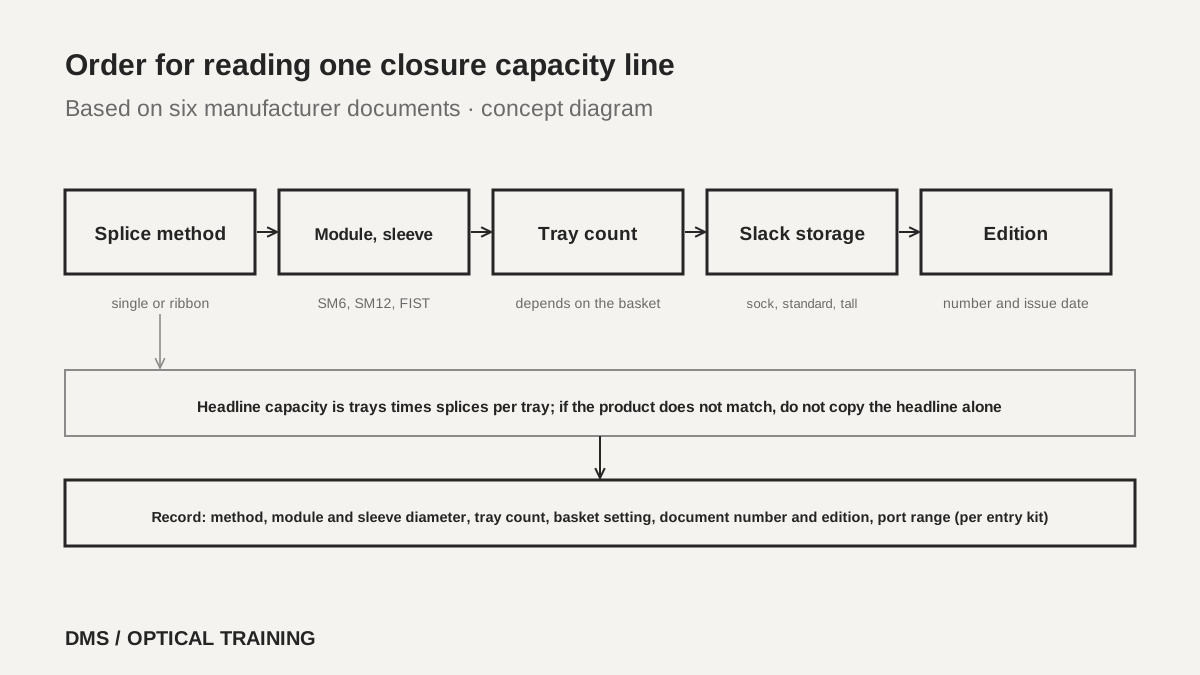 Order for reading one closure capacity lineView original
-
The headline capacity is the tray count times the splices per tray
-
Changing the module type changes the capacity of the same closure
-
SM12 and FIST carry a footnote saying SMOUV splice protection sleeves should be used
The CommScope tray table has one more footnote worth noting. When mass fusion splicing is done on the single-fiber trays, the ribbon slack must be stored on a separate tray or in a slack basket. A mass-fusion figure in the table therefore does not mean the number can be used without slack storage. When you read a capacity, first separate single-fiber from ribbon, and for ribbon, flat matrix from rollable.
How does the slack storage setting change tray count and capacity?
The Corning Evolv FRECAP closure sheet (CRR-2026, March 2026) divides the slack basket position into three settings and tabulates the trays allowed at each. The lowest setting gives standard slack storage with eight thin trays or four deep trays, the middle setting gives expanded storage with seven or three, and the highest setting gives maximum storage with six or three. The sheet also splits capacity into Typical and Max. For the Medium size, single splices are 288 typical and 768 max, and rollable ribbon is 1728 typical and 2304 max.
Multiplying by hand, DMS found that these figures follow from tray count and splices per tray. A thin tray is listed with 48 single splices (3.0 mm sleeves) or 96 (2.4 mm sleeves), and typical 288 equals six trays at 48, while max 768 equals eight trays at 96. Rollable ribbon is listed at 288 per tray, so six trays give 1728 and eight give 2304. The sheet does not say which slack setting the typical value corresponds to, and its tray table does not name a closure size, so this mapping is a DMS interpretation. The tray counts for the Large size were not in the table.
Scroll horizontally to view a wide table.
| Basket setting | Thin trays | Single, 48 per tray (3.0 mm sleeves) | Single, 96 per tray (2.4 mm sleeves) |
|---|---|---|---|
| 1 (standard slack storage) | 8 | 384 | 768 |
| 2 (expanded slack storage) | 7 | 336 | 672 |
| 3 (maximum slack storage) | 6 | 288 | 576 |
 Capacity comparison by tray countView original
-
The single-fiber columns are a DMS calculation of tray count times the sheet's splices per tray
-
A different sleeve diameter doubles the splices one tray can take
-
The table shows the trade-off: more slack storage means fewer trays
What if the same product name carries different figures in different editions?
Two FOSC 450 documents were read. One is the Tyco Electronics specification sheet (document number F421.07/07, copyright 2006 and 2007) and the other is the CommScope ordering guide, sixth edition. The closure size names are the same, but the figures differ. The 2007 sheet lists ribbon splicing at 288 for B6, 864 for C6 and 1152 for D6 (864 with the ribbon tray), while the sixth-edition chart lists flat matrix ribbon at 432 for B6, 864 for C6 and 1728 for D6, and rollable ribbon at 3456 for D6. Single-fiber capacity of C6 also grew from 192 in 2007 to 288 in the sixth edition, counting FIST modules.
The 2007 footnote explains that the listed capacity is the maximum number of trays and splices that can initially be stored if no slack storage baskets are used. The sixth edition says only that capacity may vary with slack storage. Whether the figures changed because of new trays and modules or because of a different way of counting cannot be told from these two documents. Treat a document of a different number or edition as a different basis even when the closure name is the same, and confirm which edition matches the closure in the field from the manufacturer's current document.
Scroll horizontally to view a wide table.
| Size | 2007 sheet: single / ribbon | Sixth edition: single max | Sixth edition: flat matrix / rollable |
|---|---|---|---|
| A4 | 96 / 144 | 96 | 144 / 144 |
| BS | 144 / 288 | 144 | 144 / 144 |
| B6 | 144 / 288 | 144 | 432 / 864 |
| C6 | 192 / 864 | 288 | 864 / 1152 |
| D6 | 768 / 1152 (864 with ribbon tray) | 768 | 1728 / 3456 |
How do you read cable port diameter ranges?
Units and groupings differ by document. CommScope and Tyco give inches, while Corning, Prysmian and FS give millimeters. The CommScope sixth edition lists all six round ports of BS, B6, C6 and D6 as 0.35 to 1 inch (8.9 to 25.4 mm), and splits A4 into two ports of 0.30 to 0.87 inch (7.6 to 22.1 mm) and two of 0.39 to 1.10 inch (9.9 to 27.9 mm). The 2007 sheet adds that trimming the gel fingers can extend the range to 1.07 inch (27.2 mm). That one line is an example of a headline range that depends on how the cable is installed.
Corning gives an overall range of 6 to 28 mm and then a separate range for each entry segment part. The 25 to 28 mm, 18 to 25 mm and 12 to 18 mm segments take one cable per port, the 7 to 14 mm segment takes two cables, and the 5 to 8 mm segment takes four. Prysmian Eagle has four round ports and one oval port, with round ports at 4 to 23 mm, the oval port at 6 to 18.8 mm and a heat-shrink port for large cables up to 30 mm. Putting several cables into one port narrows the range sharply, and on this sheet the four-way kit covers 5 to 7 mm. The headline number of ports and cables describes the case of the thinnest cables.
Scroll horizontally to view a wide table.
| Document | Port layout | Diameter range given | mm conversion or note |
|---|---|---|---|
| CommScope FOSC 450 sixth edition | 6 round ports (4 for A4) | 0.35 to 1 inch; A4 0.30 to 0.87 and 0.39 to 1.10 inch | 8.9 to 25.4 mm |
| Tyco FOSC 450 sheet (2007) | 6 round ports (4 for A4) | 0.35 to 1.0 inch, up to 1.07 inch by trimming gel fingers | up to 27.2 mm |
| Corning Evolv FRECAP (March 2026) | 8 segments, 1 to 4 cables per segment | 6 to 28 mm overall; by segment 5 to 8, 7 to 14, 12 to 18, 18 to 25, 25 to 28 mm | the segment sets the range |
| Prysmian Eagle (ACS-DS-0020 0923) | 4 round and 1 oval | round 4 to 23 mm, oval 6 to 18.8 mm, heat-shrink port up to 30 mm | round-port 2-way 5 to 9, 4-way 5 to 7 mm |
| Precision Optical Technologies (revised March 4, 2024) | up to 6 entries, 1 to 4 cables each | gel seal 0.23 to 0.9 inch | 5.8 to 22.9 mm |
| FS FS-S039-2I4O-36F (no issue date) | 1 oval and 4 branch | both 8 to 18 mm | mechanical seal |
What if figures disagree inside one document?
In the documents reviewed, figures disagreed inside the same document in four places. First, the CommScope sixth-edition introduction of the B Short closure says 144 single fiber and 288 mass splice, but the capacity chart of the same document lists 144 for both flat matrix and rollable ribbon on BS. Second, Corning gives the overall range as starting at 6 mm, yet the four-cable segment is for cables of 5 to 8 mm. Third, Prysmian Eagle lists the oval port as 6 to 18.8 mm, while its oval kit table starts at 5.0 mm, and the four-way port is given as 5 to 7 mm in one place and as kits of 4.0 to 6.0 mm and 7.0 to 8.5 mm in another.
The fourth case is a unit. The FS datasheet gives closure maximum capacity as 144F single fiber and 36F per tray, and then also writes 36F on the line for the maximum number of trays installed. That value is a splice count, not a tray count. Dividing 144 by 36 gives four trays by DMS calculation, but the sheet does not say so. Do not pick which side is right. Record both values as printed and note the confirmation status. This lesson made no outside inquiry, so these items stay unresolved.
What goes into the design record and the drawing?
When selecting a closure, record the product name and document number, the edition or issue date, the splice method (single fiber, flat matrix, rollable), the module and sleeve diameter, the number of trays to install, the slack basket setting, the cable outer diameter against the entry kit range, and the number of cables per port. Do not copy only one headline capacity. Write the tray count and the splices per tray together so the product can be checked. State the unit of every port diameter, and add the millimeter value in brackets for documents given in inches.
Take a hypothetical training case in which two 144-fiber cables are joined by single-fiber fusion splicing. In a Corning closure with 3.0 mm sleeves, three thin trays of 48 are needed, and with 2.4 mm sleeves two trays of 96 are enough. In the FS closure, the full 144F maximum is used, so there is no room to add a 24-fiber branch later. This case is a practice calculation from sheet figures, not a test of a real site or product.
The limits of this material are clear. The documents read were six manufacturer documents. Installation manuals, whether each document is current, and the text of Telcordia GR-771 and IEC 61753 were not read. The IP68 marks in the documents were handled only as manufacturer claims. The real slack that can be stored, the test method behind the capacity figures and whether the documents match the products now on sale were not confirmed.
-
Record the headline capacity with the module, sleeve, tray count and slack basket
-
Identify a document by its number and edition, not by its name
-
Check port ranges against the cable entry kit
Checklist
-
In the closure document you use, did you confirm whether the capacity figure is single fiber or ribbon, and for which module and sleeve diameter?
-
Did you check the headline capacity as tray count times splices per tray, and record the slack basket setting?
-
Did you record the document number and edition (issue date), and avoid mixing figures from documents of other editions under the same product name?
-
Did you compare the cable outer diameter with the range of the entry kit or segment, in matching inches and millimeters?
-
For figures that disagree inside one document, did you record both values as printed and note the confirmation status?
Review questions
1. In a CommScope D6 closure, six FIST-module trays (96 per tray) are fitted on the standard basket. What single-fiber capacity does the calculation give?
Answer and explanation: 96 times 6, which is 576. The chart prints six trays (standard basket) and 96 per tray separately, and the product is a DMS calculation, not a capacity the manufacturer printed.
2. You fusion splice 150 fibers on Corning thin trays with 3.0 mm sleeves. How many trays are needed, and what changes with 2.4 mm sleeves?
Answer and explanation: A 3.0 mm sleeve tray holds 48, so 150 divided by 48 is 3.1, which means 4 trays. A 2.4 mm sleeve tray holds 96, so 2 trays are enough. Even the highest slack setting allows six trays, so both cases are inside the tray limit.
3. You want to put one cable of 21 mm outer diameter into a round port of the Prysmian Eagle. Is the four-way port suitable?
Answer and explanation: No. On the same sheet the four-way port is for 5 to 7 mm cables, and the four-way kits are 4.0 to 6.0 mm and 7.0 to 8.5 mm. A 21 mm cable fits the 20.1 to 23.0 mm range of the single mechanical entry kit, one cable per port.
Sources
-
CommScope: FOSC 450 Gel-Sealed Fiber Optic Splice Closure Product Ordering Guide (sixth edition) · capacity chart on page 4, characteristics chart on page 5, dimensions and tray tables on pages 28 and 29
-
Tyco Electronics: FOSC 450 Fiber Optic Gel Splice Closure specification sheet · document number F421.07/07, copyright 2006 and 2007, selection guide on page 2
-
Corning: Evolv FRECAP Closure CRR-2026-AEN · March 2026, pages 3 to 5
-
Prysmian: Eagle Splice Closure ACS-DS-0020 0923 · pages 1 to 5
-
Precision Optical Technologies: Fiber Optic Splice Closure datasheet · revised March 4, 2024, pages 1 to 3
-
FS: Fiber Optic Splice Closures Datasheet FS-S039-2I4O-36F · no issue date printed, page 2