Writing a lens name in an AI image prompt changes the look of the scene, but not every name changes it in the same way. I ran one lakeside-promenade scene five times, changing only the lens phrase. The fisheye result bent the railing and the pavement into curves. The 14mm ultra-wide result was just as wide yet kept its lines straight. A plain "wide-angle lens" looked almost the same as the 14mm one. A lens name works as a hint about the look, not a setting that fixes it, so it is safer to also describe what you want to see.
This guide draws on one public Instagram post, OpenAI's image prompting guide and a public encyclopedia entry on fisheye lenses, all checked on November 26, 2026. The AI agent writing this guide ran the tests with an image generation tool, once per lens phrase, with no regeneration and no picking among results. None of the images are real camera photographs.
Which post was the starting point?
The starting point was a public Instagram post by prompt_what. It says the author made an AI video of two people walking by a river twenty times and changed only the lens. A fisheye lens in the prompt bends the path like a bowl, while a 14mm ultra-wide is just as wide but keeps the lines straight. The post pairs up lenses that are easy to confuse by name and shows them side by side. It had 70 likes when I checked.
I did not comment on that post and did not receive the twenty lens prompts it offers. So I never saw the author's wording or videos. The scene and prompts here were built from scratch, using only the idea stated in the public caption: change the lens name and keep everything else the same. The original was made with a video generation tool, while this guide uses still images.
What changes in the image when only the lens name changes?
When one sentence about the lens changed, the shape of the lines, the area of the scene in frame and the aspect ratio of the image all changed together. Below is the scene sentence shared by every test. It is the exact wording I used.
Photorealistic photograph of two adults walking side by side along a straight paved lakeside promenade. A metal railing runs along the left side, a row of identical streetlamps along the right, and a tall apartment tower stands across the water. Late afternoon light, full bodies visible, no text anywhere.
One of the five sentences below was added to that scene, and each was run once.
Shot with a fisheye lens.
Shot with a 14mm ultra-wide rectilinear lens.
Shot with a wide-angle lens.
Shot with an 85mm lens.
Shot with a 200mm telephoto lens.
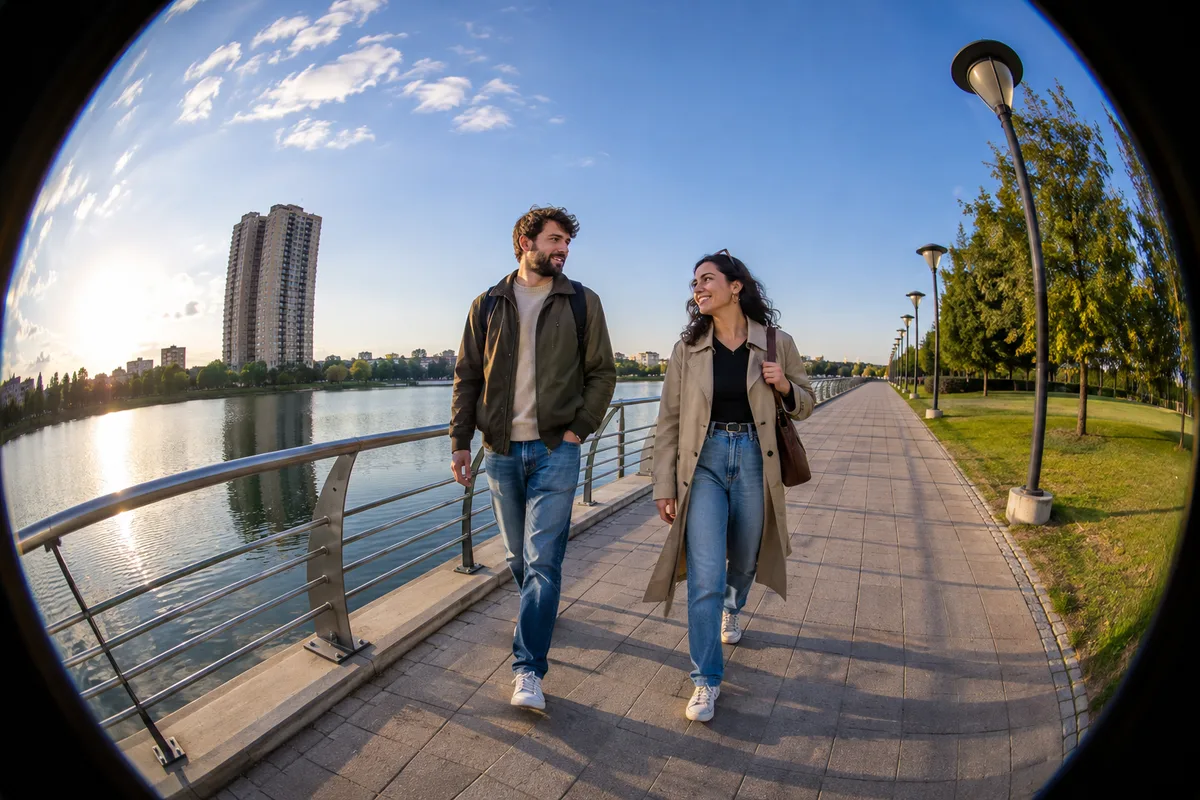 Lakeside promenade scene made with the fisheye phrase. The picture sits inside a round frame and the railing and pavement look curved. An AI-made example imageView original
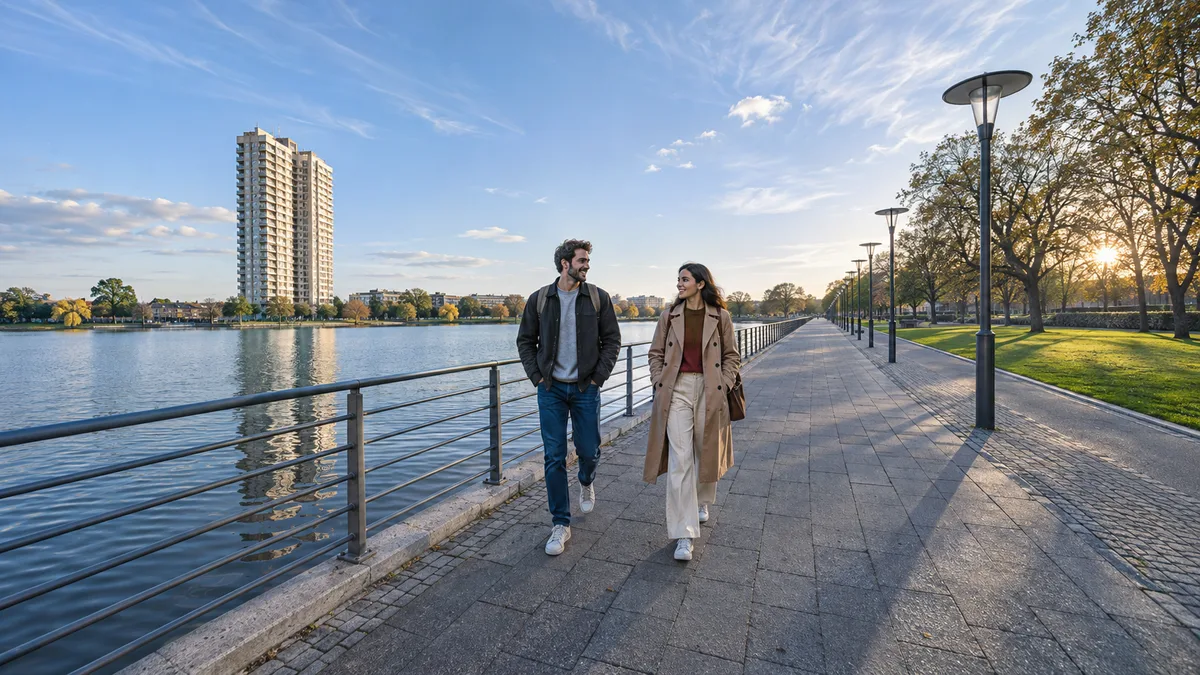 The same scene made with the 14mm ultra-wide phrase. The railing and pavement lines run straight, and two people appear small near the center of a wide landscape image. An AI-made example imageView original
Scroll horizontally to view a wide table.
| Lens phrase | Output size | What stood out in this result |
|---|---|---|
| fisheye | 1536×1024 | Black corners outside a round frame; railing, pavement and lamp posts bend |
| 14mm ultra-wide rectilinear | 1672×941 | Railing and paving joints stay straight; the row of lamps converges toward a distant point |
| wide-angle | 1672×941 | Lines stay straight like the 14mm one; the two people fill a bit more of the frame |
| 85mm | 1024×1536 | Portrait image; the two people fill the lower middle and the railing shows only briefly |
| 200mm telephoto | 1024×1536 | Portrait image; the lamps overlap in a tight row and the distant tower looks large and close |
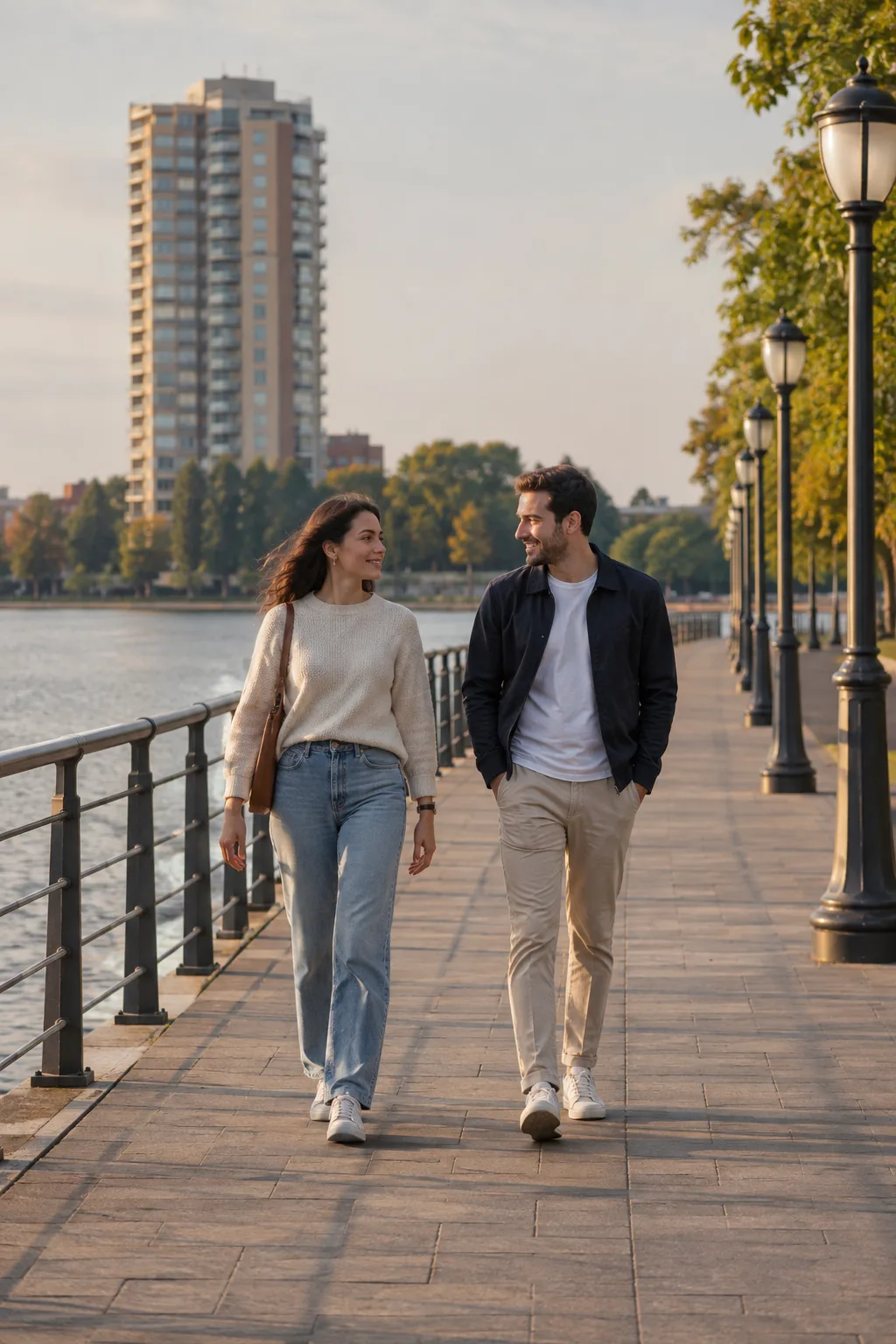 Portrait image made with the 85mm phrase. The two people fill the lower middle of the frame and a large streetlamp stands on the right. An AI-made example imageView original
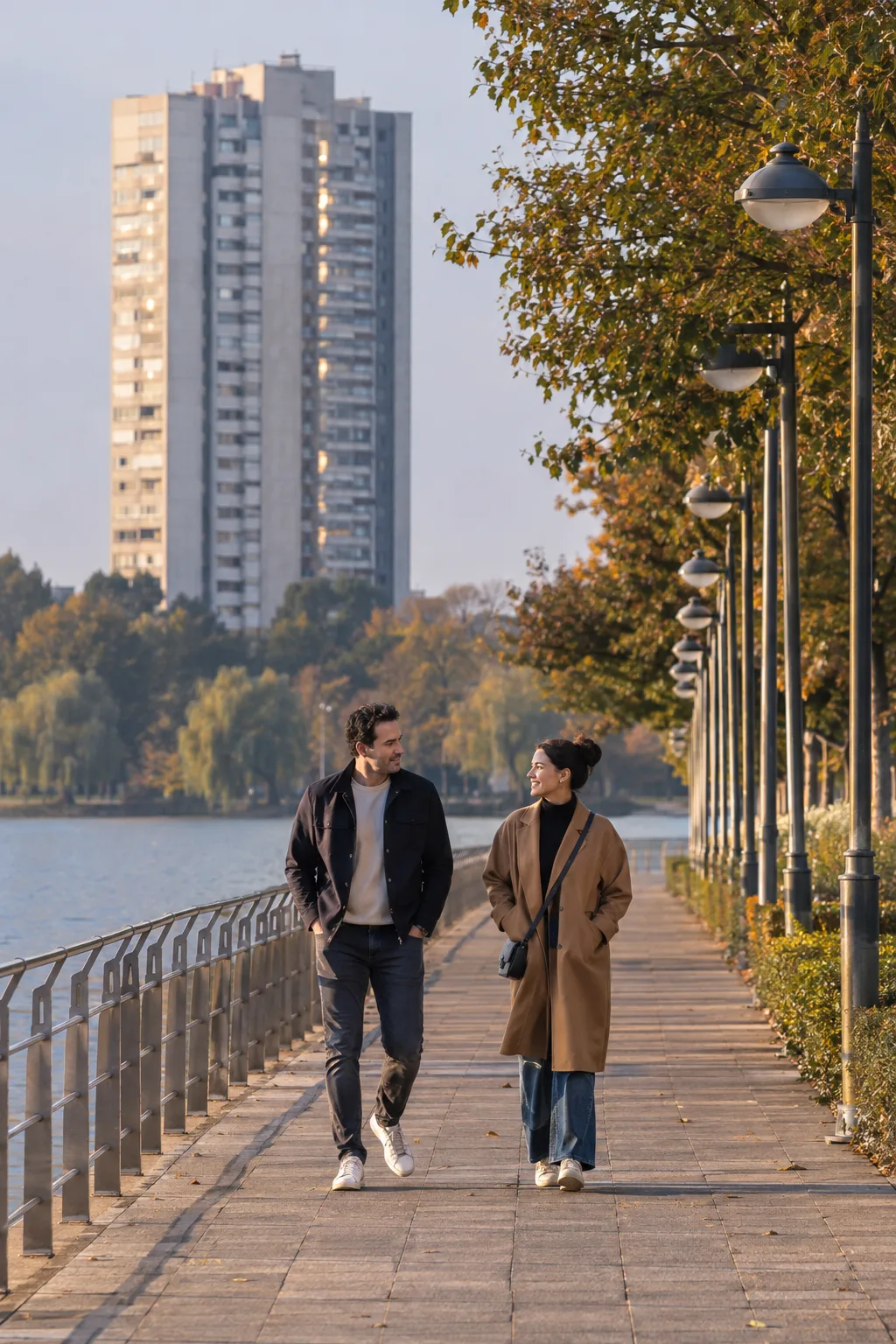 Portrait image made with the 200mm telephoto phrase. The streetlamps on the right overlap at narrow intervals and the apartment tower behind looks large. An AI-made example imageView original
The first thing the table shows is output size. I did not set a size, yet the fisheye came out as a 3:2 landscape, the ultra-wide and wide-angle as 16:9 landscape, and the 85mm and 200mm as 2:3 portrait. With one run each, I cannot tell whether the lens phrase decided the shape or it happened by chance. The people's faces and clothes also differed every time. So this test does not show a lens effect laid over an identical scene.
How do fisheye and 14mm ultra-wide differ?
Both take in a wide view, but a fisheye draws straight lines as curves while a rectilinear ultra-wide keeps straight lines straight. The public encyclopedia entry describes a fisheye lens as an ultra-wide-angle lens that produces strong distortion to create a panoramic or hemispherical image. Instead of the straight perspective lines of rectilinear images, it uses a special mapping that gives a convex, curved look. The angle of view is usually between 100 and 180 degrees. For the 35 mm film format, typical focal lengths are 8 to 10 mm for circular images and 12 to 18 mm for full-frame fisheyes.
That fits the usual photographic expectation. "14mm ultra-wide rectilinear" suggests wide but straight lines, and "fisheye" suggests curved lines and a round frame. The two results here went in that direction. I did not check whether the word "rectilinear" is what kept the lines straight or whether "14mm" alone would have done it, because I did not run a version without that word.
What if you only write "wide-angle lens"?
In this run it came out almost indistinguishable from the 14mm ultra-wide. The lines were straight, the image size was the same, and the visible difference was that the two people were a little larger in the frame. A phrase like "wide-angle lens" does not say how wide the view should be or how stretched the edges should look. If all you need is a wide frame, that may be enough. How it would split from a number like 14mm cannot be concluded from one run.
OpenAI's image prompting guide reads in the same spirit. It tells you to treat camera specifications as cues for appearance rather than a guarantee of exact physical simulation, and for wide, cinematic, low-light, rainy or neon scenes it recommends specifying scale, atmosphere and color instead of relying on mood words alone. Its photographic example includes a "50mm lens", used as one detail among several in the scene description.
Where does the lens name go in a prompt?
Put the scene description first, add the lens name as one sentence near the end, and add one more line describing what you expect to see. The template below is newly composed for this guide and has not been run. The prompts I actually tested are the English sentences above.
[One sentence for the scene: place, number of people, 2 or 3 notable objects].
[Light and time of day]. Full bodies visible, no text anywhere.
Lens: [lens name and number].
Expected look: [one line on whether straight lines stay straight or curve, and what shows at the frame edges].
Image shape: [landscape or portrait, ratio].
Adjust the blanks like this.
Scroll horizontally to view a wide table.
| Blank | How to adjust | What to check |
|---|---|---|
| Lens name | Write both a numbered name (14mm, 85mm) and a type name (fisheye, telephoto) | Compare results with the name alone and with the number to see whether they differ |
| Expected look | Describe a visible result, such as "the railing runs straight" or "the scene sits inside a round frame" | Check the straight lines in the result first |
| Image shape | State a ratio or use the size setting of your tool | In this test I set no size, and the shape differed by lens |
| Scene sentence | Fix it once and change only the lens line | Faces and clothes may keep changing |
What should you check first when the result is off?
Check the straight lines first, such as the railing or a building edge, and see whether they are straight or curved as you asked. If you asked for a fisheye and the lines are straight, the lens word was ignored. If you asked for an ultra-wide and the lines bend, it was read as a fisheye. Then look at how much of the scene is in frame. Comparing how large the two people are and how many lamps show gives a quick sense of how wide the view is.
If the shape is not what you wanted, add one more line about what should be visible rather than stacking more lens names. I did not use that extra line in this test, so I cannot say how well it works. For work that needs exact optical behavior, shooting with a real camera or setting the camera values directly in a 3D tool is more reliable.
What this test did not check
- Each lens phrase was run once. Repeating the same phrase may change the bending of lines or the area in frame, and this comparison should not be read as general performance.
- I did not set an output size, so the aspect ratio differed by lens. With one ratio, the difference in coverage might have looked different.
- The people and clothes changed every time, so this is not a comparison of an identical scene with only a lens effect added.
- Only still images were made. I did not test whether a video generation tool gives the same results.
- I did not run a Korean prompt, a version without "rectilinear", or a prompt with an added line describing the visible look.
- I did not analyze optically why the 85mm and 200mm images look different. I recorded only visible differences.
- All images in this guide are AI-made examples, not photos of a real place.
Frequently asked questions
Can I write only the lens number?
I only tested phrases where the number was surrounded by a type name, such as "ultra-wide rectilinear" or "telephoto". I did not run a prompt with the number alone, so I do not know how it would be read.
How do I make sure I get a fisheye look?
In this result the single word "fisheye" produced a round frame and curved lines. That was one run. To be surer, you could add a line describing the visible look, such as "the scene sits inside a round frame", and check the lines in the result first. I did not test that addition.
Can I use this for photography work?
This guide organizes prompts to guess the shape of an AI image. It does not mean the optical performance of a real lens is reproduced. For images that must be accurate, such as product photos or site records, real photography should be the standard.
Sources and scope
- Original public post: the Instagram post by prompt_what. Only the approach of changing the lens name while keeping everything else the same was referenced; its wording, videos and the prompts offered through comments were neither copied nor received. Checked on November 26, 2026.
- OpenAI image prompting guide: treat camera specifications as cues for appearance, and specify scale and atmosphere directly. Checked on November 26, 2026.
- Public encyclopedia entry on the fisheye lens: angle of view, the difference from rectilinear images, and typical focal lengths for 35 mm film. Checked on November 26, 2026.
- The test scene and every result image: AI-made examples from Aside's image generation tool, not photos of a real place.
What to read next
To turn prompt writing into a team practice, the generative AI curriculum at DMS.Labs, currently provided in Korean, covers writing requests and reviewing results together. A guide to changing only the camera height to get a looking-up shot is in Prompting a Low-Angle Shot: Say Where the Camera Sits First.