When you turn a travel photo into a single travel-journal page, a request that splits the page into a photo slot, a drawing slot and a margin slot is easier to predict than "make it look pretty." I ran both requests once on the same photo. The one-line request filled the photo with flowers, lanterns and a table. The slot-based request mostly kept the layout and the exclusions, but it did not keep the photo slot unchanged, even though I asked it to.
This guide draws on one public Instagram post and OpenAI's image prompting guide, both checked on November 2, 2026. The test photo is a harbor-town scene that the AI agent writing this guide made with an image generation tool, not a real trip photo. Each request was sent once, with no regeneration and no picking among results.
Which post was the starting point?
The starting point was a public Instagram post by solrr.aa. It shows a travel photo next to a version of it decorated as a drawn journal page, and says the prompt is sent to people who leave a particular word in the comments. It had 55 likes when I checked.
I did not leave that comment and did not receive the prompt. So I never saw the author's wording. The prompt and examples here were built from scratch, using only what is visible on the public post: a photo and a hand-drawn illustration share one page. Neither the author's output nor wording was copied.
What happens if you only say "make it pretty"?
The photo stays recognizable, but the model decides what to add, so objects that were not in the scene start to appear. The request I used was a single line.
Decorate this travel photo so it looks pretty.
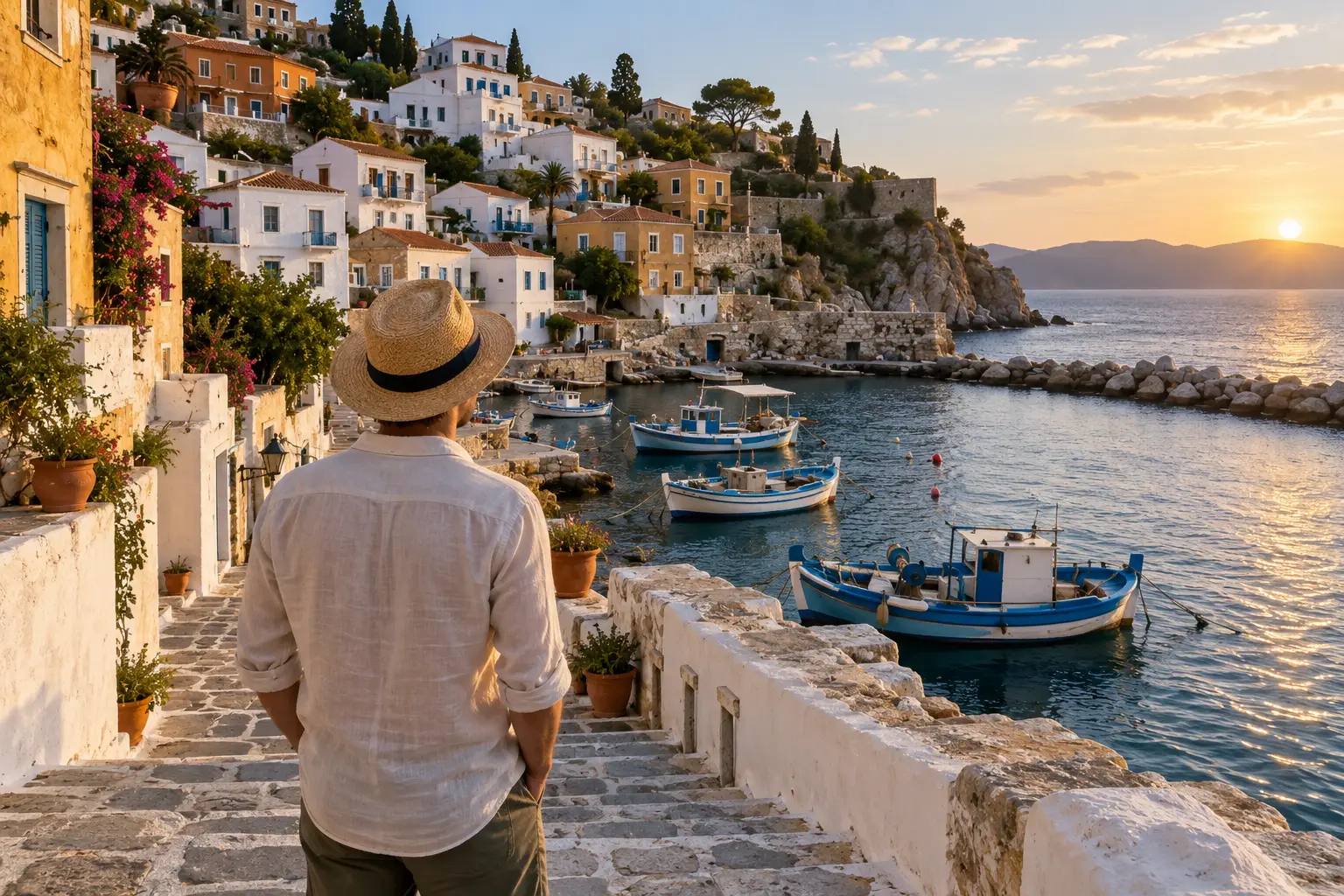 An AI-made example photo of a traveler seen from behind in a straw hat, standing on stone stairs above a harbor town at sunset. The reference photo for the testView original
That is the reference photo. Below is the result of sending only the line above with that photo.
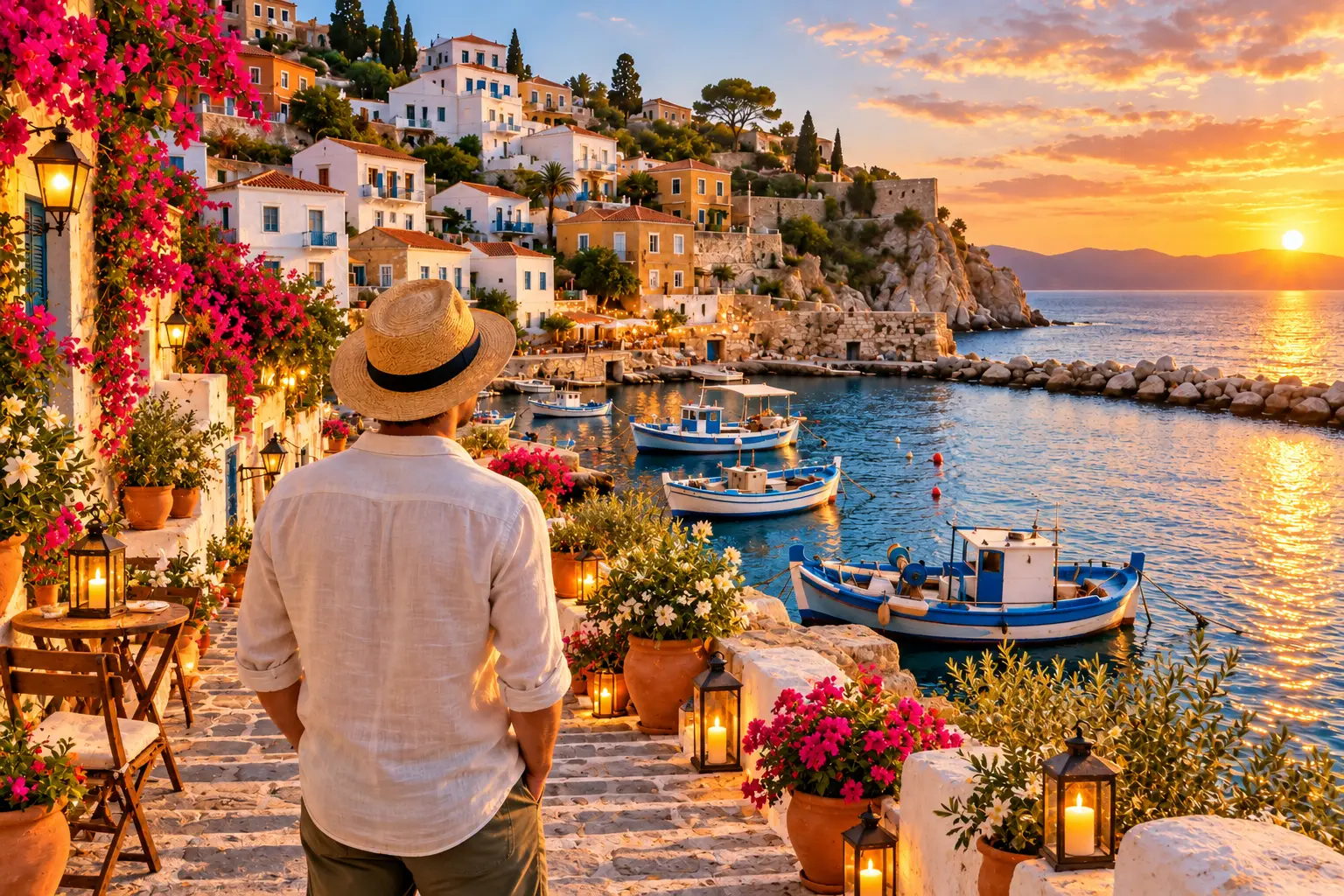 The reference photo with a large pink flowering vine, several lanterns, a round table and a chair added, and a deeper orange sky. The result of the one-line requestView original
The composition, the traveler, and the positions of the harbor and boats stayed nearly the same. What changed was the added objects. A pink flowering vine grew large on the left, several lanterns appeared along the stairs and wall, and a table and chair appeared at the lower left. The sky also turned a much deeper orange and pink. It looks as if the model read "decorate" as "add decorations." If that is not what you want, nothing in the one-line request told it not to.
What changes when you ask for slots?
The layout and the exclusions mostly held, but keeping the photo slot unchanged did not. I sent the request below once with the same photo. It is the exact prompt used.
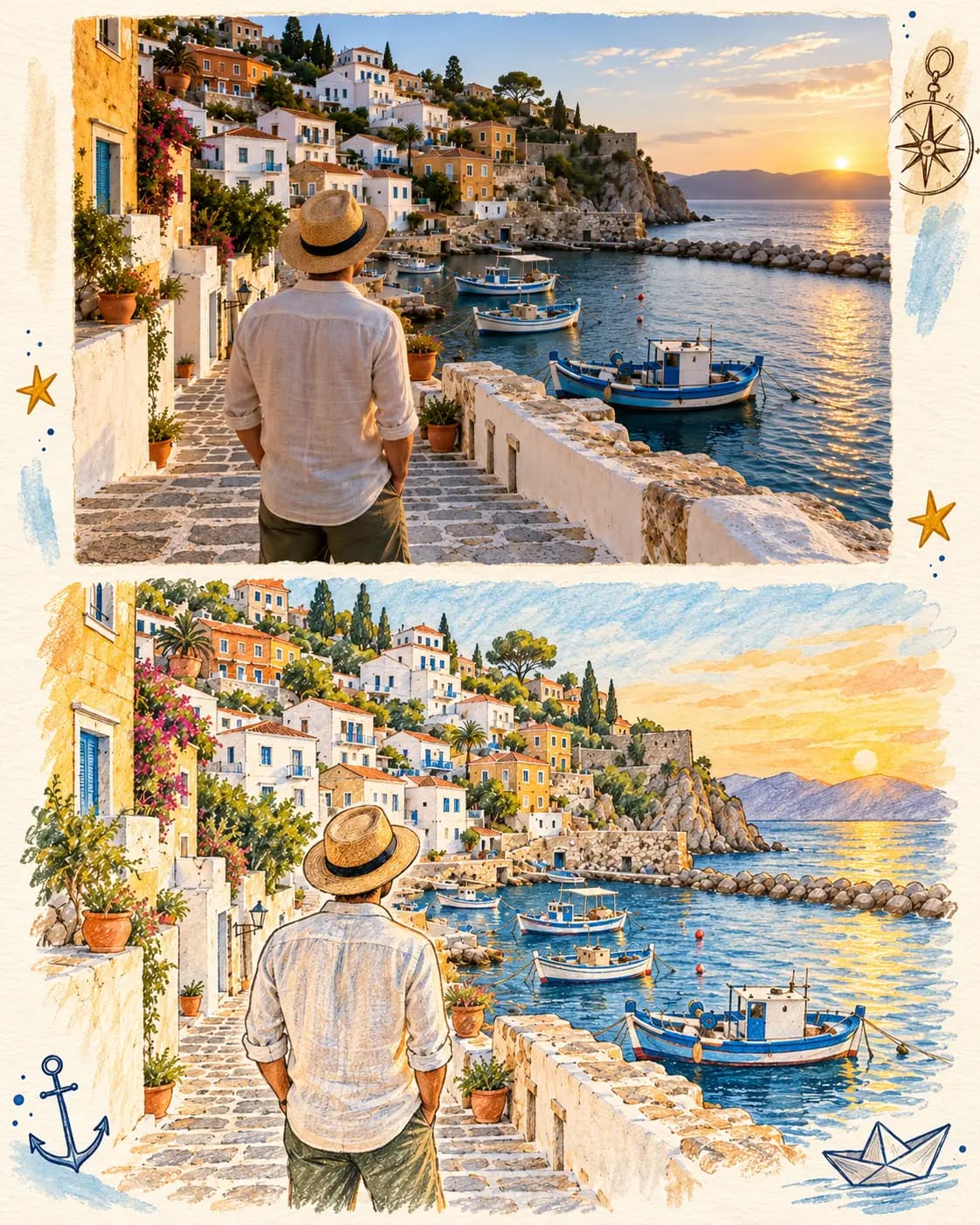
Turn this travel photo into one illustrated travel-journal page, vertical 4:5 paper layout. Slot 1 (top 55%): the original photo, kept unchanged, with a thin cream paper border. Slot 2 (bottom 45%): a hand-drawn colored-pencil and watercolor illustration of the same scene from the photo: the hillside houses, the stone staircase, the blue fishing boats, and the traveler seen from behind in a straw hat. Slot 3 (margins): a few small doodles only, such as a compass, two stars, a small anchor and a paper boat, kept away from the photo. Palette: warm cream paper, ochre, soft blue and terracotta. Do not add any letters, words or numbers anywhere. Do not add new people, flowers or lanterns to the photo.
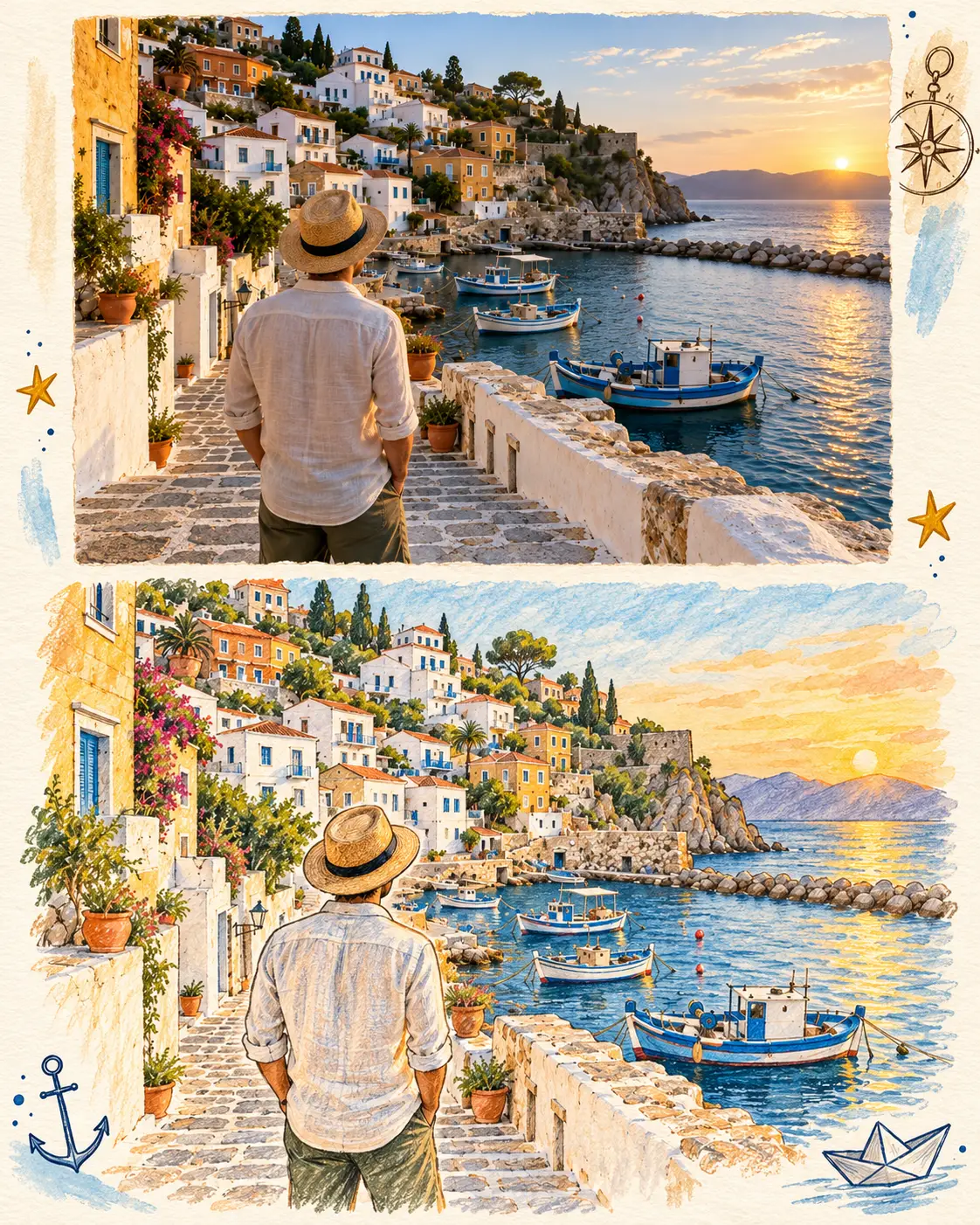 A cream paper journal page with the harbor photo on top, a colored-pencil and watercolor drawing of the same scene below, and small compass, star, anchor and paper boat doodles in the margins. The result of the slot-based requestView original
Scroll horizontally to view a wide table.
| What I checked | One-line request | Slot-based request |
|---|---|---|
| Output size | 1536×1024, same as the source | 1122×1402, one vertical 4:5 page |
| Objects added | Flowering vine, several lanterns, table and chair | The requested two stars, anchor, paper boat, compass, plus blue brush strokes |
| Drawing slot | None | Lower part redraws the same scene in a colored-pencil and watercolor look |
| Letters or numbers | None visible | None visible |
| New people | None | None |
| Photo slot share | Not applicable | About 45% of page height; I asked for 55% |
| Photo slot kept unchanged | Not applicable | No |
I also measured how far the photo slot moved. I shrank the source and each result to the same size and computed the mean absolute pixel difference on a 0 to 255 scale: 34.2 for the one-line result and 31.5 for the photo slot of the slot-based result. The two numbers are similarly large because the photo slot itself was recomposed: the traveler is larger, the town and boats sit in different places, and the colors changed. This is not a rigorous similarity metric. It only confirms that the slot is not the original. The slots kept the large frame of one photo, one drawing and margin doodles, but not the contents of the photo.
OpenAI's prompting guide points to the same limit. For edits, it says to separate what should change from what must stay the same. It also says that if a region must remain pixel-identical, you should composite the approved edit into the original image instead of relying on prompting alone.
How do you build a slot-based prompt?
Write it like a blueprint of one sheet of paper divided into slots. The structure below is new for this guide. The template is an example that I did not run.
Turn the attached travel photo into one vertical 4:5 travel-journal page.
Slot 1 (top [photo share]%): the attached photo with a thin [border color] paper border.
Slot 2 (bottom [drawing share]%): a hand-drawn [drawing medium] illustration of the same scene, including [2-3 things that are really in the photo].
Slot 3 (margins): only [3-4 doodle types], small, not overlapping the photo.
Palette: [3-4 colors].
Do not add any letters, words or numbers.
Do not add [things not to add, such as new people, flowers or lanterns] to the photo.
Each slot has a different job. Slots 1 and 2 decide which part is the photo and which is the drawing, and slot 3 confines decoration to the margins. The last two lines block the objects that grew in the one-line result, and block text. If text is allowed, spelling and legibility have to be checked separately, so I did not allow any.
How do you adjust each blank?
Scroll horizontally to view a wide table.
| Blank | How to adjust | What to check |
|---|---|---|
| Photo and drawing share | I asked for 55 to 45 and got about 45% for the photo. Treat the ratio as approximate. | Crop afterward if needed |
| Drawing medium | Choose from colored pencil, watercolor, ink line art or crayon | Here I wrote colored pencil and watercolor together and both looks appeared |
| Things to draw | List only 2 or 3 things that are actually in the photo | An item that is not in the photo may be invented in the drawing |
| Doodle types | 3 or 4 small items that fit the scene | Check that no doodle crosses into the photo |
| Things not to add | Copy the objects that grew in the one-line result | Check whether they come back |
What do you check first when the result is off?
Lay the photo slot over the original and check whether the person, the signs and the building shapes changed. If the composition moved, as it did here, a longer prompt is less reliable than placing the original photo in the top slot yourself. In an image editor or a slide tool, paste the original photo as it is and leave only the drawing slot and doodles to the AI.
Next, letters. None appeared in this result, but without a text exclusion a title-like line can show up with wrong spelling. If you need a title, add it yourself instead of asking the AI.
For photos with people, also check whether faces and clothes changed. The person in this test is seen from behind, so I could barely test that. Before uploading a photo of someone else to an outside service, consider whether that person agreed.
What this test did not confirm
- The photo is an AI-made example, not a real trip photo. I did not test noisy, blurry or dark real photos.
- Each request was run once. Repeating the same request can give different results, so the comparison is not evidence of a general performance gap.
- The slot shares came out at about 45 to 50 rather than the requested 55 to 45. I did not run several times and average.
- I did not receive the original prompt, so I did not compare against it and make no claim that it is better or worse than this one.
- Every image in this guide is an AI-made example and not a photo of a real place.
Frequently asked questions
Does a Korean request give the same result?
The test used only the English request, and I did not run a Korean one. The Korean version of the template is the same structure carried over, with no guarantee of the same result.
How do you keep the photo slot unchanged?
Writing "keep it unchanged" in the prompt did not work here. Pasting the original photo yourself and letting the AI make only the drawing slot is the reliable way.
How do you keep the doodles from touching the photo?
The prompt confined them to the margins and said to keep them away from the photo. In the result they mostly stayed in the margins, but the compass came close enough to touch the right corner of the photo slot. If overlap matters, ask for wider margins or crop the result. I did not test either.
Sources and scope
- Original public post: Instagram post by solrr.aa. Only the idea of decorating a travel photo as a page with a hand-drawn illustration was used; no wording or output was copied. Checked November 2, 2026.
- OpenAI GPT Image 2.5 prompting guide: separating what should change from what must stay the same in edits, and compositing regions that must remain pixel-identical. Checked November 2, 2026.
- The test photo and every result image: examples made with Aside's image generation tool, not photos of real places.
What to read next
To turn prompt writing into a team workflow, DMS.Labs' generative AI training covers how to write requests and review results. For asking for light and color separately in an edit of the same kind, see Write the Light, Not Just 'Moody'.