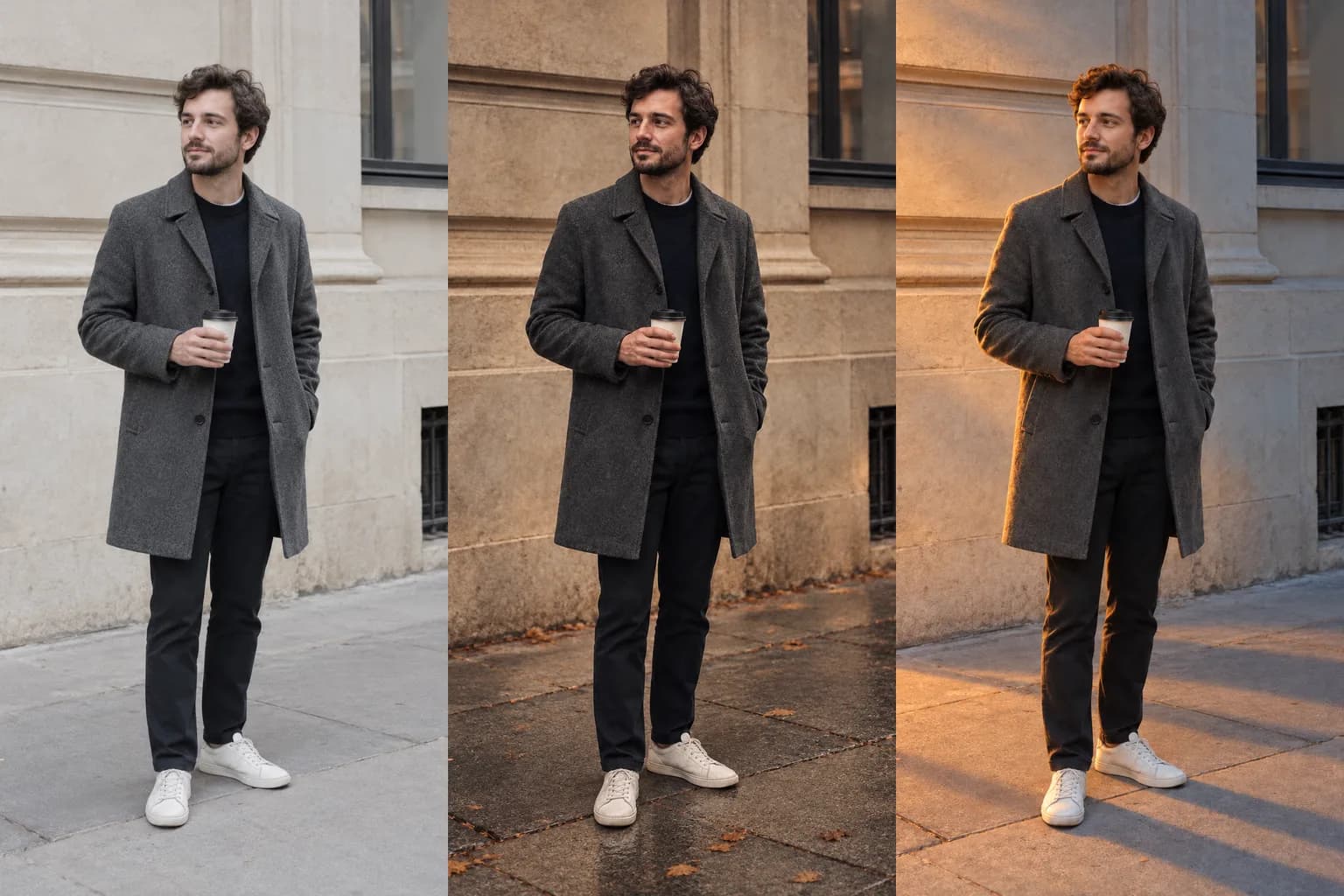
If you ask an image model to make a photo "more atmospheric" and nothing else, the model decides what atmosphere means. When you already have a feeling in mind, it is easier to predict the result if you name the direction and time of the light, two colors, and what must not change. I ran two kinds of request once each on the same photo. This guide reports what changed and what I could not confirm.
It draws on a public Instagram post and OpenAI's image prompting guide, both checked on October 25, 2026. The base photo and both edited versions were made with the image generation tool in Aside. The man in the photo is a fictional, AI-generated person. I ran each request once on the same base photo and did not pick among results or regenerate.
What does the AI decide when you only write "make it moody"?
It can choose the color grade and also add scene elements that were not in the photo. In this test it added wet-looking pavement and fallen leaves.
The starting point was a public Instagram post by heyseno.ai. According to its caption, the author entered only a line asking for a moodier version of a photo and got a sunset image back, so a night look would have needed another request. The caption also lists light and viewpoint words and a closing line to add, and says the word list will be sent by direct message to people who comment with a keyword.
I did not comment and did not see the word list. I did not test viewpoint words here. I took one direction from the caption, which is not to leave the mood to one word and to write the light and colors instead, and I designed the test sentences myself.
OpenAI's image prompting guide points the same way. It asks you to name visible details such as materials, lighting, colors and the visual medium. For wide, cinematic, low-light, rainy or neon scenes, it says to specify scale, atmosphere and color instead of relying on mood words alone. It also says camera specifications are cues for appearance, not a guarantee of exact physical simulation.
What changes when the same photo gets two different requests?
One request produced a dark reddish-brown scene and added things that were not there. The other changed only the light.
I made the base photo with the prompt below, exactly as I used it.
A realistic candid photograph of a fictional young man in his late twenties, gray wool coat, holding a paper coffee cup, standing on a plain city sidewalk in front of a light beige building wall. Midday, flat overcast daylight, eye-level camera, full body visible from head to shoes, neutral colors, no text, no logos, no signs.
I then gave the photo back as the input image and ran each of the two requests below once. They are in Korean, as I used them. The English meaning follows each one.
Request A
이 사진을 분위기 있게 바꿔 주세요.
(Please change this photo to look atmospheric.)
Request B
이 사진에서 빛만 바꿔 주세요. 해 질 녘의 낮고 따뜻한 빛이 왼쪽 옆에서 들어오고, 그림자는 길게 늘어집니다. 전체 색은 호박색과 연한 청회색 두 가지로 잡아 주세요. 얼굴, 옷, 자세, 배경, 바닥은 그대로 두세요.
(Change only the light in this photo. Low, warm sunset light comes in from the left and the shadows stretch long. Keep the overall colors to two: amber and pale blue-gray. Leave the face, clothes, pose, background and floor as they are.)
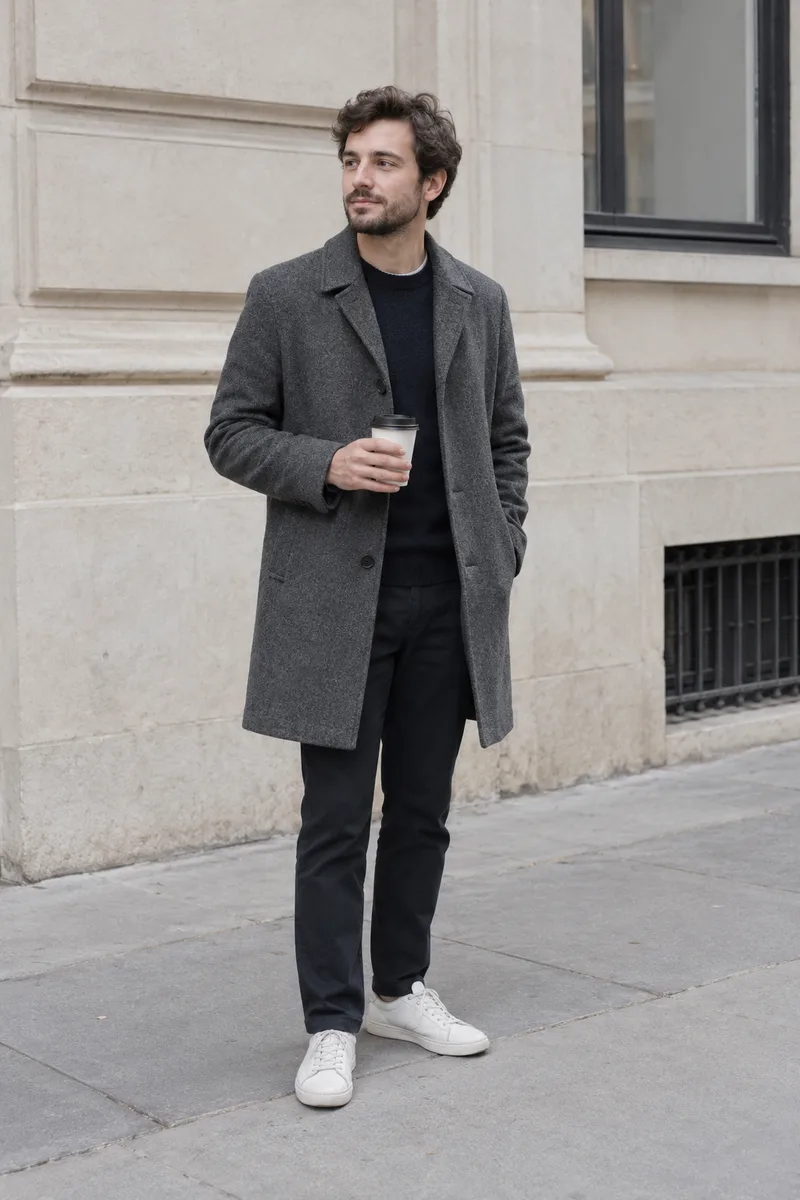 The base photo: a man in a gray coat standing on a gray sidewalk in front of a beige building wall under flat overcast daylightView original
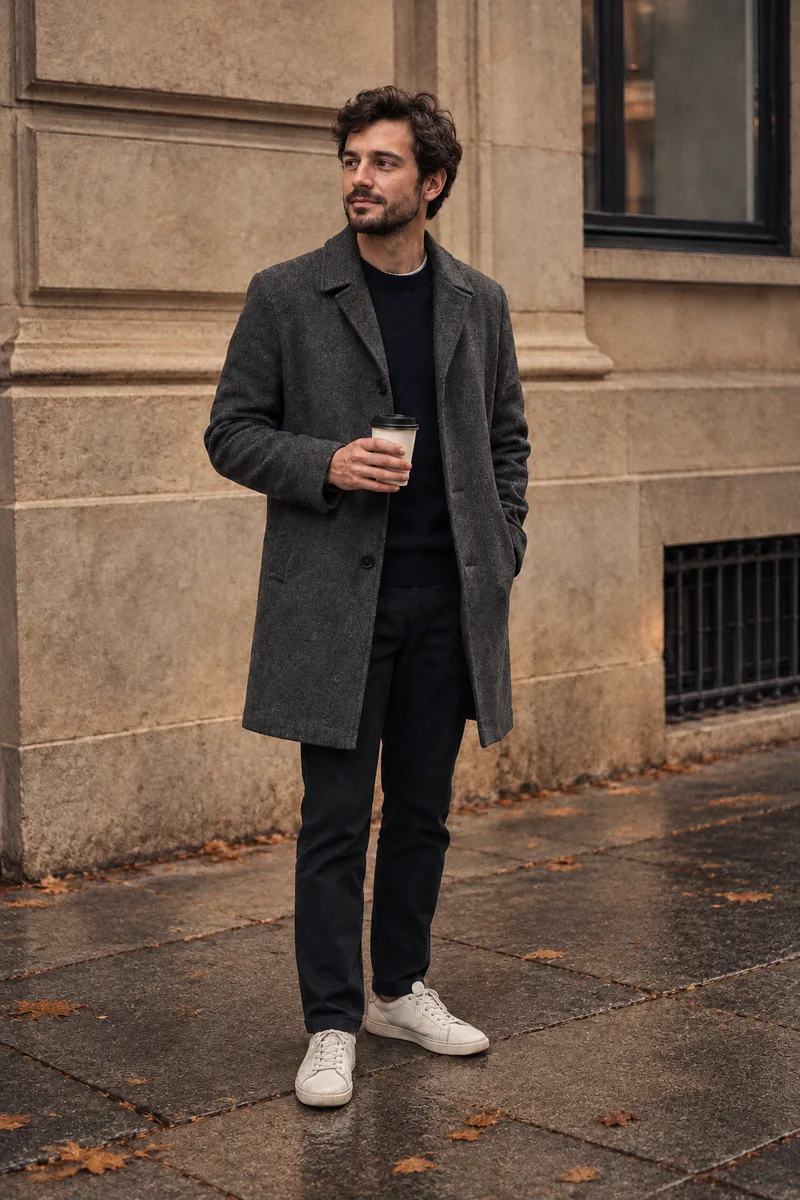 The result of request A: the whole scene is darker and reddish brown, the pavement looks wet and shiny, and fallen leaves are scattered on itView original
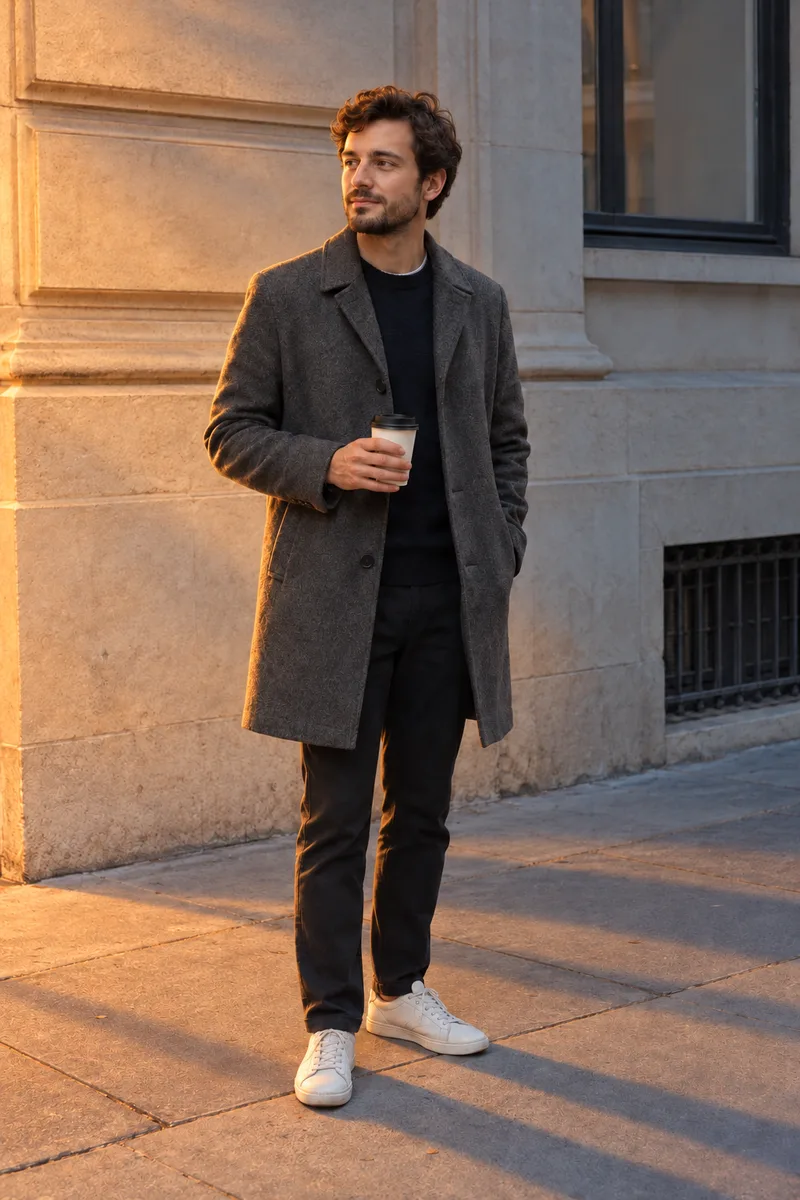 The result of request B: the left wall glows amber, long shadow stripes cross the pavement, and the wall, window and paving joints stay in the same positionsView original
I measured whole-image averages from the generated original files. Brightness is converted to a 0 to 255 scale.
Scroll horizontally to view a wide table.
| Image | Average color (R, G, B) | Average brightness | What I saw |
|---|---|---|---|
| Base photo | 150, 147, 146 | 148 | Flat overcast midday, gray pavement |
| Request A | 109, 88, 73 | 91 | Dark reddish brown, wet-looking shiny pavement, scattered leaves |
| Request B | 131, 106, 90 | 110 | Left wall lit amber, long shadows on the ground, no new objects |
Request A changed more than the color. Leaves and wet-looking ground appeared that were not in the base photo. The model seems to have read "a rainy autumn street" out of the word atmosphere, which I never asked for. The face, coat, cup, pose and the layout of the wall and window looked the same as in the base photo to my eye.
In request B the direction of the light visibly changed. The wall, window, vent grille and paving joints stayed where they were, and no new objects appeared. The average brightness landed between the base photo and request A.
What did this test fail to show?
Each request ran once, and request B bundles several elements, so I could not separate which one did the work.
- I ran each request once. Run request A again and you may get a different mood. I cannot say the leaves and wet ground appear every time.
- Request B combines a light instruction, a color instruction and a keep list. I did not test them separately.
- Request A had no keep list, yet the face looked the same to my eye. This test alone cannot show that a keep sentence protects the face.
- "Leave the floor as it is" in request B was meant to cover the layout of the paving, but changing the light changed the floor's brightness and shadows. Narrowing it to something like "keep the paving joints where they are" seems more precise, but I did not test that.
- The photo does not show what casts the long shadow stripes on the ground. I read them as the result of asking for long shadows.
- Averages cover the whole image and cannot tell local changes apart. I compared the face by eye only, not pixel by pixel.
- I did not compare English and Korean wording, and I did not test viewpoint words such as camera height.
OpenAI's guide says repeated edits can still change details you meant to preserve. If a region must stay pixel-identical, it recommends compositing the approved edit into the original image. For a use like a profile photo, where the face matters, checking by eye may not be enough.
What should the rewritten request look like?
Write one change, the direction and time of the light, two colors, and the list of what stays, one short sentence each.
OpenAI's guide tells you to separate what changes from what stays when you edit. The template below arranges the sentences I tested along that line. It is my own suggestion, and I did not test the template as a whole.
Change only [one thing] in this photo.
[Time of day] light of [strength] comes in from [direction].
Keep the overall colors to two: [color 1] and [color 2].
Leave [keep list] as it is.
Scroll horizontally to view a wide table.
| Slot | How to fill it | What to check |
|---|---|---|
| One thing to change | One of light, season or weather | You did not change two things at once |
| Time and strength of light | Specific: sunset, early morning, overcast | You did not substitute a mood word |
| Direction | One direction: from the left, from behind, from above | There is one direction in the sentence |
| Two colors | Clearly named, such as amber and pale blue-gray | The palette did not grow to three or more |
| Keep list | Visible things: face, clothes, pose, background layout | It does not overlap with what you changed, such as floor brightness |
What should you fix first when the result is wrong?
Pick one item that is off, edit only the sentence for that item, and ask once more.
Scroll horizontally to view a wide table.
| Symptom | Likely cause | Where to fix |
|---|---|---|
| Unwanted objects or weather appear | A mood word is in the request | Remove it and write light and color instead |
| Light comes from the wrong direction | The direction is buried in a longer sentence | Give the direction its own sentence |
| Too many colors | Colors were not named, or three or more were listed | Keep two |
| Face or clothes change | No keep list | Add the keep list at the end and compare again |
| Same sentence, different result | Generation can vary each time | Save the result you like and keep the sentence in a file |
In what order should you try it?
- Write the feeling you want in one word first, for example "lonely."
- Translate that feeling into visible parts: the light (time, direction) and two colors.
- List what must not change in the photo.
- Join the three into sentences, request once, and put the result next to the original.
- Mark what changed and what should not have. Fix only the item that is off and request again.
- If something must stay identical, such as a face, do not stop at checking by eye. Consider compositing onto the original as well.
Choosing the camera position is covered in our low-angle and camera height guide. This guide dealt only with light and color and did not touch the camera position.
Frequently asked questions
Should I never use a mood word?
That is not what the test shows. It looked at what the model chooses when a mood word is the only instruction. It did not test a mood word followed by light and color. OpenAI's guide says not to rely on mood words alone.
If I only add a keep sentence, will the face always stay the same?
I cannot say that. In this test the face looked the same even in request A, which had no keep sentence. One test does not show what a keep sentence does, and OpenAI's guide says repeated edits can change details.
Will camera terms move the viewpoint exactly?
OpenAI's guide treats camera specifications as cues for appearance and does not promise exact physical simulation. The caption of the source post also says the viewpoint moved only a little. I did not test viewpoint words here.
Sources and scope
- Original public post: Instagram post by heyseno.ai. I used only the direction visible in the public caption. I did not see or use the word list offered through comments. Checked on October 25, 2026.
- OpenAI image prompting guide: naming visible details, not relying on mood words alone, the limits of camera specifications, separating changes from constraints, and the limits of repeated edits. Checked on October 25, 2026.
- The images here were made with the prompts above, using the image generation tool in Aside. The base photo and the two edits were each generated once, and the cover places the three side by side. Average color and brightness were measured directly from the generated original PNG files. I did not run repeated comparisons, a test of the keep sentence alone, viewpoint words, English wording, or a pixel-level face comparison.
What to read next
If you want to move prompts from one-off tricks to a team's repeated way of working, DMS.Labs' generative AI curriculum, currently provided in Korean, covers writing requests and reviewing results together. In an edit request, what matters is less choosing an impressive word than deciding in advance what changes and what stays.