To change only a photo's background with AI, define the replacement area, the object to preserve and the openings through which the background is visible. A new wall around a chair is not enough if the old wall remains inside the backrest. Decide separately whether the floor and contact shadow should stay.
This article uses public documentation checked on October 19, 2026, and one original image-editing test. We generated a fictional chair photograph, then supplied that file as the reference for a wall-color change. We did not reuse a music video, edit a real person, run a ComfyUI video workflow or produce a separate alpha file.
What does a single background instruction miss?
The starting point was an Instagram post by ai.trend.kr introducing VINCAN's visual-effects work. Its description discusses making a mask, alpha and background separately before compositing. We took that separation principle into a smaller still-image problem: changing a wall behind a chair. This is not a reconstruction of the creator's video, node graph or prompt package.
A background does not exist only outside an object's outer silhouette. It can also appear below a chair's backrest, inside a handle or between furniture legs. A selection that follows only the outer perimeter can accidentally treat those openings as solid parts of the object. A clean outline is therefore only one part of the check.
The floor introduces another ambiguity. “Replace the background” might mean the wall and floor together, or just the wall. If the floor changes unexpectedly, the feet may no longer sit naturally and the contact shadow may cease to make sense. We limited this test to the wall, with an explicit request to retain the pale wooden floor and shadow.
Are a mask and an alpha channel identical?
A mask can define areas to reveal, conceal or edit. An alpha channel stores transparency information. They can work together, but a finished photograph is not automatically a reusable mask or a transparent cutout. Even a gray checkerboard can be painted into an image rather than represent actual transparency.
Adobe's explanation of alpha channels and masks describes white as fully opaque, black as fully transparent and gray as partially transparent when viewing an alpha channel. That is the convention in the stated compositing context. Do not assume that a white region in every tool's editing mask means the same thing. Inspect the preview and the documentation for the particular operation.
Generative editing also differs from compositing existing pixels. It may redraw details as part of the edit. OpenAI's ChatGPT Images guide warns that selections are not always precise and edits may extend beyond the highlighted area. Asking for an unchanged chair is not a technical lock on every chair pixel.
Scroll horizontally to view a wide table.
| Component | Requirement in this test | Inspection target |
|---|---|---|
| Object | Keep the ivory folding chair | Outline, legs, backrest and seat |
| Replacement | Change the sage wall to terracotta | Wall around and inside openings |
| Retained setting | Keep the wooden floor and contact shadow | Plank lines, feet and shadow direction |
| Deliverable | One finished photograph | No separate mask or alpha output |
What did the input contain?
The input was not a product photograph or a client asset. We generated an ivory wooden folding chair with a woven cane seat, a muted sage plaster wall and a pale wooden floor. No person or lettering was included. The large opening below the backrest and the spaces between the legs make it possible to inspect background continuity.
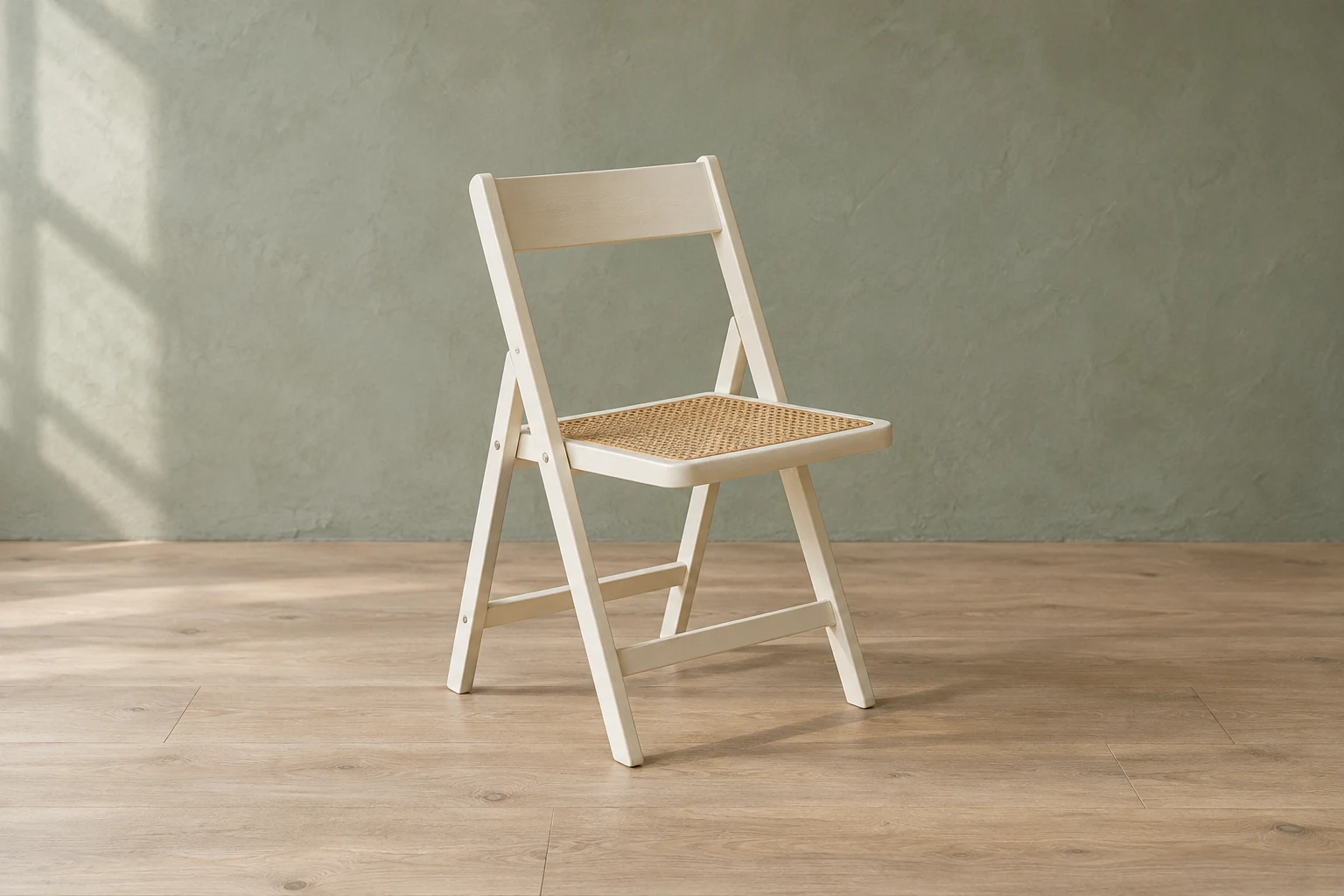 Original synthetic input showing an ivory folding chair against a sage wall and wooden floorView original
Before editing, inspect what must remain. A cropped foot or a dark, unreadable joint makes it harder to tell whether the result lost a detail or whether that detail was never visible. Here the entire chair and its contact with the floor are in frame. For a real product, any identifying screw, seam or material pattern would also need to be readable in the source.
Our earlier sketch-position guide assigned different roles to a visual reference and written instructions. This test does not redesign the placement. It separates the permitted change from the areas to preserve in an existing photograph. Supplying an image is useful, but it does not replace describing which parts matter.
What did the actual edit show?
We supplied the input above and asked for a warm terracotta plaster wall. The request specified that the new wall should appear through openings that reveal the wall, while openings that reveal the floor should continue to show the floor. We passed no separate selection or grayscale mask. The test used an image reference and a text instruction only.
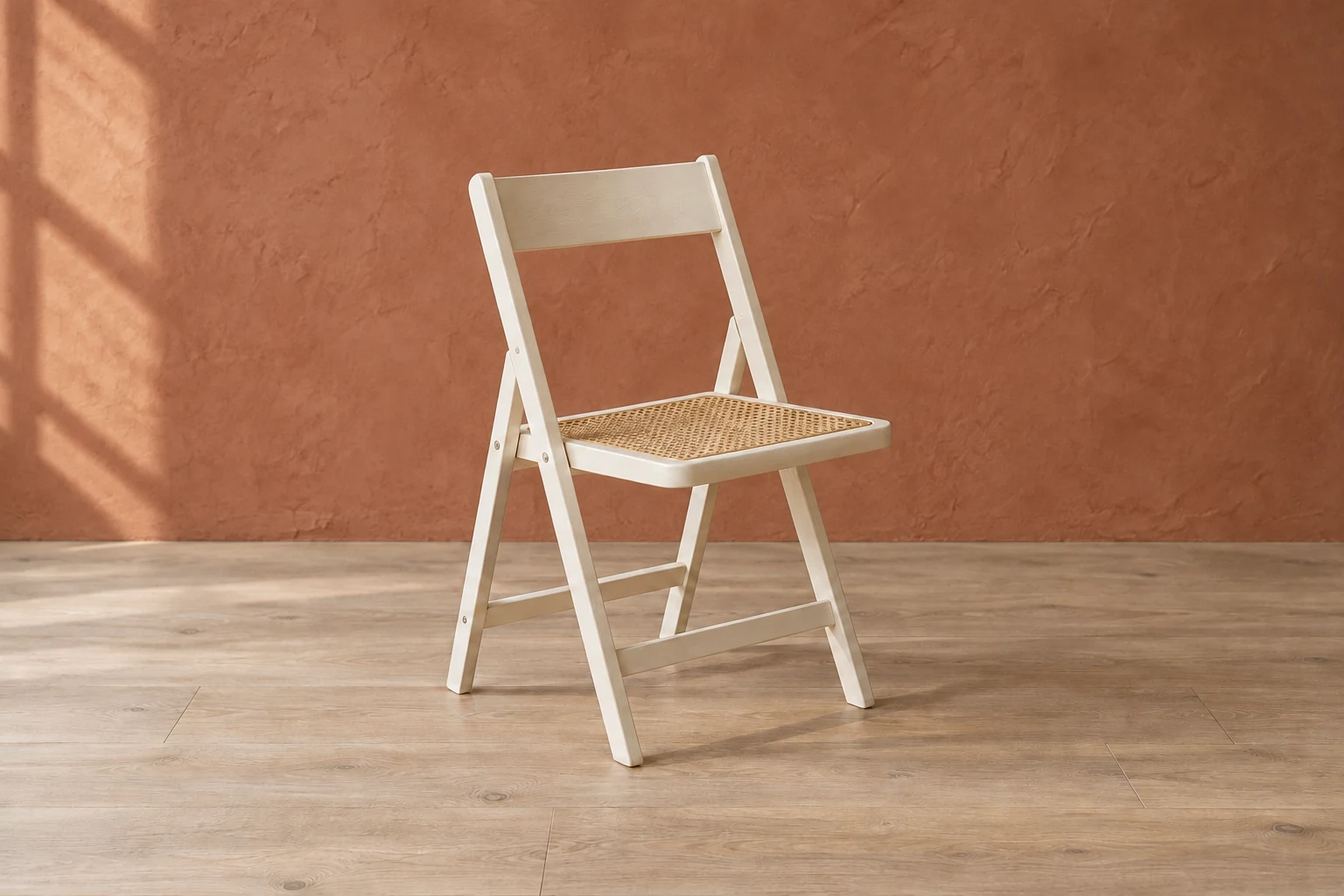 Actual generated edit with a terracotta wall visible both around the chair and below its backrestView original
The result changed the wall color, including the large opening below the backrest. The overall chair composition, leg arrangement, woven seat and main floor lines remained visually recognizable. The lower spaces between the legs continued to show the floor rather than being filled with wall color. The relevant distinction was what each opening revealed, not merely whether it sat inside the object's perimeter.
This was a visual comparison of shape and color, not proof of pixel identity. We did not certify that tiny textures, brightness or color values were unchanged. The result is a new image. A similar appearance does not qualify it as an exact replacement for a factual product photograph, nor does it establish that original pixels were preserved by layer compositing.
The following is the actual instruction used for the reference edit. It is preserved as submitted, with the chair input attached.
Edit the attached original synthetic chair photograph. Change only the sage plaster WALL to a muted warm terracotta plaster wall. The new wall must also be visible through the open rectangle below the backrest and through the gaps between the chair legs wherever those openings reveal the wall, not the floor. Preserve the chair silhouette, its ivory paint, woven cane seat pattern, screws, angle and size. Keep the pale oak FLOOR and its plank layout, the contact shadow, camera viewpoint, framing and soft left-hand light unchanged. Do not add or remove objects. Do not make the chair terracotta. No text, labels, logos or borders. Return a single natural editorial photograph.
How should you adapt the request?
Replace the word “background” with a visible region whenever possible. Name the wall if you mean the wall. For a sky replacement, decide whether the sky visible between branches and buildings is included. Glass reflections and the branches themselves may need different treatment. Grouping all ambiguous areas under one word can change information that should stay.
The following is an original, unexecuted planning template for other images. Fill the bracketed fields after inspecting your photograph. It is not a hidden product command or a redistributed creator template, and the results above were not generated with this shorter version.
In the attached photograph, change only [region] to [new appearance].
Preserve [object], including its shape, position, size and [identifying details].
Show the new appearance through internal openings that reveal [region].
Do not replace [floor / glass / shadow / other retained areas].
Do not invent hidden details or add objects.
I will compare the result with the original before using it.
Start with one change, such as wall color or wall material. Changing camera distance, chair angle, lighting and wall color together makes it difficult to identify what caused an unwanted difference. Even a restricted request can alter small details, so the output still needs inspection. A narrow prompt improves the definition of the task; it is not evidence that the task succeeded.
Keep the distinction between a planning conversation and an edit. If the model describes an excellent mask but supplies no mask file, the description is not the file. If it says the chair is unchanged, compare the chair rather than taking that sentence as verification. The same applies to promises of a transparent export.
What should you inspect after the gaps?
Treat the outer boundary, internal openings and ground contact as separate inspection targets. Look for a strip of the old background along an edge, a closed opening or a shadow that ends abruptly. A full-frame view can look plausible while a closer view reveals thickened edges or legs that have merged.
Glass and hair are harder inputs than this opaque chair. Glass can contain reflections and refraction as well as a view of the background. Fine hair edges are not adequately described by only fully transparent and fully opaque states. This single chair example does not validate either case, and it offers no general success rate for complex cutouts.
If you need an alpha-enabled deliverable, request and inspect it separately. Place the received file over contrasting backgrounds in an editor and examine the transparent regions and edges. A response saying “transparent” is not enough. Our result includes a wall and is not offered as a transparent PNG. A PNG filename alone does not establish that useful transparency is present.
Video adds a time dimension. A convincing frame does not show whether a moving arm or fine edge will remain stable throughout a clip. Flickering gaps and inconsistent boundaries require motion review. That is why this still-image experiment is not described as a reproduction of the source video's workflow. Our cinemagraph guide discusses a different, code-based compositing exercise and its own verification limits.
Keep the source and edited file under separate names. Before sharing, open the exact file you intend to attach rather than relying on an earlier preview. If several revisions exist, record which input produced each result. Otherwise, a boundary you carefully checked may not be the boundary in the file someone receives.
Rights remain a separate requirement. Being able to view a photograph or music video online does not automatically permit uploading it to another service or publishing a modified version. This test used only newly generated fictional material. For real people, products or client assets, establish the allowed use before editing and sharing.
Where to go next
DMS.Labs' generative AI curriculum, currently provided in Korean, covers the broader connection between planning, production and verification. A background edit is a small exercise in both request design and output review. A pleasing image and a faithful preservation of source information are different things to check.