
Suppose you ask for a giant yellow umbrella in a rainy plaza. An umbrella can fill the frame yet look like an ordinary one photographed up close. Or it can dwarf the people while appearing to float above the paving. Before adding another word for size, check what the image gives viewers to compare.
Size does not travel in a single word. The eye does not read how big an object is; it reads how big it is next to something else. So the prompt should describe relationships instead of size. This guide turns the reference object, ground, overlap, shadow and camera into plain instructions. No special commands are involved.
Scope of this guide
Creator Jessica (@aistudio.jessica) posted a reel on September 22, 2026, and public comments under it list short labels for compositions that place a giant subject and a small one in one frame. This guide does not reproduce that list. The templates and scene prompts below are independently written examples inspired by that idea.
OpenAI's image prompting guide tells writers to be specific about the relative size of subjects, framing and interaction. It also says to separate what to change from what to preserve when editing, to change one element at a time, and that special syntax is not required. It cautions that camera specifications are appearance cues rather than a guarantee of exact physical simulation. The method below applies those points to giant-object scenes.
Can you write size as a number?
You may want to write "the umbrella is ten metres tall." A number can work as a composition request. It should not be taken as something the model calculates and draws to scale. If you use phrases like "ten times" or "three times," treat them as requests for a certain look. We did not measure real ratios in any output, and you should not read them that way. A number is useful for direction rather than accuracy: "about ten times a person's height" conveys a rough step where "much taller than a person" does not.
Describe the spatial relationships
Settle these before you write anything.
- Reference object: an ordinary thing whose size everyone knows, such as an adult, a bicycle or a lamp post.
- Same ground: the giant object and the reference stand on the same surface.
- Overlap: one partly hides the other, which makes the depth order readable.
- Contact shadow: a shadow consistent with the lighting where the object meets the ground.
- Camera: a chosen viewpoint to preserve during edits.
The reference must be ordinary
If the reference is unfamiliar, the comparison fails. Use something with a widely known size: an adult of normal height, a normal bicycle. When you include a person, write "anonymous adult," and if the face does not matter, a back view or greater distance is safer. Put the reference right next to the giant object. If it is far away, the eye does not read the two as sharing a space.
Put both on the same ground
One fault to check is a giant object that appears to hover. To prevent it, say directly that both stand on the same paving and share the same horizon. Naming the surface helps: wet stone paving, grey pavers, a brick courtyard. A textured ground gives the object somewhere to sit.
Use overlap to create depth
If the giant object hides part of the background, or the reference hides part of the object's front edge, the front-to-back order appears. Write it out: "the giant canopy partly overlaps the lamp post behind it," or "the person stands in front of the teapot's edge and covers part of it." The point is to decide in words which one is in front.
The contact shadow gives weight
A small dark shadow where the object touches the ground makes it feel placed rather than pasted. In sunlit scenes, make it fall in the same direction as the person's shadow. On a rainy day you can add wet paving and small puddles around the contact point. If the object seems detached from the scene, check its contact point before adding more detail to the ground.
Choose the camera once and keep it
Decide whether the camera is at eye level or tilted up, and repeat "keep the camera angle unchanged" in every correction. If the camera shifts while you adjust the size, the relationships you already fixed fall apart.
A template to copy
The brackets mark what you swap for each scene.
Create a photorealistic photograph of [place, time and weather]. Horizontal 3:2 composition, [eye-level] camera. One giant [object], about [N] times the height of a normal adult, stands on the [ground material] in the middle distance. Next to it stands a normal adult [holding / beside an ordinary reference object], so the viewer has a familiar scale. The object and the person share the same ground plane and the same [light]. The object [overlaps / is overlapped by] [a background element]. Place a soft contact shadow where the object touches the ground, pointing the same way as the person's shadow. Keep [background elements] and the camera angle unchanged. No text, no logo, no duplicated objects, no collage.
Three generated scenes and the prompts used
The first is a giant yellow umbrella in a rainy plaza. This is the actual prompt used to generate the image below. Pedestrians carrying ordinary umbrellas provide the reference. The output added a stone plinth beneath the shaft, making the umbrella read as a plaza installation rather than a handheld object.
Create a photorealistic surreal editorial photograph for a tutorial about believable relative scale. Horizontal 3:2 composition, eye-level camera, one consistent perspective and a single shared ground plane in a normal real-world environment (not a miniature diorama, no tiny city). A gigantic open yellow umbrella stands upright in a rainy stone plaza. The canopy dominates the upper frame; the shaft and round base have believable contact with the wet paving, with reflections and a soft contact shadow. Several anonymous normal-sized adult pedestrians walk in the plaza as size references, some partly overlapping the umbrella's base. Overcast rainy light. Restrained natural film-photographic colour, soft realistic lighting. No text, no lettering, no logo, no watermark, no collage, no duplicated objects. Fictional staged visual, not an actual field photograph.
 Cover scene: a giant yellow umbrella and a reference adult placed on the same ground in a rainy plaza.View original
The second is a large cream ceramic teapot in a sunlit courtyard. An adult and a bicycle share the paved ground and provide familiar references. The output was not measured for an exact size multiple.
Create a photorealistic surreal editorial photograph for a tutorial about believable relative scale. Horizontal 3:2 composition, eye-level camera, one consistent perspective and a single shared ground plane in a normal real-world environment (not a miniature diorama, no tiny city). A giant cream ceramic teapot sits in a sunlit courtyard beside a normal parked bicycle and a normal adult standing next to it. All objects stand on the same ground plane with a clear contact shadow under each, and each is visible enough for size comparison. The teapot is several times taller than the adult, with plain unbranded glaze. Restrained natural film-photographic colour, soft realistic lighting. No text, no lettering, no logo, no watermark, no collage, no duplicated objects. Fictional staged visual, not an actual field photograph.
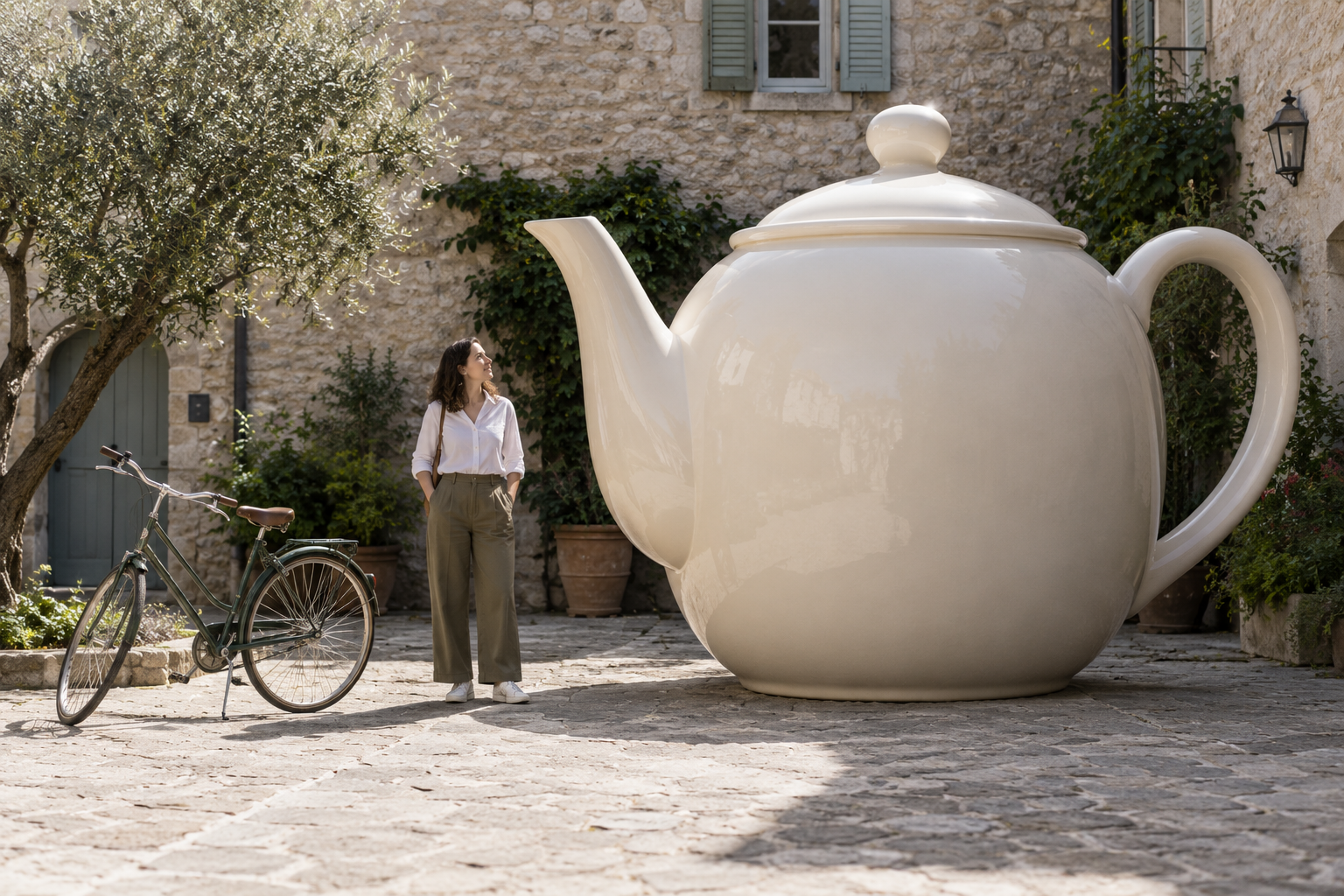 Teapot example: an adult and a bicycle as references, with a contact shadow specified under the teapot's base.View original
The third is a huge green thread spool. A seated adult partly covers its front edge, making the depth order visible. The prompt requests cotton thread, but some of the output texture looks closer to coarse yarn.
Create a photorealistic surreal editorial photograph for a tutorial about believable relative scale. Horizontal 3:2 composition, eye-level camera, one consistent perspective and a single shared ground plane in a normal real-world environment (not a miniature diorama, no tiny city). A huge spool of green cotton thread stands on its flat end in a daylight work courtyard. One normal adult sits on a normal chair in front of it, partly overlapping the spool, with natural contact shadows on the ground for both. The thread wraps show believable cotton texture, and the spool has no printed labels. Restrained natural film-photographic colour, soft realistic lighting. No text, no lettering, no logo, no watermark, no collage, no duplicated objects. Fictional staged visual, not an actual field photograph.
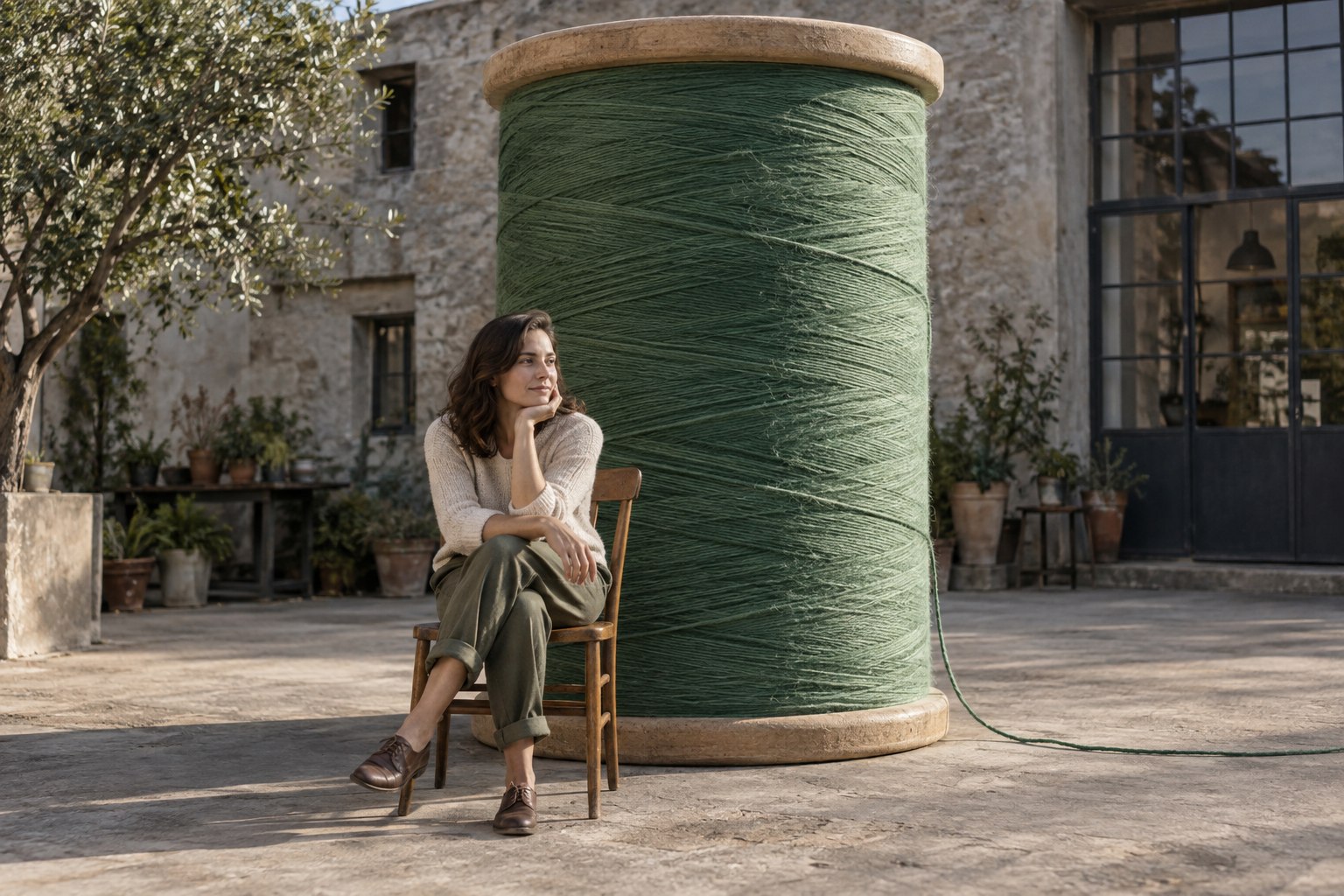 A seated adult partly overlaps the front edge of a giant green thread spool.View original
These are the exact English prompts used for the three images. Each names a scale relationship, familiar references and shared ground and light; overlap and contact details vary with the scene. They are worked examples, not a controlled experiment isolating the effect of individual phrases. Repeating a prompt can change composition, people and fine details.
A step-by-step sequence
Rather than aim for polish at once, check one thing at a time.
- Choose the scene. Write place, time, weather and ground material in one line.
- Choose the giant object and the reference. One ordinary-size reference is enough.
- Write a rough multiple. It signals a step, not an exact value.
- Write the shared ground and light in one sentence.
- Add one overlap and one contact-shadow line.
- State the background and camera angle to keep, then add the ban on text and logos.
After generating, check in the same order. Is the object resting on the ground? Is it on the same surface as the reference? Is the overlap right? Do the shadows agree? If one fails, fix only that.
Correction lines for when it goes wrong
Pointing at one fault works better than rewriting everything.
- The object floats: "Keep the scene, camera angle and lighting. Make the giant object's base rest on the same paving and add a clear, soft contact shadow. Change nothing else."
- The size difference is weak: "Same composition, but make only the giant object one step larger. Leave the person and background as they are."
- The person grew to match the object: "Keep the person at normal adult height. The giant object must be clearly larger than the person."
- Shadow directions disagree: "Make the giant object's shadow fall the same way as the person's shadow."
- The object doubled: "There is one giant object. Remove the duplicate."
- The depth order is muddled: "Have the person stand in front of the object and cover part of its edge."
Always attach what to preserve to a correction. Without a line like "change nothing else," other parts may shift while you fix one.
Know the limits
This method does not guarantee a natural placement. The same prompt can give different results, and complicated structures such as hands and bicycles may lose their shape when drawn beside a giant object. A text prompt alone does not guarantee exact numeric scale. Use this approach for visual concepts, not dimensional drawings or product validation.
When you publish a realistic-looking result, make clear it is a staged image. A giant umbrella is rarely mistaken for a real one, but scenes that include people deserve extra care. Services also change, so the same wording may behave differently later.
Check the size of the final display
A reference that reads clearly at full resolution can disappear on a small social card. If the adult or bicycle becomes a few barely visible pixels, the viewer loses the clue that makes the other object look enormous. Keep the reference and some shared ground visible rather than filling the frame with the unusual object alone.
Check crops too. A horizontal image placed in a portrait card can lose its handle, spout or ground contact. Leave room around the complete scene, or request a portrait composition instead of trimming away the evidence. A good image is not automatically a good fit for every layout.
Try reading the scene without its caption. Can you identify the reference object and understand the intended size relationship? This is a communication check, not a physical measurement. Once the relationship reads clearly, refine colour and texture.
One picture to make today
Pick an everyday object: an umbrella, a teapot, a spool. Put one ordinary reference beside it, then write the shared ground and light, one overlap and one contact-shadow line. When the result arrives, check the ground, then the overlap, then the shadow. If you want the object bigger, do not add more sentences; reread how the object and the reference relate.