If you make short dramas or product videos, you will need the same room in several shots. Describe it fresh each time ("small studio, green sofa, yellow rug") and the window moves, the curtains change material, and the kitchen rearranges itself. The characters stay put while the room keeps changing.
This post covers one way to reduce that drift. Generate a set image that shows the whole space first, then feed it back as a reference and change only the camera. We generated the same room with the reference image and with text alone, and the sentences we actually entered are pasted below as they were.
Where this started, and its limits
yeonsidesign's Instagram post describes a workflow that turns a single image into a 3D drama set and shows it from several camera positions. According to the public caption, the author first makes an isometric background image, converts it to 3D in Blender, picks the compositions they want, and turns them into video. The caption carries a production-support label, and the link to a specific service is sent to people who leave a comment.
We did not use that service or its link, and we skipped the Blender step. The test below borrows one idea from the caption, which is to fix the space first and change only the camera, and rebuilds it with a single image model. This post cannot tell you how the author's tool combination performs.
Why fix the space first
An image model draws each request from scratch. Objects you name usually show up, while everything you leave out gets decided again every time. In a room, the usual drift is window position and count, curtain fabric, which way the furniture faces, and what hangs on the walls.
A set image works like a blueprint that fills in those blanks in one go. A top-down cutaway shows furniture layout, walls, doors and windows on a single screen. When you pass it back with later requests and say "the same room," the model has far more to go on than text alone.
What we used
No real photographs and nobody else's sets. The starting point is one image generated for this post: a cutaway of a Korean one-room apartment seen from above, containing a green sofa, a round yellow rug, an oval low table with a teapot, white kitchen cabinets, a window with blue curtains, a bed with a green plaid blanket, a red front door and a potted plant.
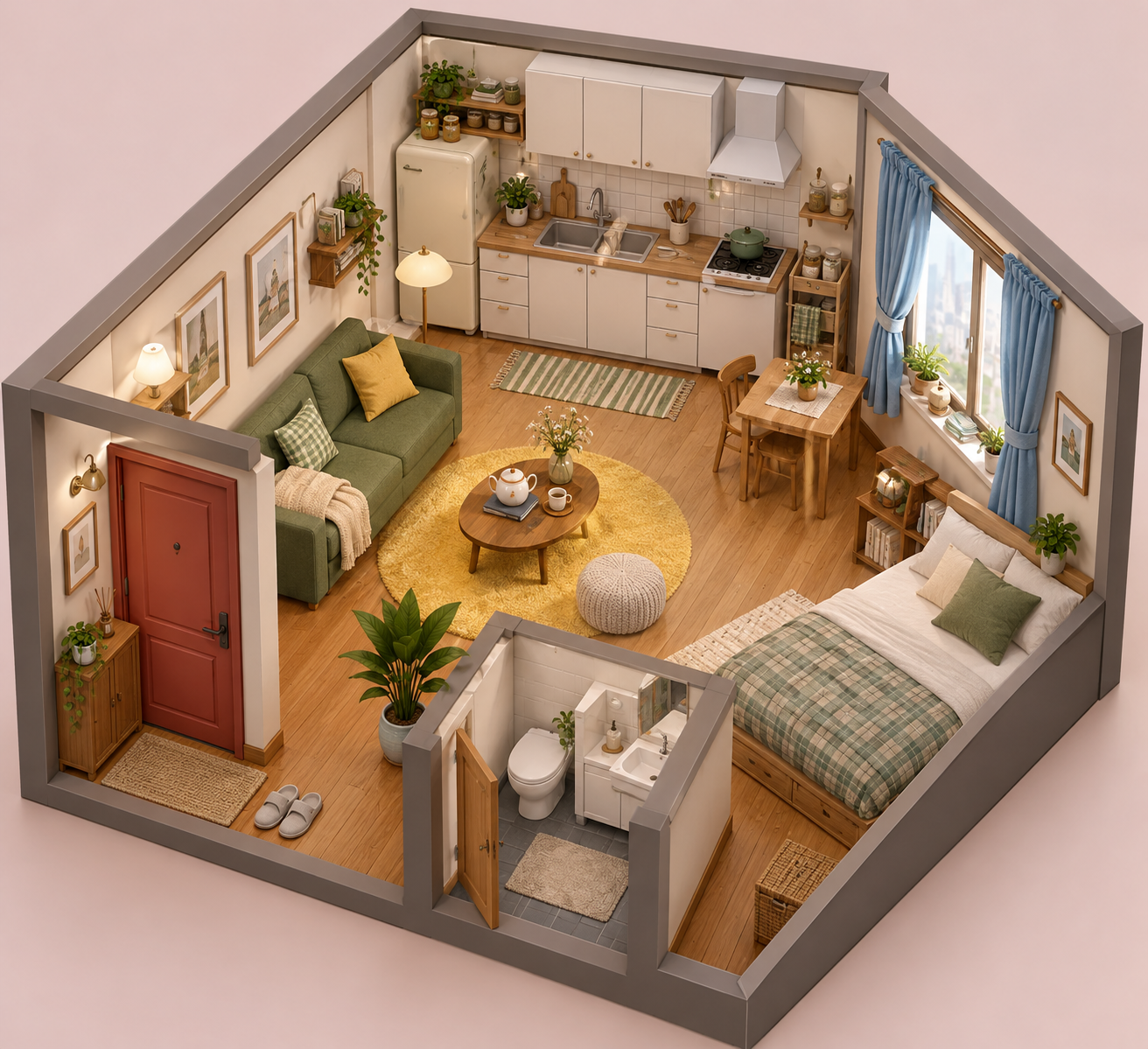 Self-generated isometric one-room set used as the referenceView original
This is the sentence that produced the reference image.
An isometric cutaway view of a small cozy Korean one-room apartment drama set, 3D render look: wooden floor, a green sofa on the left wall, a round yellow rug, a small kitchen with white cabinets on the back wall, a window with blue curtains on the right wall, a red door at the front-left, a potted plant, a low table with a teapot. Clean soft studio lighting, pastel background, no people, no text.
The image is generated, not a record of a real room. So the test says nothing about how closely a real space is matched. It only checks whether the same set survives a change of shot.
Reference image in, camera changed
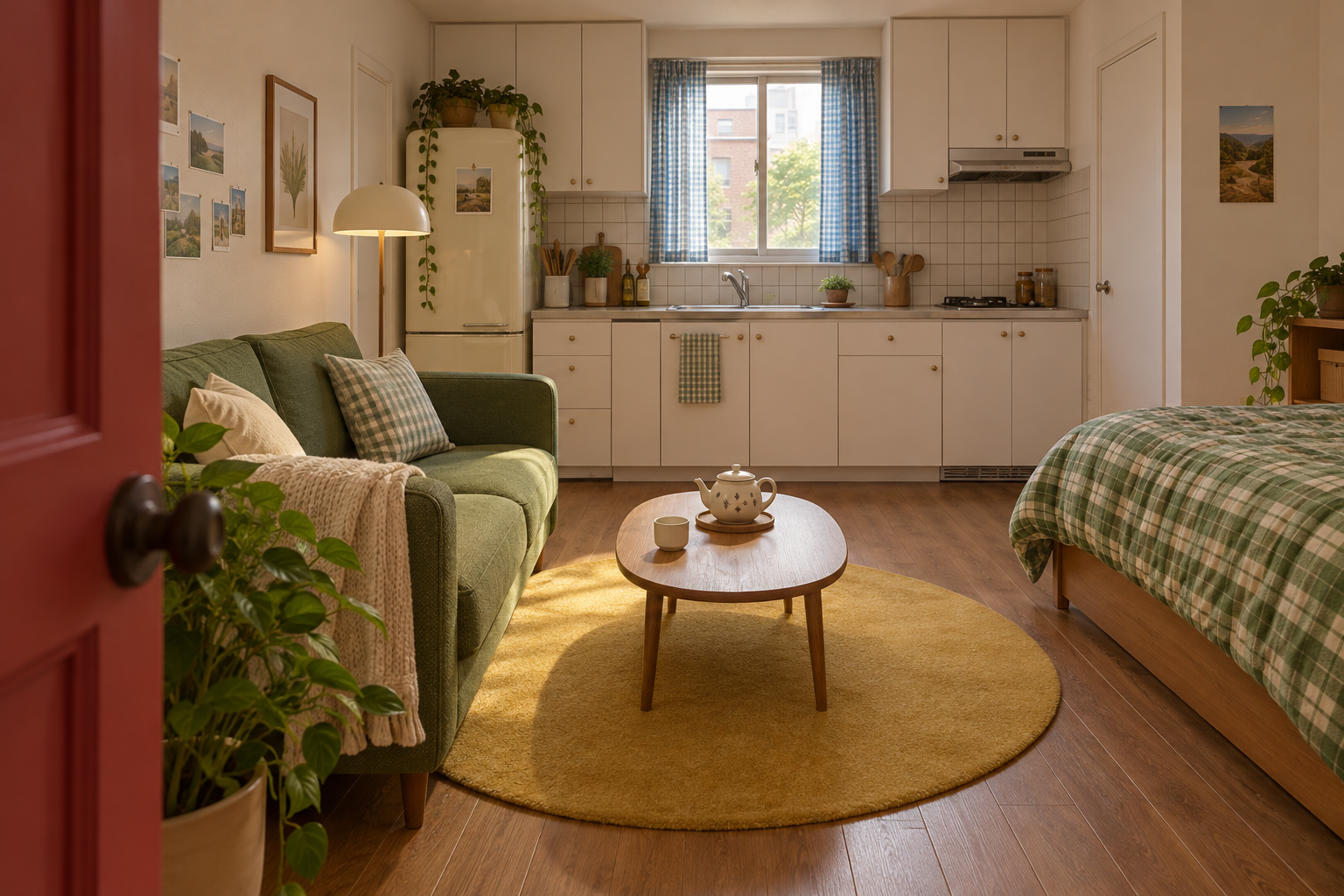
The first request passed the reference image and asked for an eye-level shot from the red door, looking toward the kitchen wall.
This is the reference set (Image 1). Recreate the same room as a ground-level eye-height shot from the red door looking toward the kitchen wall. Keep the same objects, colors and layout: green sofa, round yellow rug, oval low table with teapot, white kitchen cabinets, blue curtains window, bed with green plaid blanket, plant. Do not add or remove furniture. No people, no text.
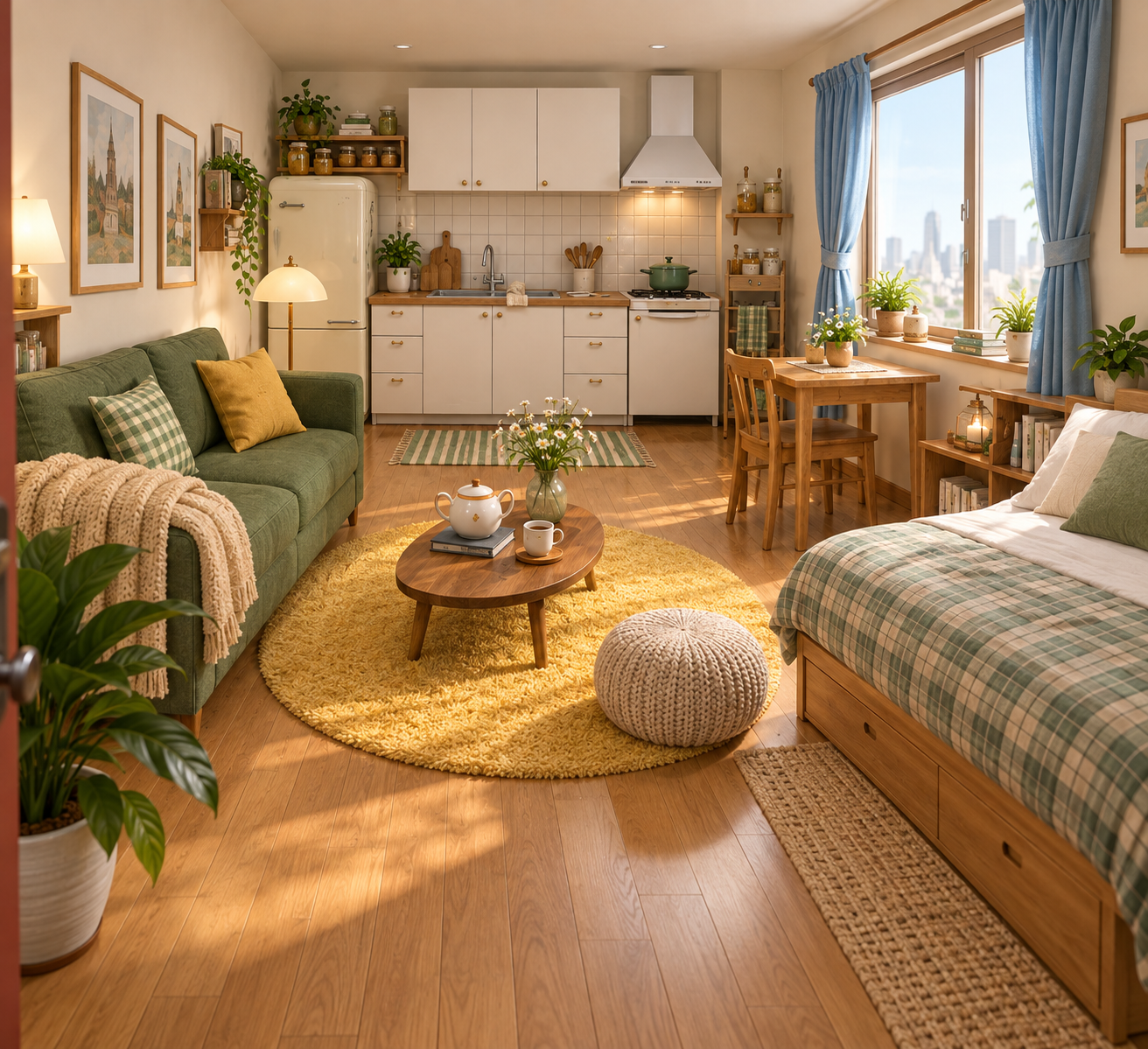 Eye-level shot from the red door, generated with the reference imageView original
The green sofa, yellow rug, teapot on the oval table, kitchen cabinets and hood, blue-curtained window and plaid-covered bed landed in the same relationships as the reference. The sofa is on the left, the bed on the right, the kitchen at the back. There were differences too. The slippers by the front door are out of frame at this angle, small ceiling lights appeared, and the shelf beside the bed changed shape slightly. The furniture held, and the small props drifted.
The second request used the same reference and asked for a low angle from the bed side, looking toward the sofa and the door.
This is the reference set (Image 1). Recreate the same room as a low-angle view from the bed side looking toward the sofa and the red door. Keep the same objects, colors and layout: green sofa with yellow cushion, round yellow rug, oval low table with teapot, red door, blue curtains window, plant. Do not add or remove furniture. No people, no text.
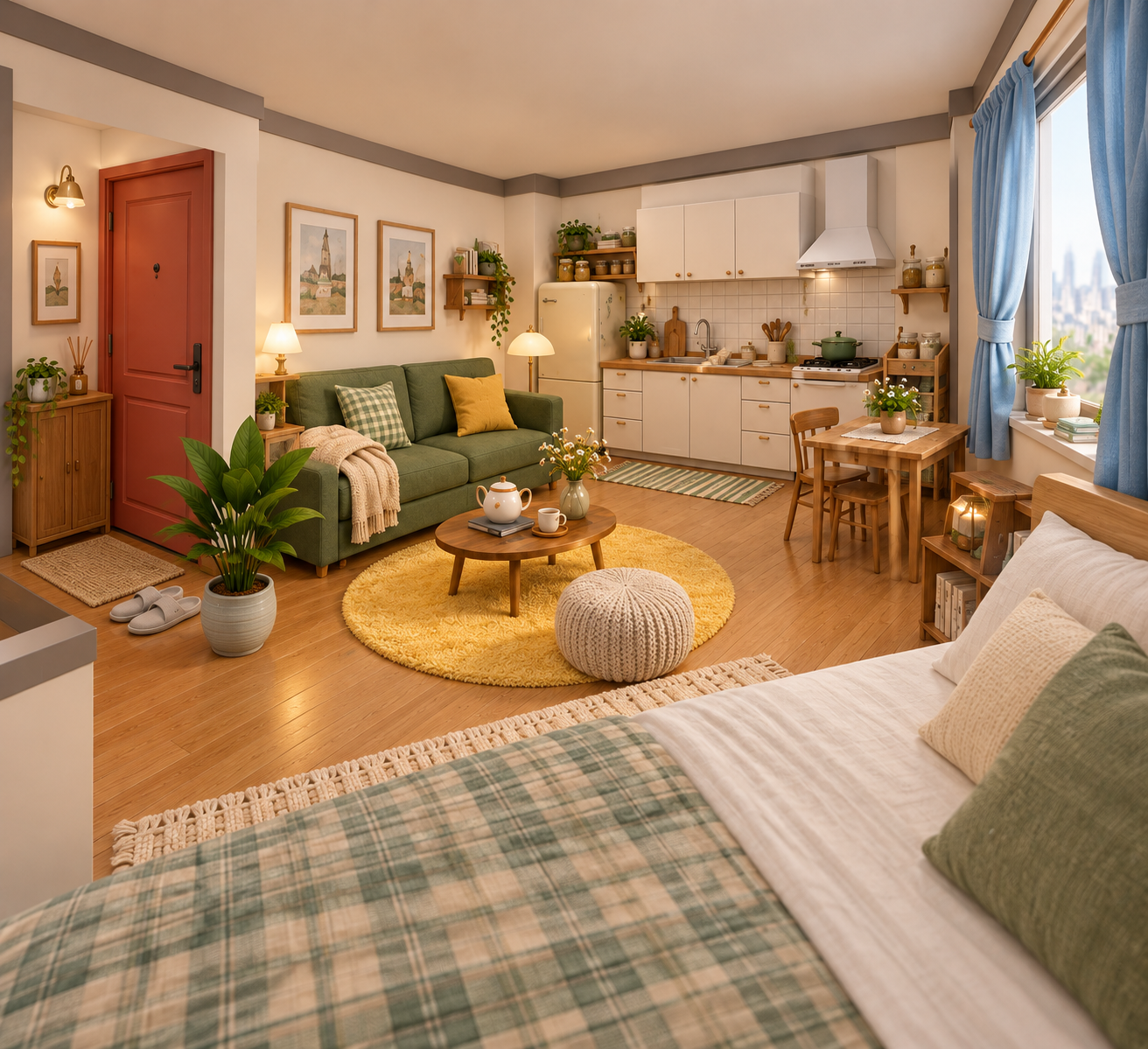 Low-angle shot from the bed side, generated with the reference imageView original
The red door, the slippers, the cabinet beside the door, the sofa's yellow and checked cushions, and the rug and table positions agree with the reference image. The two shots read as one room. A gray wall corner that is not in the reference hangs in the lower left, and the bathroom wall looks awkwardly cut at this angle. The lower the camera, the more the bed fills the frame, so the sofa and door we asked for came out relatively small.
Text only, no reference image
For comparison we dropped the reference image and generated again, using the first request's sentence plus one added line describing the room.
Recreate the same room as a ground-level eye-height shot from the red door looking toward the kitchen wall. Keep the same objects, colors and layout: green sofa, round yellow rug, oval low table with teapot, white kitchen cabinets, blue curtains window, bed with green plaid blanket, plant. Do not add or remove furniture. No people, no text. The room: a small cozy Korean one-room apartment with a green sofa, round yellow rug, oval low table with teapot, white kitchen cabinets, window with blue curtains, bed with green plaid blanket, red door, plant.
 Same composition generated from text alone, without the reference imageView original
Most things we named did appear: the green sofa, yellow rug, oval table and teapot, white cabinets, plaid-covered bed, red door and plant. What we did not name differed from the reference set. The window sits dead center above the sink, the curtains are a patterned blue fabric, there is no range hood, and a second door has appeared on the right wall. It is a plausible room, but it is not the same room as the first shot.
The claim here is narrow. Each sentence was generated once, and this is not a statistic showing that a reference image always matches better. In this one pair, the reference image held the unnamed layout, especially the window, door and hood. That is as far as we can go.
A prompt template to copy
Turn the structure shared by all three requests into blanks and you get this. Brackets mark what you replace.
This is the reference set (Image 1). Recreate the same [space type] as a [camera height and direction] shot from [camera position] looking toward [target]. Keep the same objects, colors and layout: [list of objects that must stay]. Do not add or remove furniture. No people, no text.
The template generalizes the sentences used on this room. We did not test it on other spaces.
How to fill each blank
Write the space type with the word the reference image already shows. One name such as "studio apartment" is enough, and the objects inside go in the list further down.
Pick one camera height and direction per request. We asked for eye level and for low angle in separate requests. Mix height, position and direction in one request and you cannot tell which element changed the result.
Name the camera position and the target using things you can find in the reference image. Here the red door, bed, sofa and kitchen wall did that job. If you point to an object that is not in the reference, the model invents one.
In the keep-list, include what will actually be in frame. Our second request left the cabinets and bed out of the list, and the bed ended up taking a large part of the picture. List any big furniture that is likely to appear.
Applying it to another space
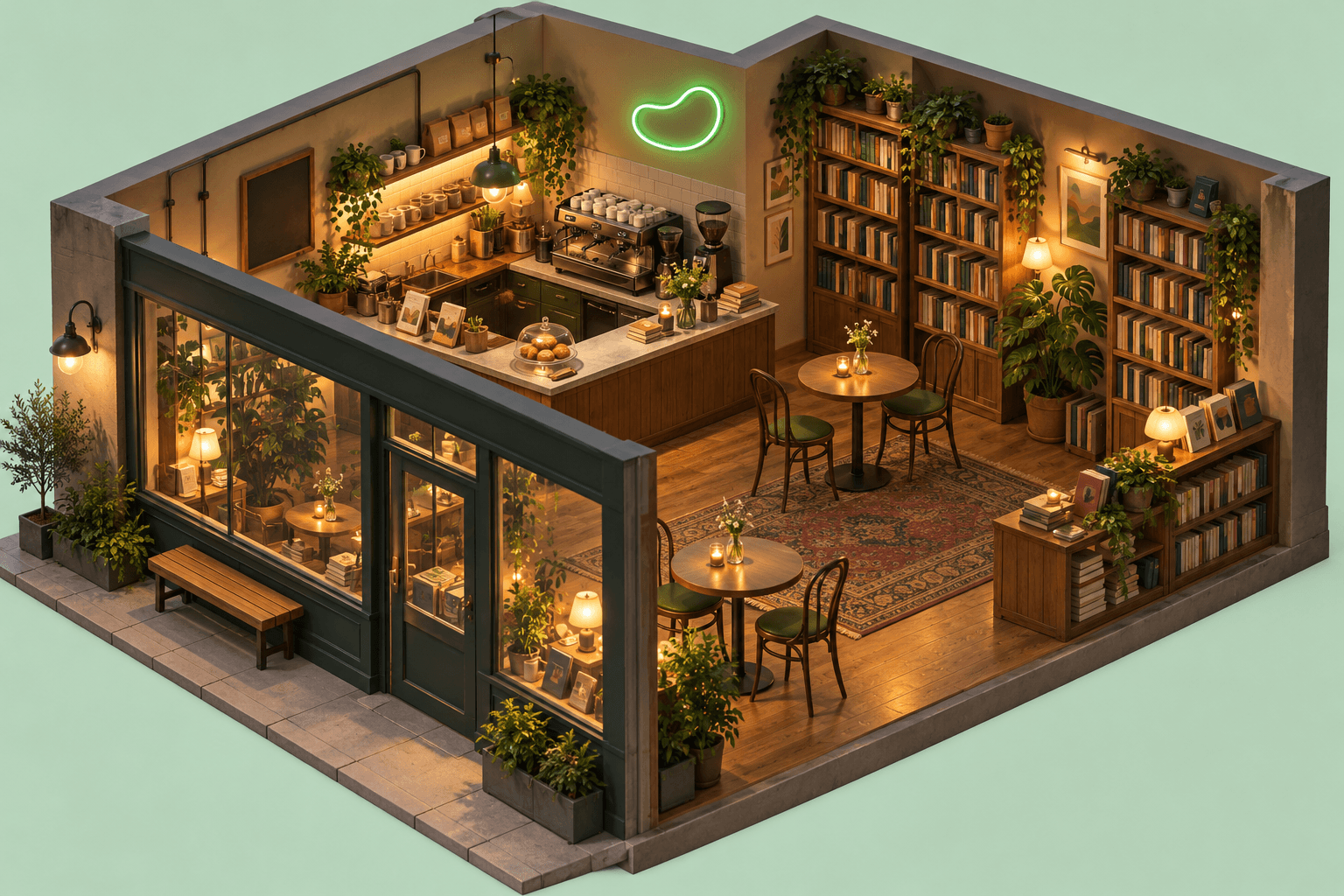
The same order works for spaces with different objects, such as a shop or a cafe. For a bookstore cafe, make the set image first, then request one eye-level shot toward the counter and one low-angle shot from the entrance. The image below is the set-image stage of that idea, generated new.
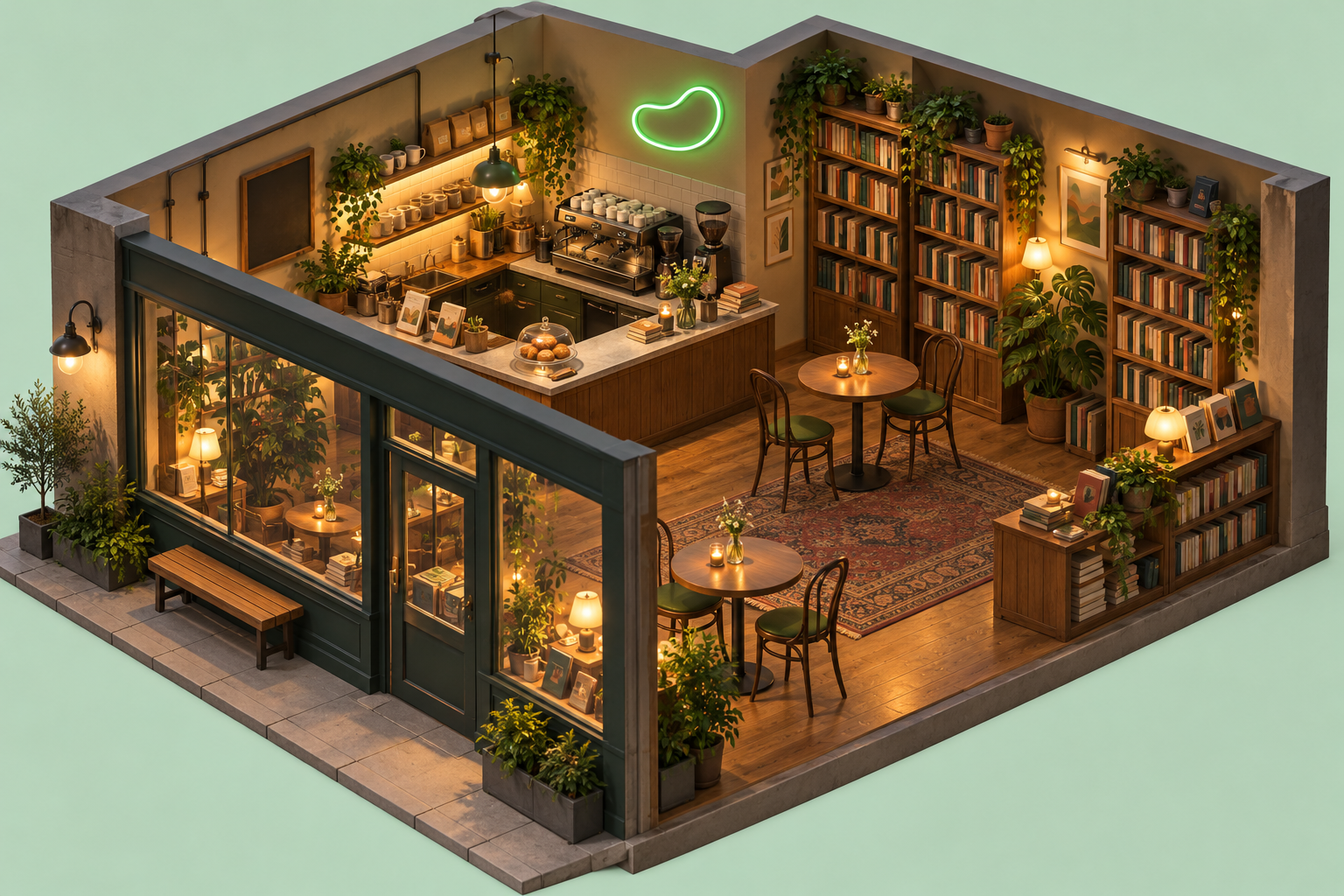 A generated isometric bookstore cafe set, shown as an application exampleView original
This bookstore cafe is an illustration of the application, not a test result. We did not generate other angles from it or compare them.
Checks before you add more shots
Each time you request a new angle, compare two or three things against the reference image. The number of windows and doors, the position of large furniture relative to each other, and the color of anything with a fixed color. Most of the drift in this test was on that list.
It is more realistic to assume small props will change between shots. For props that matter to continuity, such as slippers or shelf decorations, state the count and position in the prompt, or choose an angle where they are not visible.
If you plan to cut the shots together, check light direction too. These shots all happened to land on warm afternoon light, but that was also left unspecified, so it may be luck. You could try adding a line such as "warm afternoon light from the right window" to the template. That line is a suggestion we have not run.
Limits
This is a comparison built from single generations, so it does not generalize. Image generation varies between runs even with the same sentence, and rerunning may produce different drift.
A reference image does not remove structural errors. Areas the reference makes hard to read, like the bathroom wall in the low-angle shot, are guessed by the model. For work that needs exact dimensions and consistency, going through an actual 3D model, as the author describes, may well be more stable. We did not test that route, so we make no claim about which is better.
Generated images are not photographs of real places. Using them for advertising or property listings that describe a real space could mislead people.
Source
The idea starts from the workflow in yeonsidesign's Instagram post (original), which in its public caption describes fixing the space first and changing the camera. The test images and all prompts were made new for this post, and none of the author's images or materials were copied. Because the post carries a production-support label, we do not evaluate the performance of the service it promotes.