“Muse for everyday life, dots for office work.” That neat distinction made me wonder how either service would fit the automation I already run with Aside, Claude Code and Codex. My question was not whether they could help me write a document. It was whether they could take over the work around it, including the parts that happen on my own computer.
My setup covers research, writing, blog publishing, several social accounts, KakaoTalk conversation collection, website deployment and video production. When I checked on October 3, 2026, Aside had 38 active recurring routines configured. That is a count of saved routines, not evidence that all 38 run without errors.
This is a comparison of official documentation against my current workflow requirements, not a hands-on migration review. I have not moved all those routines to either service, measured their completion rates or run a performance benchmark. The useful distinction at this stage is between work worth testing first and work whose dependencies still need to be checked.
Research, summaries and unpublished drafts are reasonable starting points. Publishing across multiple accounts, running local programs and checking an overnight video render involve more than producing a good answer.
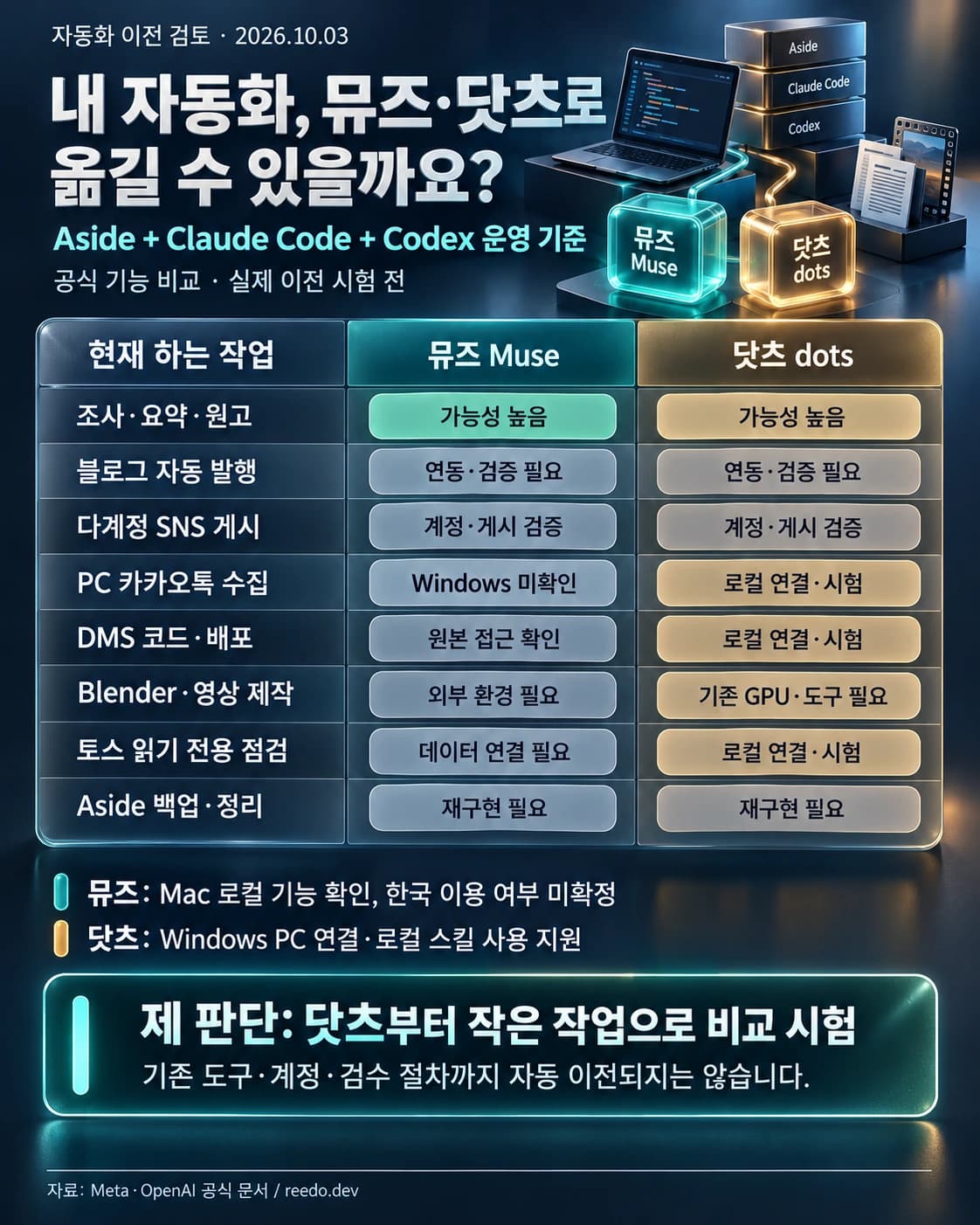
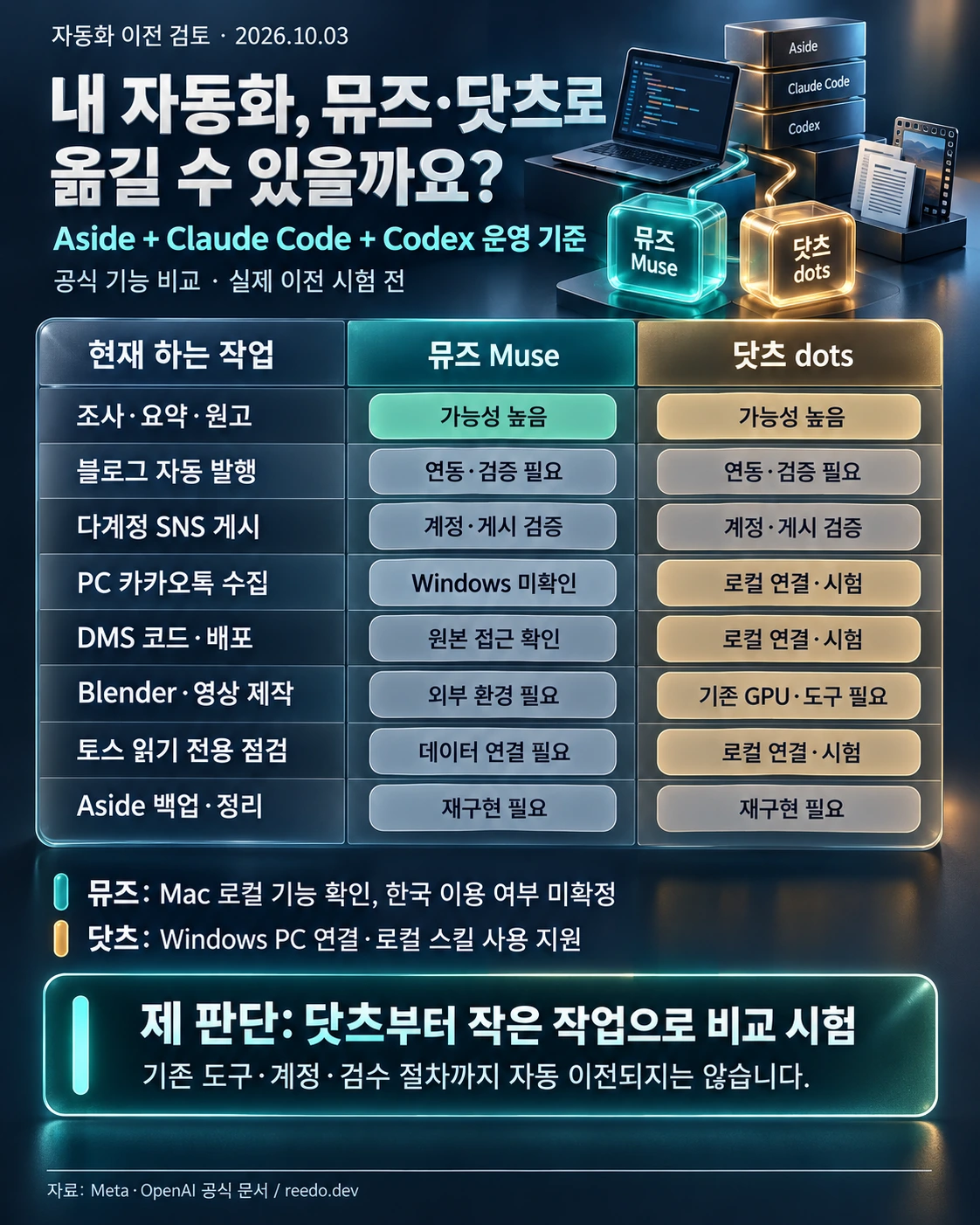 Korean 3D comparison chart of Muse and dots against an Aside, Claude Code and Codex automation setup. Research and drafting are promising; publishing and local tasks require integration and verification.View original
The infographic is in Korean. Its full comparison is provided in English in the table below. “Promising” means worth testing, not proven execution; “unverified” does not mean impossible.
First, separate the jobs these tools do
Treating Aside, Claude Code and Codex as one interchangeable capability makes the comparison less useful. In my setup, Aside starts scheduled work, handles browsers and accounts, and carries task records forward. Claude Code and Codex help write or modify code and perform script-driven or local production work when needed.
Below them is another layer: Blender, video encoding tools, image-generation services, website repositories and publishing editors. These are the environments that actually produce or deliver the output. Changing the agent that receives instructions does not automatically remove any of them.
“Moving to dots” could therefore mean changing the place where I assign work, changing the coding tool, or replacing an entire production and publishing workflow. Those are different migrations. Progress on the first does not prove the last is ready.
Muse goes beyond everyday advice
It is easy to picture Muse as a shopping or calendar assistant. The official product explanation describes something broader: its own computer, file system, terminal and browser. It can write code, produce documents and web pages, and continue work on schedules or in response to relevant events.
That makes research, regular reports and web-based information checks reasonable candidates. It overlaps with existing automation in its ability to produce things, rather than only describe how to make them.
The operating system matters in my case. Meta documents local file and app access on Mac. This review did not establish equivalent access to my Windows files, KakaoTalk installation, dedicated Chrome profiles or production software.
Having a computer in the cloud is not the same as using the programs already installed on mine. A browser is evidence that a workflow may be attempted, not proof that every existing local dependency is reachable. The missing Windows confirmation should not be stretched into a claim that Muse cannot automate anything. Web work and local work deserve separate assessments.
Dots reaches beyond documents
Local access was the most relevant part of dots for this comparison. According to its getting-started guide, dots has a cloud computer and can optionally connect to a user's local computer through the ChatGPT desktop app. Windows is supported. With access enabled, it can use local files and skills, create Work or Codex tasks and use a local browser.
That creates a plausible path to scripts, project folders and website source files I already have. It does not mean those workflows become compatible as soon as a folder is connected. Commands, dependencies, credentials and file permissions still need to work in the actual environment.
There is also an important distinction in what gets replaced. If dots creates a Codex task, Codex may still be doing the execution after the migration. Dots could become the place that assigns and supervises that work rather than eliminating every tool beneath it.
The same documentation does not establish that my existing Claude Code configuration, model choices and approval rules transfer unchanged. Local access is a useful capability, but it is not a compatibility guarantee for an entire toolchain.
Start with research, summaries and drafts
Reading email, comparing sources, preparing a report and adapting a Korean draft into English are relatively practical tests. Their outputs are easy to inspect, and the trial can be bounded so that a mistake does not immediately affect a public account or published page.
For an email summary, I would start with read-only access and check whether important messages and deadlines are retained accurately. For writing, I would give both setups the same source material and instructions, then compare factual errors and editing time. A summarization trial does not require permission to send mail, even if the connector offers it.
Editorial instructions matter too. Different channels in my setup use different voices and structures. A fluent draft can still be unusable if it ignores them. The migration test needs to include those existing rules, not just a topic prompt and a judgment about whether the prose sounds polished.
Publishing is a separate test from writing
Finishing an article and publishing it correctly are not the same event. Images must be present and distinct, headings and paragraphs must survive the editor, affiliate disclosures must remain intact, and links must work on the public page. A good draft with missing images is an unfinished job.
Social platforms add identity checks. Accounts on the same service serve different purposes in my setup. The automation must verify the account in the composer, preserve the order of connected posts, attach the right media and inspect the published result. A valid login alone does not prove that the correct account is selected.
Muse and dots having browsers makes these tasks plausible to attempt. It does not establish reliable handling of each platform's editor, separation between accounts or unattended performance on a schedule. I therefore class blog and social publishing as requiring integration and publication checks, not as either categorically impossible or already solved.
Local collection, deployment and video have heavier dependencies
A KakaoTalk digest has two distinct stages: collecting messages from rooms in the PC app, then summarizing the collected text. The second is a language task. The first relies on the current collection script and Windows environment. Even with dots connected to the PC, I would need to check that the script runs, that rooms are not omitted and that the collection window covers the intended 24 hours.
Publishing to DMS also involves more than writing. The workflow edits a designated local source, preserves existing changes, builds and deploys, then checks the live page. Local access makes dots a candidate, but the source path, authentication and repository state still have to be handled correctly. Accidentally committing someone else's in-progress changes is a real migration failure, even if the new article itself is fine.
Video has more dependencies again: scene-generation code, Blender, GPU rendering, voice, music, encoding, subtitles and final review. Changing the agent does not make that production environment disappear. Dots may be able to run and coordinate the tools, but I have not verified reliable recovery from an interrupted overnight render or the quality of a finished film.
Short samples and long-running jobs need separate tests. A video file existing on disk does not establish that the picture, sound and subtitles are ready for an audience. Technical checks can catch faults without replacing viewer-level review.
The migration map
Scroll horizontally to view a wide table.
| Existing task | Muse | dots |
|---|---|---|
| Research, summaries and drafts | Promising candidate | Promising candidate |
| Automated blog publication | Integration and output checks needed | Integration and output checks needed |
| Multi-account social publishing | Account and publication checks needed | Account and publication checks needed |
| PC KakaoTalk collection | Windows access unverified | Test after local connection |
| DMS code and deployment | Verify access to designated source | Test after local connection |
| Blender and video production | External production environment needed | Existing GPU and tools still needed |
| Read-only Toss bot checks | Data connection needed | Test after local connection |
| Aside backups and cleanup | Separate implementation needed | Separate implementation needed |
The Toss comparison is limited to reading bot logs and account state for monitoring. It is not approval to delegate trading or financial decisions. Aside backups and temporary-file cleanup depend on internal task state and preservation rules. File access by itself does not recreate those safeguards.
Scheduling is not proof of unattended reliability
Recurring tasks are necessary, but much of the operational difficulty comes after the start time. A previous run may still be active. A login may expire. A delayed response after pressing Publish can lead to a duplicate post. A late render can collide with another job that needs the same GPU.
The duplicate-prevention records, recovery instructions and account checks in my current setup exist to handle these cases. Copying a task description into a new service does not automatically move that history. A migration needs a clear source of truth for what has started, what has finished and what must not be repeated.
Permissions must also be rebuilt. The dots safety and permissions guide describes custom rules, while making clear that they do not disable core safeguards and approval requirements. My own boundaries, including no unsolicited outreach or email, read-only monitoring and no changes to existing posts, need to survive the move. A broader capability set is not a reason to broaden those permissions.
Subscription price is only part of the cost
Meta's subscription information lists a free usage allowance and monthly plans at $20 and $100, with limited regional availability. This review did not confirm whether my account in South Korea can use Muse.
Dots is rolling out on eligible plans including Pro and Business Premium, with the first dot included. The Pro tiers checked for this article are $100, $200 and $500 per month. These are the published terms reviewed on October 3, 2026, not a promise of future pricing, availability or capacity. The actual account and checkout terms need to be checked before subscribing.
Those figures do not represent the total cost of my automation. Existing image and music services, production tools and local GPU time may remain. Usage limits, repair work and human review also count. Moving the coordinator does not necessarily remove the bills or resource demands of the tools it coordinates.
I would compare ten equivalent tasks and record how often each produces an acceptable result and how long corrections take. That is a proposed test, not a measurement already performed. Acceptance should cover content, formatting, permissions and publication state, not merely the creation of a file.
My next step would be a small comparison, not a wholesale switch
For my current Windows-centered setup, dots looks like the more practical first trial. I would begin with read-only email summaries, research and unpublished drafts. Next would come a DMS article prepared locally and checked with a build. Only after that works consistently would I expand to a bounded publishing task on one account.
Collecting every KakaoTalk room, running several social accounts and making overnight videos would come later. The dependencies are heavier and the consequences of mistakes are harder to contain. Muse remains worth comparing on lighter tasks once availability and access to the required environment are established.
“Muse handles everything” is too broad for the evidence here. “Dots is for office paperwork” is too narrow. A substantial part of my automation is worth evaluating for migration, but choosing a replacement requires seeing the same work completed with my accounts, files and production environment.
I have not replaced the existing routines. The next useful result would be a task that starts when expected and finishes with checked output, not simply a more convincing answer about what an agent can do.