Working with AI, you eventually hit the moment where you explain the same thing again. The tone rules you settled last week, the fix you found after something failed, the reason you decided not to do a particular thing: all of it sits in yesterday's chat, and a new conversation starts without it. A notes app helps for a while, but as the folders multiply it gets harder to remember what you wrote where, and you end up repeating the same trial and error.
This guide describes how Reedo at DMS.Labs built a personal knowledge base called "Reedo's World Tree" to cut down on that repetition. It is not a report on a client project. It is a practical walkthrough based on a public idea document and a vault Reedo runs personally. At the end there is a link to a blank starter with all personal content removed, so you can open the same structure while you read.
The problem first: what you learn gets scattered
Reedo uses AI every day for writing, product listings and video work, and what came out of that work ended up split across job logs and memory files. An earlier vault with the same purpose had been built once, and within a few months it was barely used. A person was responsible for the filing, so on busy days it was the first thing to slip.
People tend to give up on organizing knowledge for two reasons. Every new source means editing several existing notes, which is tedious, and when the notes are not edited they start to contradict each other. The idea behind this knowledge base was to hand both jobs to the AI. The person decides what goes in and what is correct. The AI summarizes, links, updates the index and writes the log.
 A wooden desk seen from above, with handwritten notes and sticky notes scattered on the left and four empty folders and a notebook arranged neatly on the right.View original
What makes an LLM Wiki different
The method rests on an idea document Andrej Karpathy published in April 2026. It is an idea, not a product, so the details are left for each person to work out with their own AI. The core of it is that the AI reads and organizes a source at the moment it goes in, folds the result into a set of linked Markdown pages (the wiki), and keeps editing that wiki over time.
The contrast with the usual approach is easy to see. Tools such as NotebookLM, or uploading files to a chat, retrieve the relevant parts of your sources each time you ask a question. This is called RAG (retrieval-augmented generation). The organizing happens at question time, so once the question is answered nothing accumulates. In an LLM Wiki the organizing happens when a source is added, so links, flagged contradictions and syntheses pile up in the pages. Asking the same question again does not mean searching from scratch.
Scroll horizontally to view a wide table.
| RAG (find at question time) | LLM Wiki (organize in advance) | |
|---|---|---|
| When the organizing happens | Every time you ask | When a source goes in |
| Does knowledge build up? | No | Links and structure accumulate |
| Typical example | NotebookLM, file uploads | The knowledge base in this guide |
The original describes three layers. Raw sources are never edited after they go in, the wiki is written by the AI, and a rules document tells the AI how to work. There are three operations (ingest, query, lint), and the wiki is navigated with an index page and an activity log. The author says an index alone is enough up to roughly a hundred sources and a few hundred pages.
Four folders are enough
Reedo's vault separates folders by role. Anything not yet sorted goes into an inbox, originals that will not be touched after they are added go into a raw folder, knowledge the AI keeps refining goes into the wiki, and things built from the wiki, such as lesson plans or article outlines, go into an outputs folder. Templates and attachments live elsewhere so those four stay tidy.
Scroll horizontally to view a wide table.
| Folder | Role | Who writes |
|---|---|---|
| Inbox | Links, thoughts and quick notes not yet sorted | Person and AI |
| Raw | Original sources. No edits after they go in | Person adds, AI may only append |
| Wiki | Knowledge the AI organizes and links | AI |
| Outputs | Lesson plans and article outlines made from the wiki | Person and AI |
The wiki is split once more. A source-summary folder holds one summary per source and contains facts only. Interpretation and links go in a concepts folder. Tools and platforms are collected separately, and what Reedo learned by doing goes in a practice folder divided into methods, experiments, lessons and decisions. Keeping facts and interpretation out of the same page makes it much easier to find and fix a wrong claim later.
One rules file the AI reads first
The most important file in the knowledge base is not a wiki page but the rules file. An AI does not remember earlier agreements once the conversation changes, so it is told to read this file before every job. Claude Code and Codex automatically read instruction files inside the working folder, so if that file points to the rules, they apply without being asked each time.
The rules file says what the vault is for: not collecting as much as possible, but pulling things back out for the next job. It says only reusable lessons go in, that existing pages are edited before new ones are created, and that a wrong statement is never quietly overwritten; the change and its reason are recorded. It also holds each folder's role, the page header format and the order of the three operations. The shorter and more specific the rules file is, the better the AI follows it. This is the same thinking as the one-page job sheet in Before you ask AI to do the job, write the one-page job sheet.
Every page carries a source and a status
The weakness of an LLM Wiki is that something filed wrongly once can spread into other pages and later answers. The original has no remedy for this, so Reedo put a header at the top of every wiki page: title, type, verification status, sources, the date checked, the date to check again, and a topic tag.
There are five statuses. Confirmed by doing means it was actually tried or checked on screen or in a file. Confirmed by source means it was checked against official documentation or the original. Author's claim means only the writer says so and nobody checked. Unverified means not yet checked. Retired means wrong or no longer true. A retired page is not deleted; the reason is kept. For content that changes often, such as pricing or policy, the recheck date is set 30 days out, tool features get 60 days, and principles or judgments are left blank.
These marks pay off when the AI answers. The rules tell it to cite the supporting pages and to say so when the status is low. If you ask about a tool's features and the supporting page is marked as an author's claim, the AI tells you that. When a person reads the page, it is just as clear which sentences can be trusted.
Only three operations, repeated
Using the knowledge base comes down to three operations.
Ingest starts by saving the original in the right folder. The AI reads it, writes a source summary, then finds the related concept, tool and practice pages and edits those first. It creates a new page only when no existing page fits. Then it updates the index and the log and marks the original as processed. The rule is to finish one item before starting the next.
Query means reading the index first, then the relevant wiki pages, then answering. Originals are checked last. An answer worth reusing is saved in a synthesis folder so it can feed the next question.
Lint happens once a month. It looks for contradictions, pages past their recheck date, pages linked to nothing, broken links, pages missing a header, and places where the index and the actual files disagree. It produces a report first, and fixes happen after a person has looked at it. The starter you can download includes a short script (scripts/check.mjs) that runs this check with one command on any machine with Node.js.
Decide what goes in and what stays out
The most common way a knowledge base turns into a heap of useless records is by taking everything. Reedo decided not to file daily "posted" logs, plain progress reports or one-off states. What goes in are results of finished experiments, failures and how they were fixed, reasons a person clearly chose or rejected something, and production methods that will be reused.
There is also a list of things that never go in: passwords and verification codes, access keys, personal data, other people's conversation text, and the full text of paid articles. For paid articles only the link, a short quotation, your own summary and ideas for applying it are kept. The list doubles as a safety line against the AI moving something sensitive into the wiki by mistake.
As an example, here is one lesson from the wiki that generalizes. "Saved" is not the same as "succeeded". Even if an automation leaves a completion message, a result is not recorded as a success until it is confirmed on the real screen. Once judgments like this pile up in one-line form, you spend less time re-explaining the same caution to the AI on the next job.
Edit in one place only; other AIs write to the inbox
When several AIs are in use, it is easy to end up editing the same vault at the same time. Reedo fixed a single AI as the one that edits the wiki and the raw folder. Other tools, such as Claude Code, Codex, ChatGPT and NotebookLM, only read. Anything new they learn, or any suggestion, goes into the inbox as a file named with the date and the AI that wrote it. The AI in charge reads those files during the weekly cleanup and decides whether to add them to the wiki.
The same principle applies to two computers. The wiki is edited on one machine, and the other holds only a read-only copy. Edits from both sides are not merged with a sync tool, because when the index and the log change in two places at once it becomes hard to tell which one is right.
Keep a change history so you can roll back
You can hand work to an AI with more confidence if you can return to the state before a bad edit. Reedo manages the vault with git, records a change each time an ingest, a cleanup or a lint fix finishes, and also pushes that history to a backup repository on another drive. If the main drive fails, the vault can be restored from the backup. If git is unfamiliar, you can start by compressing the folder and keeping a dated copy. What matters is that the state before the AI's edit exists somewhere.
 A wooden desk by a window with an open laptop beside a cork board holding bundles of blank cards tied with twine, plus a mug of tea and a pencil.View original
NotebookLM as a side tool
NotebookLM is Google's study tool that takes your sources and answers questions from them or produces an audio overview. Karpathy himself uses it as an example of the RAG approach that retrieves sources at question time. So Reedo treats NotebookLM as a supporting tool, not the main store. Only the wiki pages on a given topic are picked and fed in, and the tool is used to ask questions within that scope or to make an audio overview.
The connection was tried by syncing wiki pages automatically to Google Docs and pointing NotebookLM at those documents. Seven documents were connected and working, and whether the sync stays stable over a long period has not been confirmed. Because the wiki itself is still edited in one place only, nothing done on the NotebookLM side changes the original.
Seeing the links as a 3D knowledge graph
As pages multiply you start to want to see how well they are connected. Obsidian has a graph view, and Reedo turned the wiki's links into a 3D graph and named it "Reedo's World Tree". As of October 9, 2026 it shows 74 documents and 119 links in 7 groups, labeled verification principles, video production principles, writing principles, sales and affiliate principles, work operation principles, concept, tool and operating decisions, and source summaries. The graph is regenerated during the weekly Sunday cleanup.
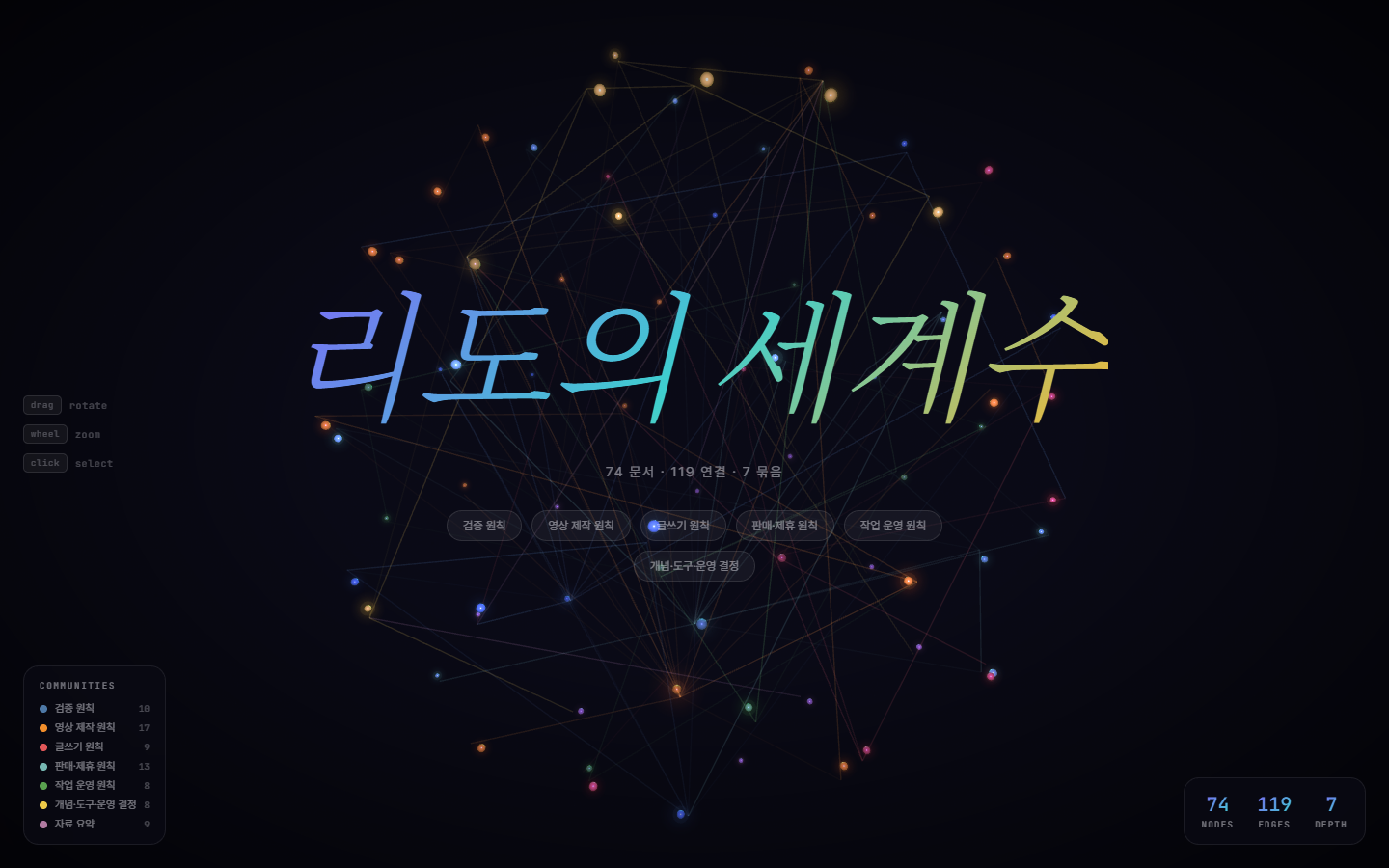 The Reedo's World Tree 3D knowledge graph, showing 74 documents, 119 links, 7 groups and the group names.View original
The screen above comes from Reedo's actual vault, and the numbers are Reedo's own counts. Building the same structure will not give the same numbers. A dot that connects to no group in the graph is a sign of a page that has not been organized yet.
Know the limits in advance
This approach is not a cure-all. First, if the AI organizes something wrongly, the error can spread. Source and status marks, a change history and a monthly lint reduce that risk; they do not remove it. Because the AI wrote the wiki pages, a person still needs to read some of them now and then.
Second, once pages run into the hundreds, an index alone may no longer be enough to find things. The original says an index is sufficient only up to about that scale, and beyond it you should think about adding a search tool. Reedo's vault is still at about 74 documents, so it has not reached that limit.
Third, the numbers and the way of working above come from one person over about three weeks. The effect for a team, or after several months, has not been confirmed. Reedo's wiki holds 52 lessons Reedo has confirmed and 5 domain principles, and a weekly Sunday cleanup routine was set up, but that does not mean it will work equally well for everyone.
Start from the blank starter
Reedo has packaged a blank starter with all personal content removed as a zip file. It contains the folder structure, the rules file, instruction files for Claude Code and Codex, three note templates, the lint script and two example pages.
Download the blank knowledge base starter (reedo-world-tree-starter.zip)
The steps are short. Unzip it and open the folder as a vault in Obsidian. Run an AI tool such as Claude Code or Codex inside that folder, give it one link and ask it to add the link to the knowledge base. It follows the rules file: save the original, summarize, link, then update the index and the log. Open the first few results yourself and check them, and if something is not what you wanted, edit the rules file so the next job reflects it.
If you want to use this in a team, it reads well alongside the earlier guides. How to decide which tasks to hand to AI is in AI training should start with 'Should I hand this task over?', and how to divide permissions for a handed-over task is in Giving AI automation permission in three steps. How to measure the effect after adopting a knowledge base is covered in Measuring AI performance.
This guide is a general walkthrough based on a public idea document and the way Reedo at DMS.Labs runs a personal vault. It is not the result of a specific client. Tool features and pricing can change, so please check the latest official documentation before you apply any of this.
References
- Karpathy, A. LLM Wiki (idea document). GitHub Gist, April 2026.
- Obsidian. Data storage · Pricing. Checked October 9, 2026.